VectorStyler
    • Categories
    • Unread
    • Recent
    • Tags
    • Popular
    • Register
    • Login

    Add option to switch to transparent background on export panel options

    Scheduled Pinned Locked Moved Features and Ideas
    4 Posts 3 Posters 2.0k Views 2 Watching
    Loading More Posts
    • Oldest to Newest
    • Newest to Oldest
    • Most Votes
    Reply
    • Reply as topic
    Log in to reply
    This topic has been deleted. Only users with topic management privileges can see it.
    • BoldlineB Offline
      Boldline
      last edited by

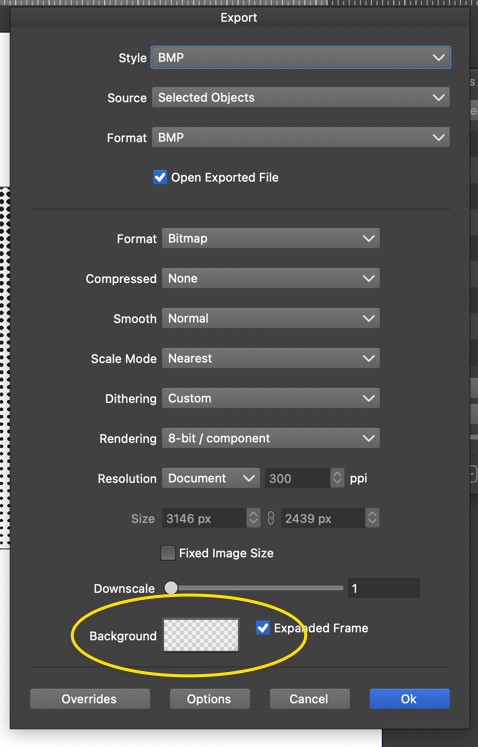
      When exporting a file (in any applicable format), I don't see an easy way to return the background color to transparent after it has been changed to some other color. If I am missing it, let me know. My thought would be to add a dedicated "transparent" button next to it so it can be easily reset
      0_1755993607399_9621e3a2-9cb6-47fd-bd65-905176cad380-CleanShot 2025-08-23 at 19.58.27.png

      🍎 macOS Tahoe 26.2, Mac mini (M1, 2020), Chip Apple M1, Memory 16 GB
      Cintiq 27QHD Display and LG Ultra HD Display

      VectorStylerV S 2 Replies Last reply Reply Quote 1
      • VectorStylerV Offline
        VectorStyler @Boldline
        last edited by

        @Boldline With image formats that support masks there is a checkbox for this. It is not supported by BMP

        1 Reply Last reply Reply Quote 1
        • S Offline
          Subpath @Boldline
          last edited by Subpath

          @Boldline

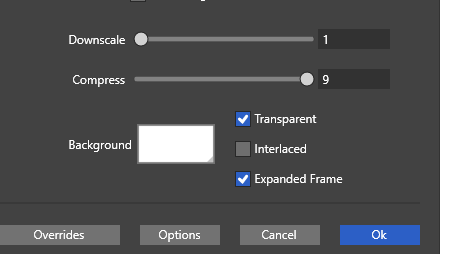
          if there is a transparent button or not
          is related to the file format

          in your case .BMP there is not

          here a pic with .PNG format
          0_1756013675069_transparent button.png
          .
          .
          @VectorStyler
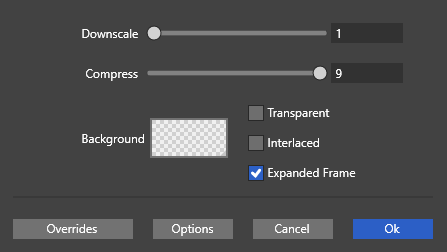
          What i dont understand when i export a image,
          in this case a .PNG file, that the little Background Window
          shows a Transparent Background.

          But the exported File has a white Background, only
          because the Transparent Flag is not set. I would say
          the little Background Window is misleading.
          0_1756014443413_no transparent background.png

          Win 11
          CPU: AMD Ryzen 5 9600X, 6-core.
          GPU: Nvidia Geforce RTX 5070.

          BoldlineB 1 Reply Last reply Reply Quote 0
          • BoldlineB Offline
            Boldline @Subpath
            last edited by

            @Subpath @VectorStyler OK thank you. that makes more sense. Maybe I was confused because the option for transparent was there automatically when i started editing the settings under bmp.


            🍎 macOS Tahoe 26.2, Mac mini (M1, 2020), Chip Apple M1, Memory 16 GB
            Cintiq 27QHD Display and LG Ultra HD Display

            1 Reply Last reply Reply Quote 0
            • First post
              Last post