VectorStyler
    • Categories
    • Unread
    • Recent
    • Tags
    • Popular
    • Register
    • Login

    I can’t make the line thickness small enough in sub level group

    Scheduled Pinned Locked Moved Questions and Support
    2 Posts 2 Posters 1.0k Views 2 Watching
    Loading More Posts
    • Oldest to Newest
    • Newest to Oldest
    • Most Votes
    Reply
    • Reply as topic
    Log in to reply
    This topic has been deleted. Only users with topic management privileges can see it.
    • RaaskotR Offline
      Raaskot
      last edited by

      I have a general question concerning attached file
      How does parent group settings work in VS?

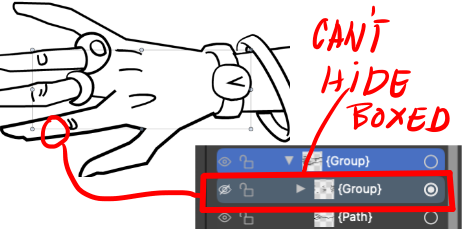
      1. I want to change thickness in sub-layers but I can’t make the thickness smaller unless I specify this in the parent layer. Is there any controls I’ve missed? How does this interfere with values I set in sub level shapes?

      2. Also I can’t make sublayers/groups invisible in attached file.
        How do I do this?

      0_1758893711187_boevel.vstyler
      0_1758893670655_ad6b5279-6c22-4954-9b31-30cc1815a95e-image.png

      VectorStylerV 1 Reply Last reply Reply Quote 0
      • VectorStylerV Offline
        VectorStyler @Raaskot
        last edited by

        @Raaskot

        1. this is not possible, as the stroke is added and does not override the stroke inside the group.
          You need to remove the stroke from the object that is inside the group, to make the parent stroke thinner.

        2. There is a bug here, with hiding sublayers if a style was specified in the parent layer. I will try to fix this.

        1 Reply Last reply Reply Quote 1
        • First post
          Last post
