VectorStyler
    • Categories
    • Unread
    • Recent
    • Tags
    • Popular
    • Register
    • Login

    Is there a way to set these text boxes more permanently?

    Scheduled Pinned Locked Moved Features and Ideas
    5 Posts 2 Posters 1.4k Views 1 Watching
    Loading More Posts
    • Oldest to Newest
    • Newest to Oldest
    • Most Votes
    Reply
    • Reply as topic
    Log in to reply
    This topic has been deleted. Only users with topic management privileges can see it.
    • BoldlineB Offline
      Boldline
      last edited by

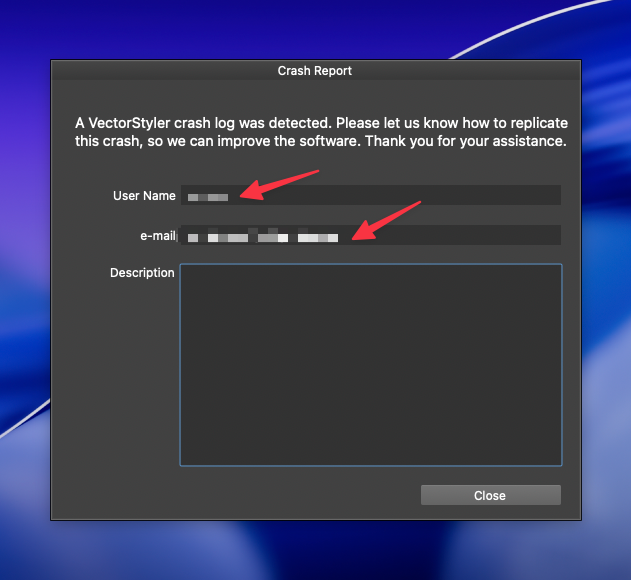
      Each time I update to a new build of VS, if I run into a crash, I have to fill out these text boxes each time. They remain there until the next build is installed.
      Is there a way to make it more permanent?
      0_1760383395156_62787dbf-494a-4b0b-8b76-c65eee0f9801-CleanShot 2025-10-13 at 15.21.06.png

      🍎 macOS Tahoe 26.2, Mac mini (M1, 2020), Chip Apple M1, Memory 16 GB
      Cintiq 27QHD Display and LG Ultra HD Display

      VectorStylerV 1 Reply Last reply Reply Quote 1
      • VectorStylerV Offline
        VectorStyler @Boldline
        last edited by

        @Boldline I will look into this.

        1 Reply Last reply Reply Quote 1
        • BoldlineB Offline
          Boldline
          last edited by

          Here's my two cents as a non-developer - What if there was a section in in the help settings where the user could add their handle name and email address and it stayed there and that was what VS used to populate the crash form panel?

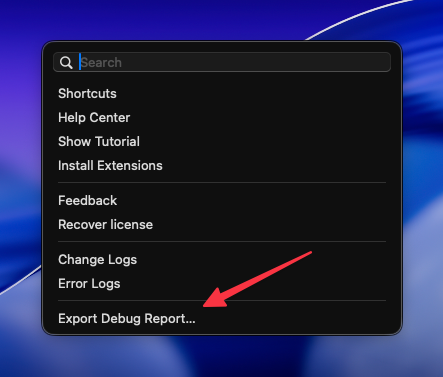
          On a related note - Eagle.cool offers to auto-zip relevant info into a zip package that can be emailed to them that contains all relevant files related to settings. This might be a good way to get all relevant info in one fell swoop. maybe even offer a way to drop it into the crash report panel? that would tie the appropriate system info with the crash report you receive internally. maybe it could also include an option to also send the apple crash report if one gets generated?
          0_1760384204230_2cedb942-c63b-48b7-9571-b7d5b7fef332-CleanShot 2025-10-13 at 15.35.26.png

          🍎 macOS Tahoe 26.2, Mac mini (M1, 2020), Chip Apple M1, Memory 16 GB
          Cintiq 27QHD Display and LG Ultra HD Display

          VectorStylerV 1 Reply Last reply Reply Quote 1
          • VectorStylerV Offline
            VectorStyler @Boldline
            last edited by

            @Boldline said in Is there a way to set these text boxes more permanently?:

            Eagle.cool offers to auto-zip relevant info into a zip package that can be emailed to them that contains all relevant files related to settings

            This is interesting. I will add this in the (near) future.

            BoldlineB 1 Reply Last reply Reply Quote 1
            • BoldlineB Offline
              Boldline @VectorStyler
              last edited by Boldline

              @VectorStyler It would be nice to have the individual links to the files remain but add that extra option to the list to "export debug report"

              if it helps, when you're ready, I can generate a debug report from Eagle and send the zip to you. You could see the kinds of things they have included, etc.


              🍎 macOS Tahoe 26.2, Mac mini (M1, 2020), Chip Apple M1, Memory 16 GB
              Cintiq 27QHD Display and LG Ultra HD Display

              1 Reply Last reply Reply Quote 1
              • First post
                Last post