VectorStyler
    • Categories
    • Unread
    • Recent
    • Tags
    • Popular
    • Register
    • Login

    Could low decay values in spiral tool have a smoother transition ?

    Scheduled Pinned Locked Moved Questions and Support
    4 Posts 2 Posters 1.2k Views 2 Watching
    Loading More Posts
    • Oldest to Newest
    • Newest to Oldest
    • Most Votes
    Reply
    • Reply as topic
    Log in to reply
    This topic has been deleted. Only users with topic management privileges can see it.
    • S Offline
      Subpath
      last edited by Subpath

      I had problems with the spiral tool settings in previous versions of VS.
      But since version 1.2.086 everything seems to works better.
      Love how transitions work now with Values above 80 - 90 %

      But lower values could be a bit smoother when i
      use values lower then 80 - 90 % in decay?
      See Picture the arrow show the problem
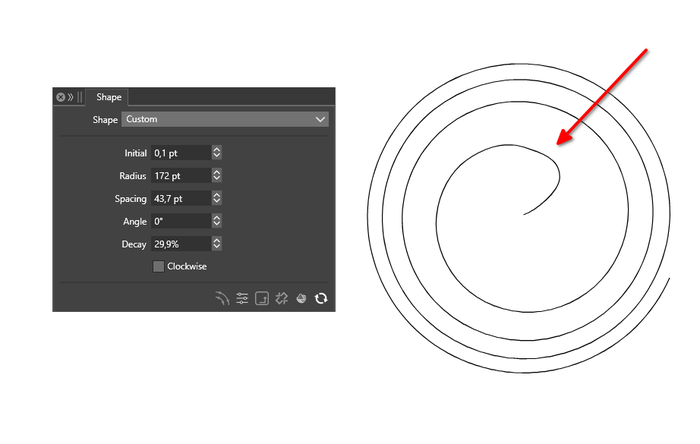
      0_1760530765819_Spiral-transitions.png

      Win 11
      CPU: AMD Ryzen 5 9600X, 6-core.
      GPU: Nvidia Geforce RTX 5070.

      VectorStylerV 1 Reply Last reply Reply Quote 1
      • VectorStylerV Offline
        VectorStyler @Subpath
        last edited by

        @Subpath I will try to improve this

        1 Reply Last reply Reply Quote 1
        • S Offline
          Subpath
          last edited by

          @VectorStyler

          Sorry to say, the Spiral decay still have Problem Zones.
          While the low decay looks smoother now. Sadyl the
          higher decay (above 100) lose his smootness
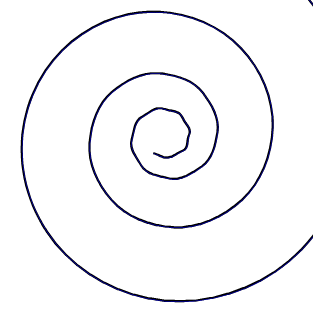
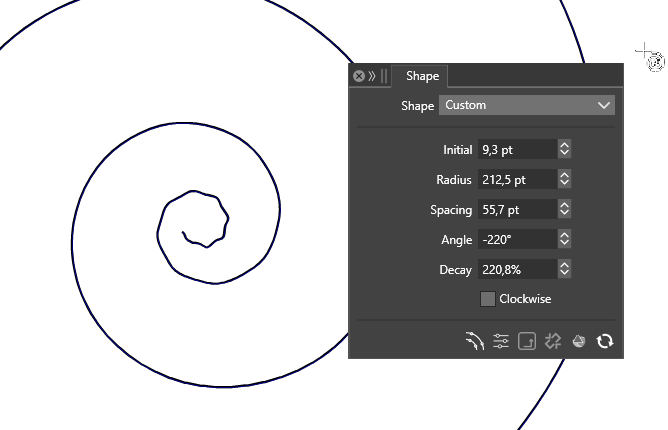
          0_1761909622480_spiral tool.png

          0_1761909631220_spiral tool (2).png

          Win 11
          CPU: AMD Ryzen 5 9600X, 6-core.
          GPU: Nvidia Geforce RTX 5070.

          VectorStylerV 1 Reply Last reply Reply Quote 1
          • VectorStylerV Offline
            VectorStyler @Subpath
            last edited by

            @Subpath I reopened this issue

            1 Reply Last reply Reply Quote 1
            • First post
              Last post
