VectorStyler
    • Categories
    • Unread
    • Recent
    • Tags
    • Popular
    • Register
    • Login

    Search in application

    Scheduled Pinned Locked Moved Questions and Support
    14 Posts 7 Posters 9.4k Views 6 Watching
    Loading More Posts
    • Oldest to Newest
    • Newest to Oldest
    • Most Votes
    Reply
    • Reply as topic
    Log in to reply
    This topic has been deleted. Only users with topic management privileges can see it.
    • J Offline
      Jayanta Das
      last edited by

      Is there search functionality in VS like AI where we can search for tools, functions etc.?

      Mac Mini M4 Pro | 24Gb
      WIndows 11 | Intel i5 11Gen
      Wacom Intuos Pro

      1 Reply Last reply Reply Quote 0
      • BoldlineB Offline
        Boldline
        last edited by

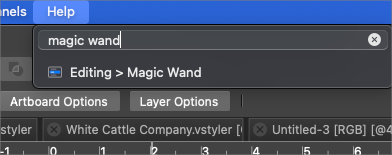
        Typing things into the help box can bring up a lot of stuff
        0_1647625031899_ae935c58-27e9-44bd-b702-34d1d1fbcbc5-BLD 2022-03-18 at 13.36.49.png

        🍎 macOS Sequoia 15.3, Mac mini (M1, 2020), Chip Apple M1, Memory 16 GB
        Cintiq 27QHD Display and LG Ultra HD Display

        J 1 Reply Last reply Reply Quote 0
        • J Offline
          Jayanta Das @Boldline
          last edited by

          @Boldline Text box not available in help. May be not available for Windows.

          Mac Mini M4 Pro | 24Gb
          WIndows 11 | Intel i5 11Gen
          Wacom Intuos Pro

          b77B VectorStylerV 2 Replies Last reply Reply Quote 0
          • b77B Offline
            b77 @Jayanta Das
            last edited by

            @Jayanta-Das Yes, it's Mac-only — the search field in the Help menu is made available for all apps by macOS, not by VS.

            MacBook Pro (Intel) running Monterey 12.6.4

            1 Reply Last reply Reply Quote 0
            • VectorStylerV Offline
              VectorStyler @Jayanta Das
              last edited by

              @Jayanta-Das said in Search in application:

              @Boldline Text box not available in help. May be not available for Windows.

              Yes, searching the menu is a Mac-only tool, no such tool on Windows.

              How it is done in other apps on Windows?

              J 1 Reply Last reply Reply Quote 0
              • J Offline
                Jayanta Das @VectorStyler
                last edited by

                @vectoradmin In AI F1 key is use for seach where tool or other function can be search and display inside the popup itself. Then we can select from the popup.

                Mac Mini M4 Pro | 24Gb
                WIndows 11 | Intel i5 11Gen
                Wacom Intuos Pro

                VectorStylerV 1 Reply Last reply Reply Quote 1
                • VectorStylerV Offline
                  VectorStyler @Jayanta Das
                  last edited by

                  @Jayanta-Das said in Search in application:

                  @vectoradmin In AI F1 key is use for seach where tool or other function can be search and display inside the popup itself. Then we can select from the popup.

                  This sounds like a new feature to be implemented 🙂

                  1 Reply Last reply Reply Quote 3
                  • J Offline
                    Jayanta Das
                    last edited by

                    @vectoradmin This is how it works in AI.

                    Mac Mini M4 Pro | 24Gb
                    WIndows 11 | Intel i5 11Gen
                    Wacom Intuos Pro

                    1 Reply Last reply Reply Quote 1
                    • IngolfI Offline
                      Ingolf
                      last edited by Ingolf

                      It is an additional feature making learning resources etc. easier to find:
                      Learn faster with the Illustrator Discover Panel

                      Learn how to work on the Discover panel and explore tools and articles within Illustrator.

                      The new Discover panel offers contextually relevant help and learning resources to quickly locate articles and work efficiently with the tools in Illustrator.

                      The panel gives you recommendations that improve speed and efficiency with Illustrator tools. These recommendations include tips and tutorials on how to get multi-step workflows done faster.

                      🍏 macOS Sequoia Apple Silicon

                      1 Reply Last reply Reply Quote 1
                      • F Offline
                        FastVector
                        last edited by

                        Just wondering if this feature "Search in application" is already available and if not if this will be implemented in the future.

                        Windows 10 | 1920x1080 | 125%

                        VectorStylerV 1 Reply Last reply Reply Quote 1
                        • VectorStylerV Offline
                          VectorStyler @FastVector
                          last edited by

                          @FastVector said in Search in application:

                          Just wondering if this feature "Search in application" is already available and if not if this will be implemented in the future.

                          Not available, and not planned for the next version

                          F 1 Reply Last reply Reply Quote 0
                          • F Offline
                            FastVector @VectorStyler
                            last edited by

                            @VectorStyler Thanks for the quick response. Just an other question. Don't remember if I asked this before. But will there be a command line in the future. You can type in instructions. You have this in CAD software. This is very helpfull in making exact dimensions in your design.

                            Windows 10 | 1920x1080 | 125%

                            VectorStylerV 1 Reply Last reply Reply Quote 0
                            • VectorStylerV Offline
                              VectorStyler @FastVector
                              last edited by

                              @FastVector said in Search in application:

                              @VectorStyler Thanks for the quick response. Just an other question. Don't remember if I asked this before. But will there be a command line in the future. You can type in instructions. You have this in CAD software. This is very helpfull in making exact dimensions in your design.

                              Scripting and plugins are planned for the future.

                              M 1 Reply Last reply Reply Quote 1
                              • M Offline
                                marce @VectorStyler
                                last edited by

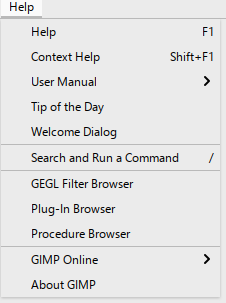
                                @VectorStyler Yes is very usefull, specially for newbies like me. Gimp has this feature:
                                0_1764952345529_d6909804-0fa3-43ef-97e7-a6fa3c31be50-image.png

                                Ryzen 9 3900X on Asus prime x570-p
                                Memory 48gb ddr4
                                Nvidia gtx 970 on an Asus strix, 4gb gddr5
                                NVMe CT100p 1TB

                                1 Reply Last reply Reply Quote 1
                                • First post
                                  Last post
