Quick radial tool
-
I could see this quick rotation copy function as part of the repeater or the mirror tool
🍎 macOS Tahoe 26.2, Mac mini (M1, 2020), Chip Apple M1, Memory 16 GB
Cintiq 27QHD Display and LG Ultra HD Display -
Maybe even better is to invoke mirrored (or radial mirrored) mode adjust\set a centre point (or line) and start designing.
If the object crosses the point\line of symmetry (mirror line) to get 'non-destructively cropped' (masked?) Is it actually the same thing → non-destructive cropping = masking? -
@Boldline The mirror tool can do something like this with increasing the axis
-
-
I have to once again call your attention to FreeHand's absolutely wonderful mirror, rotate and duet function with a dedicated dialog box to decide the number of axes too. I'll post a gif tomorrow.
-
This post is deleted! -
https://ibb.co/JRmjQVfJ - Check this out.
-
The gif I posted is from FreeHand, which pioneered the mirror tool originally. What's great about it is that unlike Irritator which is a modal window that has to be called back repeatedly to apply the transformation, FreeHand allows to successively apply the transformation once you've decided the number of axes. FreeHand really sucks at snapping though. It has virtually no smart snapping, and object snapping is pretty shite, which means you have to eyeball the edges. But otherwise, it is remarkably sophisticated. Allows you to very rapidly create tiling clones. You can also apply a duet transform to your original object. A duet acts like a symbol, except that it undergoes every transformation that your main object goes through. Including every change of attribute including position. It is very useful.
-
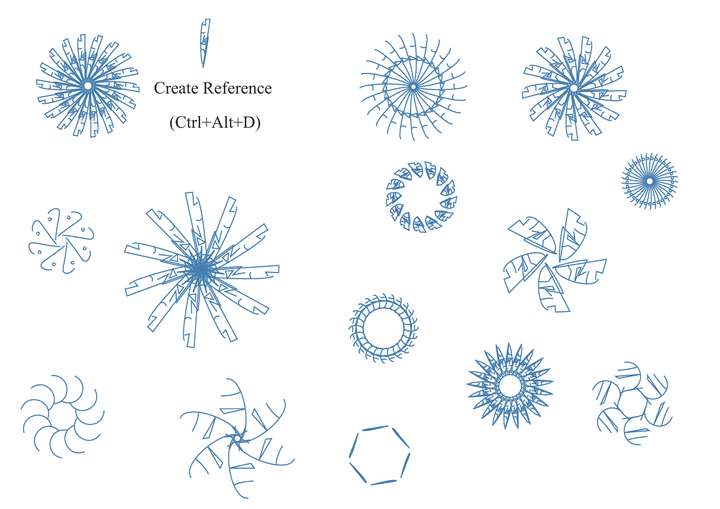
would creating something like this fall under a mirror feature or a repeater tool function or both?
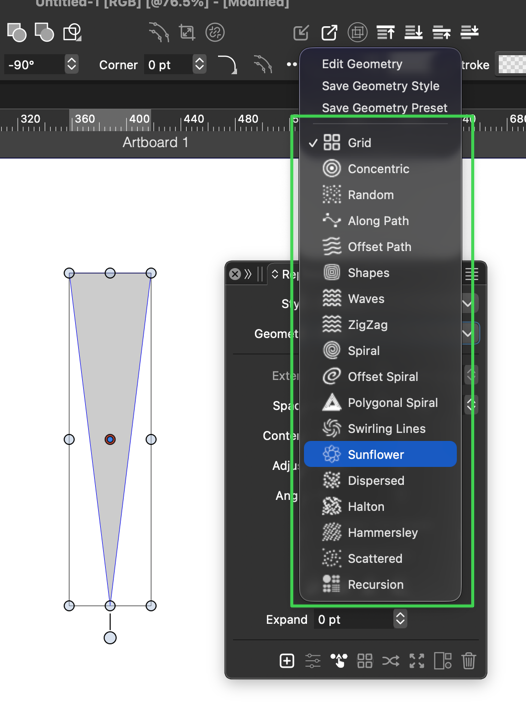
I'm wondering if repeater needs a "radial" option as one of the geometry opitions?

-
'I'm wondering if repeater needs a "radial" option as one of the geometry opitions?'
@Boldline Do you mean something like this?
-
Just played a little around with this. Here a video how you can easily change the shape that is in the repeater