VectorStyler
    • Categories
    • Unread
    • Recent
    • Tags
    • Popular
    • Register
    • Login

    Rich Text Format pasting

    Scheduled Pinned Locked Moved General Discussion
    9 Posts 3 Posters 1.1k Views 3 Watching
    Loading More Posts
    • Oldest to Newest
    • Newest to Oldest
    • Most Votes
    Reply
    • Reply as topic
    Log in to reply
    This topic has been deleted. Only users with topic management privileges can see it.
    • M Offline
      marce
      last edited by

      Hi, im seeing the option to paste and paste without format. To what is refering "format"? When i paste formated text, from any source -word, libreoffice, etc- VS ignores formatting -text fonts, color, etc- or paste it as a metafile or kind of.
      Is there a way to import a document file conserving the format (styles, fonts, colors, etc)?

      Ryzen 9 3900X on Asus prime x570-p
      Memory 48gb ddr4
      Nvidia gtx 970 on an Asus strix, 4gb gddr5
      NVMe CT100p 1TB

      VectorStylerV 1 Reply Last reply Reply Quote 1
      • VectorStylerV Offline
        VectorStyler @marce
        last edited by

        @marce said in Rich Text Format pasting:

        Is there a way to import a document file conserving the format (styles, fonts, colors

        Yes, this should be in the Edit menu, but is this on Windows or MacOS?

        M 1 Reply Last reply Reply Quote 0
        • M Offline
          marce @VectorStyler
          last edited by

          @VectorStyler I'm on windows. When I paste, no format is kept.

          Ryzen 9 3900X on Asus prime x570-p
          Memory 48gb ddr4
          Nvidia gtx 970 on an Asus strix, 4gb gddr5
          NVMe CT100p 1TB

          S 1 Reply Last reply Reply Quote 1
          • S Offline
            Subpath @marce
            last edited by

            @marce

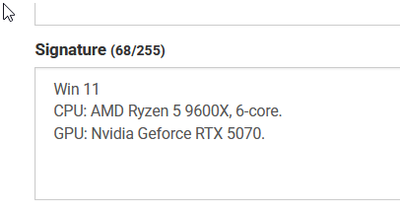
            You can add some of your PC specifications, if you like,
            under "Edit profile" > signature.

            0_1765107758062_signature.png

            Win 11
            CPU: AMD Ryzen 5 9600X, 6-core.
            GPU: Nvidia Geforce RTX 5070.

            M 1 Reply Last reply Reply Quote 0
            • M Offline
              marce @Subpath
              last edited by

              @Subpath I added my computer specs to signature, pretty standard.

              I only see in the File>import the .TXT extension, not RTF or any other rich text format. When i paste formated text, very basic bold, italic, with some selected fonts, i only got simple text without any formating, even i choose "Paste" or "Paste without formating" is the same.
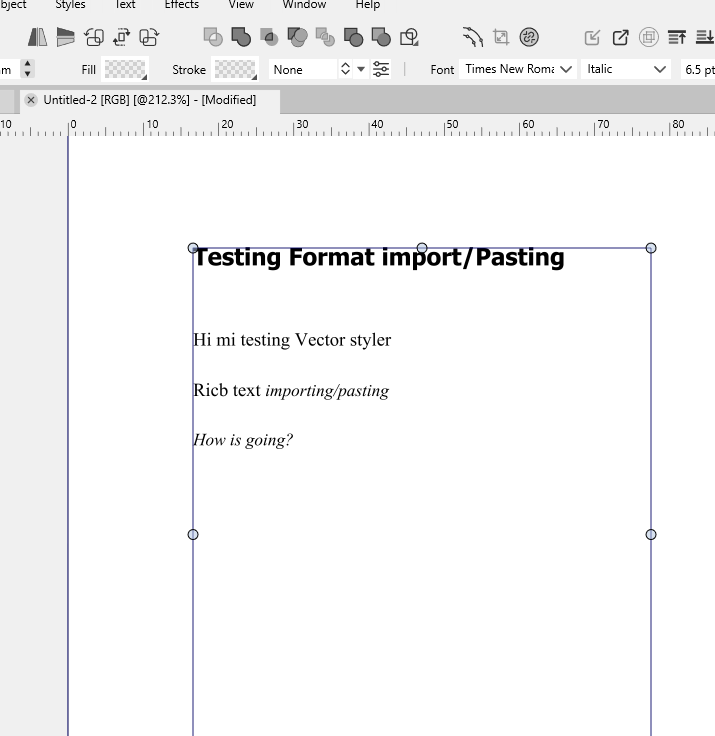
              By example, when i copy this from LibreOffice
              0_1765120060235_65bc27c0-e17f-4ed3-ad7c-0ab4ef04225b-image.png
              And when i paste it in VS, i got this:
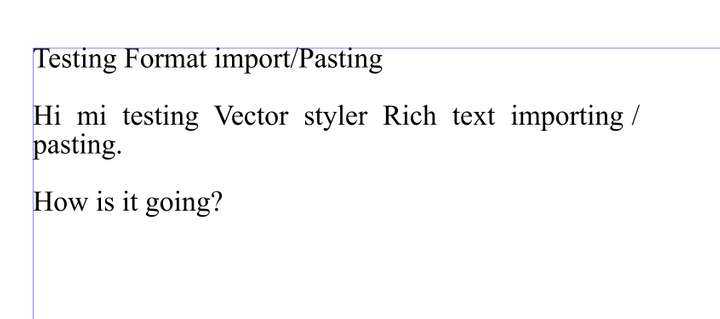
              0_1765120128141_372b2d56-6e2b-4ef5-bd43-8898fcc72406-image.png

              If i paste the same text from Wordpad, the pretty basic text editor from windows, that has rich text, nothing happens.

              Ryzen 9 3900X on Asus prime x570-p
              Memory 48gb ddr4
              Nvidia gtx 970 on an Asus strix, 4gb gddr5
              NVMe CT100p 1TB

              S 1 Reply Last reply Reply Quote 1
              • S Offline
                Subpath @marce
                last edited by

                @marce

                sorry, but i could not help with that
                i do very less with text in VS

                Win 11
                CPU: AMD Ryzen 5 9600X, 6-core.
                GPU: Nvidia Geforce RTX 5070.

                M 1 Reply Last reply Reply Quote 1
                • M Offline
                  marce @Subpath
                  last edited by

                  @Subpath Thanks anyway. To import some kind of Rich Text format could be good, since Vector Styler has pretty good formating capabilities. Importing text previously formated in some dedicated text editor can make faster your work.

                  Ryzen 9 3900X on Asus prime x570-p
                  Memory 48gb ddr4
                  Nvidia gtx 970 on an Asus strix, 4gb gddr5
                  NVMe CT100p 1TB

                  S 1 Reply Last reply Reply Quote 0
                  • S Offline
                    Subpath @marce
                    last edited by Subpath

                    @marce

                    i had a look at the import file options
                    and found a .RTF import
                    Importing a RTF made in Corel was also working

                    could it be Wordpad related ?
                    i dont think so but ?

                    0_1765122568790_rtf file.png

                    Win 11
                    CPU: AMD Ryzen 5 9600X, 6-core.
                    GPU: Nvidia Geforce RTX 5070.

                    M 1 Reply Last reply Reply Quote 0
                    • M Offline
                      marce @Subpath
                      last edited by

                      @Subpath Thanks! I dont see the rtf option, since the scroll went out of screen
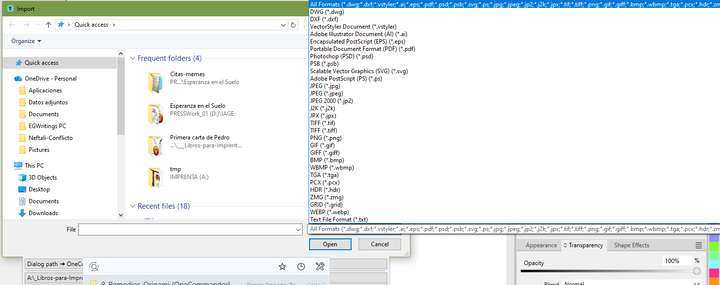
                      0_1765124328164_39fa21ce-b83f-4d2b-9afd-517a900efc1e-image.png
                      Im testing it, and it works great:
                      0_1765124348677_8605bcad-d6d3-418b-83ea-cf5d149aa4d9-image.png

                      Ryzen 9 3900X on Asus prime x570-p
                      Memory 48gb ddr4
                      Nvidia gtx 970 on an Asus strix, 4gb gddr5
                      NVMe CT100p 1TB

                      1 Reply Last reply Reply Quote 1
                      • First post
                        Last post