VectorStyler
    • Categories
    • Unread
    • Recent
    • Tags
    • Popular
    • Register
    • Login

    Wrap of transparent PNGs

    Scheduled Pinned Locked Moved General Discussion
    6 Posts 3 Posters 652 Views 3 Watching
    Loading More Posts
    • Oldest to Newest
    • Newest to Oldest
    • Most Votes
    Reply
    • Reply as topic
    Log in to reply
    This topic has been deleted. Only users with topic management privileges can see it.
    • M Offline
      marce
      last edited by

      Hi! Is there a way to wrap around an image with transparency? Normally in layout programs, transparency is used as empty space, and text use it for flowing around the image. But i see that in VS the image is squared, and transparency not used. I screenshot a transparent png and a svg, when you can see the difference in wrapping
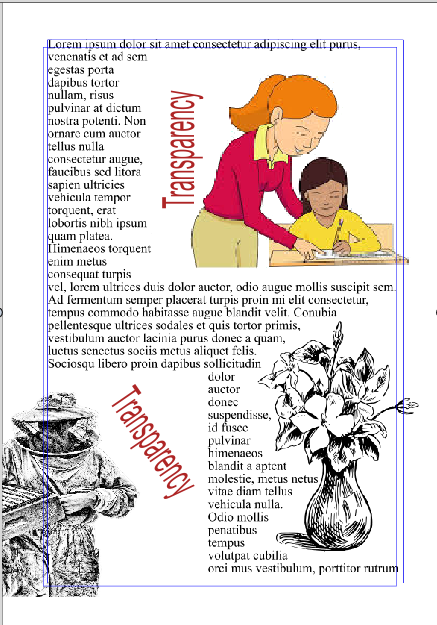
      0_1765675404024_d094374b-d23e-44bd-bad6-03564a2b9d83-image.png

      Ryzen 9 3900X on Asus prime x570-p
      Memory 48gb ddr4
      Nvidia gtx 970 on an Asus strix, 4gb gddr5
      NVMe CT100p 1TB

      VectorStylerV 1 Reply Last reply Reply Quote 1
      • VectorStylerV Offline
        VectorStyler @marce
        last edited by

        @marce No such option in VectorStyler. You need to draw a clipping path for now.

        1 Reply Last reply Reply Quote 1
        • M Offline
          marce
          last edited by

          Hi! I cant find how to make a clipping path in the manual, im not sure if you are refering to a line manually draw as contour or something else.

          Ryzen 9 3900X on Asus prime x570-p
          Memory 48gb ddr4
          Nvidia gtx 970 on an Asus strix, 4gb gddr5
          NVMe CT100p 1TB

          VectorStylerV S 2 Replies Last reply Reply Quote 1
          • VectorStylerV Offline
            VectorStyler @marce
            last edited by

            @marce said in Wrap of transparent PNGs:

            Hi! I cant find how to make a clipping path in the manual, im not sure if you are refering to a line manually draw as contour or something else.

            Draw any shape, and drop the image inside the shape in the Layers panel.
            The Node tool can be used to keep editing these shapes

            1 Reply Last reply Reply Quote 1
            • S Offline
              Subpath @marce
              last edited by Subpath

              @marce

              Here a Video

              you could cut a shape (Ctrl+x) and put it per "Paste Inside"
              into another shape

              or like vectorstyler mentioned select a shape in the layer Panel
              and drop it onto another shape in the Layer panel

              the video show both ways

              to enter a clipping shape, if you like to edit the content
              double click at that clipping shape

              to leave that editing state double click anywhere
              outside of the clipping shape

              Win 11
              CPU: AMD Ryzen 5 9600X, 6-core.
              GPU: Nvidia Geforce RTX 5070.

              1 Reply Last reply Reply Quote 2
              • M Offline
                marce
                last edited by

                Thanks VS and Subpath! Great thing the drag and drop inside a draw shape! Nice. Would be nice for bitmaps with transparency to have the option to extract automatically the contour for wrapping purposes.

                Ryzen 9 3900X on Asus prime x570-p
                Memory 48gb ddr4
                Nvidia gtx 970 on an Asus strix, 4gb gddr5
                NVMe CT100p 1TB

                1 Reply Last reply Reply Quote 0
                • First post
                  Last post