Advanced Bezier Editing for Logo & Lettering Work
-
Additional Bezier Editing Workflow Suggestions
In addition to the curvature visualization and harmonization ideas mentioned above, I would also like to suggest a few advanced Bézier editing improvements specifically for precision logo and lettering work:
- Multi Handle Editing
Ability to select multiple anchors and adjust their handles simultaneously while preserving relative angle and length relationships.
This would allow proportional refinement across connected segments without manually adjusting each handle one by one.
- Real Time Symmetry Edit Mode
A non-destructive symmetry editing mode for path refinement.
Desired behavior:
• Select mirrored anchors or handles
• Move them simultaneously relative to a chosen axis
• Support vertical, horizontal, or custom symmetry axis
• Temporary activation via modifier key
• Preserve existing node structureThis would significantly accelerate refinement of symmetric shapes like O, U, arches, bowls, and logotype constructions.
- Independent Anchor Repositioning (Handle Preserving Move)
An option to move anchor points without altering handle angles or segment tangency.
This would allow micro-adjustments in curve positioning without rebalancing both handles manually after every move.
- Intelligent Line to Curve Conversion
When converting a straight segment into a curve:
• Automatically generate balanced handles
• Respect neighboring curvature
• Avoid curvature spikesThis would improve curve construction speed and reduce manual correction work.
These additions would complement the proposed curvature tools and position VectorStyler as an even stronger precision bezier environment for advanced shape construction. I believe VectorStyler’s existing architecture and curve engine are already robust enough to support these advanced workflow improvements efficiently.
-
@Honor said in Advanced Bezier Editing for Logo & Lettering Work:
- Multi Handle Editing
enabled with Settings -> Path Editor -> Control Handle Mode
- Real Time Symmetry Edit Mode
Is this the non-destructive Mirror Group feature? (Object -> Transform -> Mirror Object)
Or, for nodes there is symmetric node mode.
- Independent Anchor Repositioning (Handle Preserving Move)
Hold Shift when dragging the control point handle
- Intelligent Line to Curve Conversion
I will add this to the backlog. Can you send me a few before / after examples for this?
-
After testing more carefully, I realized that most of the advanced bezier editing features we discussed are actually already available in VectorStyler (multi-handle editing, axis-based symmetry, etc.). Thank you for clarifying that.
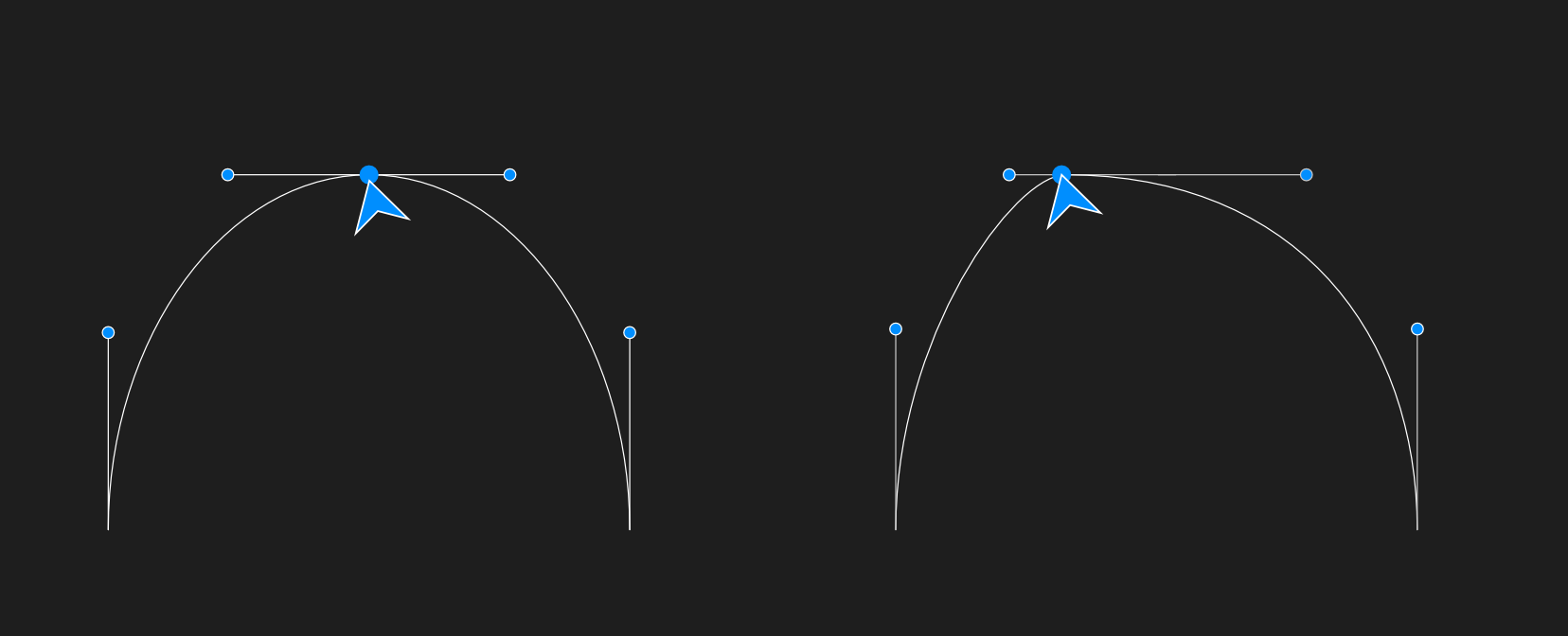
The specific behavior I am still looking for is shown in the attached graphic:
The ability to move an anchor point without altering the direction or angle of its handles — meaning both handles remain fixed in orientation while the anchor shifts position.
In the example image, the intended behavior is moving the middle node while keeping both handle directions completely unchanged, preserving the original curve tension and tangency.
-
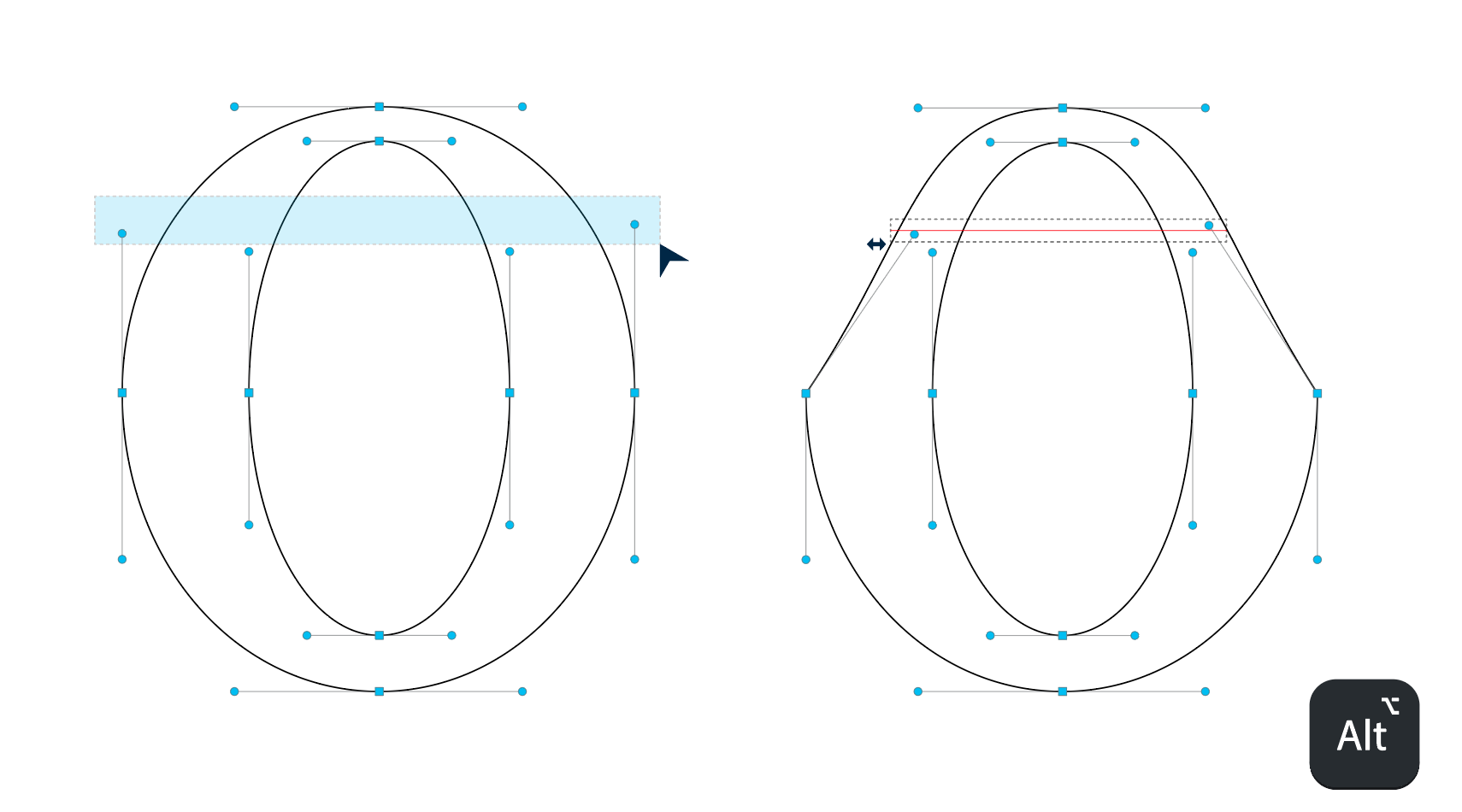
Parallel handle adjustment with a modifier key
The ability to move two opposite handles simultaneously and symmetrically relative to their anchor, for example using Option / Alt while dragging.
This would allow both handles to move toward or away from the anchor while remaining parallel, making it much easier to adjust curve tension without breaking the overall geometry.
Left: Standard node movement
Right: Parallel handle adjustment (Alt / Option) allowing both handles to move symmetrically relative to the anchor, providing more precise control over the curve shape.- Marquee selection for multiple handles
The ability to select multiple handles by dragging a selection area (marquee selection) instead of selecting them individually.
This would make it much faster to adjust several handles at once during curve refinement.
-
@Honor @vectorstyler This will definitely be a power option to speed up the workflow.
-
- Intelligent Line to Curve Conversion
I will add this to the backlog. Can you send me a few before / after examples for this?
Here is a short GIF showing the behavior.
It allows moving straight segments without creating curves, preventing accidental distortion. Curves are only introduced intentionally using Alt. This behavior is currently possible by selecting multiple nodes, but the goal here is to allow direct segment selection and manipulation with a single click.
Especially when shapes overlap, selecting the correct nodes can be difficult.
With this behavior, you can directly select the segment and make adjustments more easily.
