Adding more magnetism to the arc tool when closing a path
-
With the new arc tool, could we set the magnet pull when you are close to completing a closed path like what is already set with the pen tool?
When I create an arc with the arc tool and I go to complete a shape by clicking on the original node, it appears to "lock-in" but not really, it always leaves a small gap
If we gave it the same setting s as what the pen tool uses, it was be much easier to get a closed shape quickly.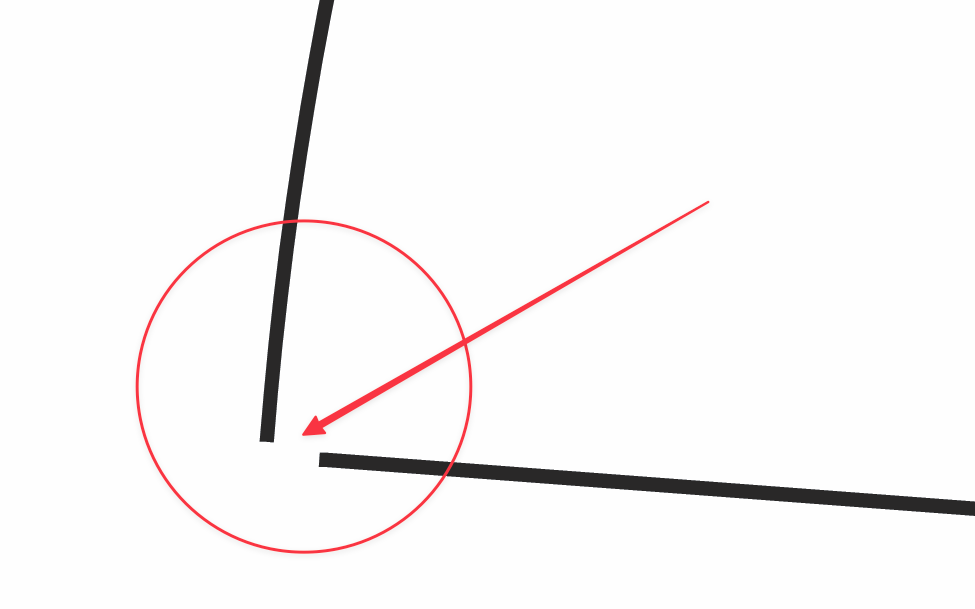
-
@Boldline There should be snapping by default:
I get this with the default settings (and snapping enabled in the Snapping panel):
https://cleanshot.com/share/SRGlWty7 -
@VectorStyler thank you - yes, if I turn on snapping, it will close the path as expected. I did notice however, it does not work as well on non-circle results like I was demonstrating. If the shape is not a circle, even with the snapping on, it will not join together properly. here is a video showing this
In the video, I also show how it would be helpful if the snapping would show the midpoint of the path nearby in this case right below it so I could make my node centered if I wanted to. Does this go against the principle of the tool? Because I understand it's meant to be an on the fly adjustment as you work not necessarily technical.
Even as a general option for all plotting tools - it would be handy to have snapping indicate when you are at the center point of a nearby path. it works in VS when there is already a node there to represent that spot like in this video
The end of the video cuts to the open source "Graphite" where it allows for that kind of thing

