VectorStyler
    • Categories
    • Unread
    • Recent
    • Tags
    • Popular
    • Register
    • Login

    Combine two simple yet overlapping paths. How?

    Scheduled Pinned Locked Moved Questions and Support
    3 Posts 2 Posters 13 Views 2 Watching
    Loading More Posts
    • Oldest to Newest
    • Newest to Oldest
    • Most Votes
    Reply
    • Reply as topic
    Log in to reply
    This topic has been deleted. Only users with topic management privileges can see it.
    • RaaskotR Offline
      Raaskot
      last edited by

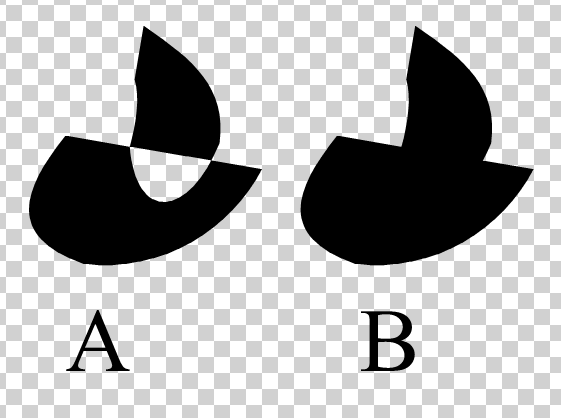
      I cant figure out how to combine two simple yet overlapping paths (A) into the same shape (B). What is quickest praxis in VS?
      combine.vstyler

      7723e2bb-a8d7-4710-864a-4b3e31d0a024-image.png

      VectorStylerV 1 Reply Last reply Reply Quote 1
      • VectorStylerV Offline
        VectorStyler @Raaskot
        last edited by

        @Raaskot Here the two shapes (in A) are already combined into a composite shape, so you have to "Object -> Break Apart" first and then use Union to get B.

        RaaskotR 1 Reply Last reply Reply Quote 1
        • RaaskotR Offline
          Raaskot @VectorStyler
          last edited by

          @VectorStyler
          Good.
          Yet I couldn't replicate your solution without selecting Separate Path also ...

          5eea44f3-a761-469d-a376-1f5f6da41e9e-image.png

          1 Reply Last reply Reply Quote 0
          • First post
            Last post
