Preserve Compound-Path Holes When Using Scissors and Knife Tools
-
When using the Scissors Tool or Knife Tool on a filled compound path, cutting a contour can unexpectedly cause an empty negative-space region to become filled. Here is a video showing this happening
I understand this happens because a contour defining a hole is opened or reconnected in a way that changes the compound-path topology. On complex monochrome artwork, it is difficult to predict when this will happen. The result can look like an unwanted flood fill across previously empty areas.
Could we add a contextual option to the Scissors Tool and Knife Tool, such as:
Preserve Fill Regions
Preserve Compound Holes
Reconnect Without Changing FillWhen enabled, the tool would attempt to preserve the visible filled and empty regions that existed before the cut.
The option could:
Record the filled appearance before the cut.
Perform the cut.
Reconnect compatible endpoints where necessary.
Preserve existing compound-path holes and winding relationships.
Avoid filling negative-space regions that were empty before the operation.If the result is ambiguous, VectorStyler could show a preview, offer alternate reconnection results, or leave the paths open rather than changing the fill unexpectedly.
Why this is needed
Complex traced artwork and black-and-white illustrations often contain many negative-space holes inside a single compound path. Breaking the object apart is not a practical workaround because every released contour inherits the same fill, turning all hole contours into filled objects and creating a large cleanup problem.
Boolean cutters can work, but they are slower for simple path edits and are not a replacement for the Scissors or Knife workflow.
A Preserve Fill Regions option would make these tools much safer for:
compound paths
traced artwork
negative-space illustrations
logo cleanup
screen-print artwork
dense monochrome vector designs
Suggested interface locationAdd the option to the contextual controls for both:
Scissors Tool
Knife ToolIt could also be available in the right-click contextual menu after a cut, allowing the user to choose a region-preserving reconnection result.
-
@Boldline Send the the file with the shape where this happens (looks like a bug).
There is a settings: Separate Path with Knife tool, that will keep the combined shapes in all cases
-
@boldline, @vectorstyler
I am using knife splitting, opening contours at nodes, closing, joining etc. all the time too.
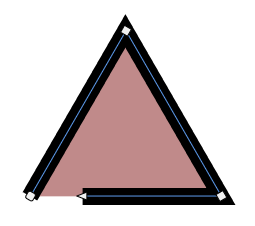
Is part of the problem that assigned Fills will show, even when the Path is open?- Is there an option - or can we have an option - to show or not Show Fills for Open Path?
BR / Lars Herold
-
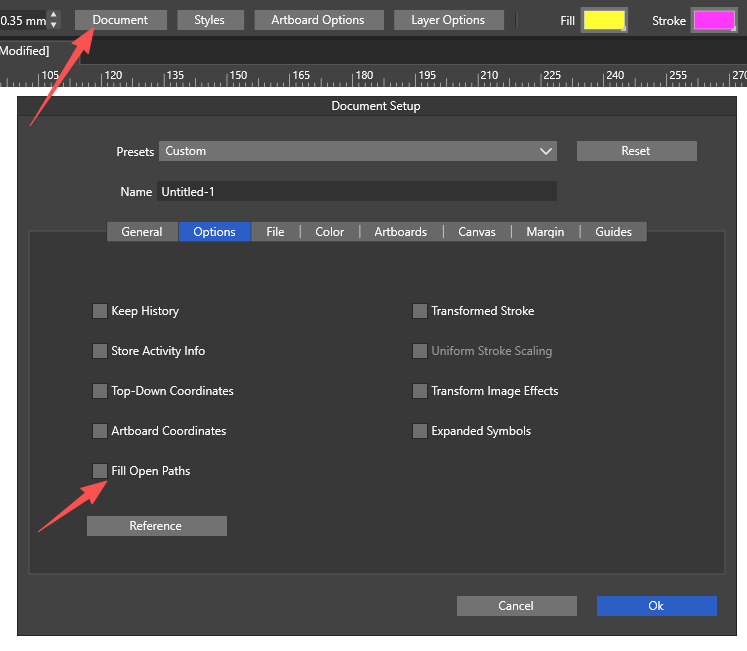
@larsherold This option already exists.
-
@Li-Xiao , ah! Of course it's there

 .
.
A Document Option, one place I didn't look!Thanks!
-
@VectorStyler it’s the same file I sent by email link in relation to the GPU view crashes yesterday. It’s a covered wagon from the American west circa 1800s. I can send again if needed. I also have the setting checked to separate with the tool already

