Per-Document Auto Save Control or Read-Only Mode
-
I would like an option to disable Auto Save for individual documents. ideally an option to "Open as Reference"
My concern is when I leave one VectorStyler file open as a reference while copying elements or information into another document. If I accidentally move, delete, paste, or change something in the reference file, Auto Save could overwrite the original before I notice. I understand I can set the timer for up to 20 min, but sometimes I forget to close out a reference file because it's out of sight-out of mind
A per-document option would solve this. Possible implementations could include:
Disable Auto Save for the current document
Open document as read-only
Lock document against saving
Warn before Auto Save overwrites a file that was opened as a reference
Add an “Open as Reference” optionThe ideal workflow would let Auto Save remain enabled globally while protecting selected files from accidental changes.
My personal preference would be an option to open a document as "read-only"
A possible location is right ehre in the file menu
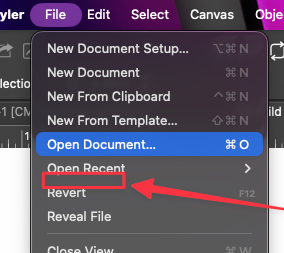
This would be especially useful when working with templates, client-approved artwork, production files, or older designs that need to remain unchanged.
I would also feel safer with these options, knowing it's far less likely to accidentally save over a file I left open by mistake or that I need to keep track of how long its open for fear it gets saved over.
🍎 macOS Tahoe 26.2, Mac mini (M1, 2020), Chip Apple M1, Memory 16 GB
Cintiq 27QHD Display and LG Ultra HD Display -
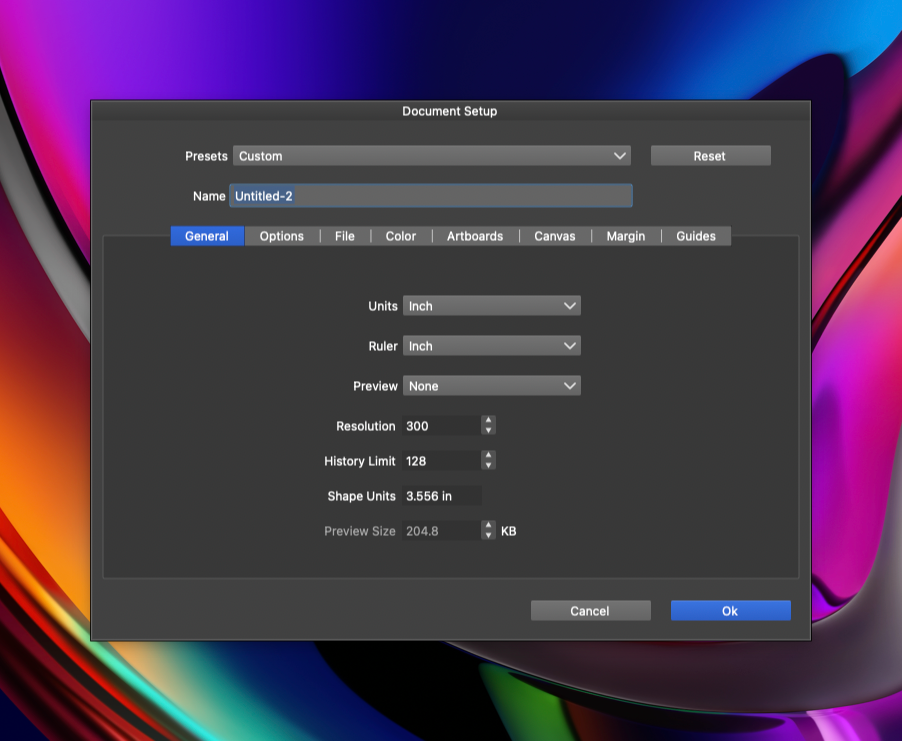
An addendum: I was thinking more about a comprehensive solution because not every file is opened from the File menu in VS. Oftentimes a file is opened from a folder menu or finder menu on the OS. If we added the option to “Set as Reference” in the Document Setup Panel, that would deactivate autosave for that specific document and even prevent it from getting accidentally saved manually as well
-
@Boldline Could this be called "Open Readonly" ?
-
@VectorStyler yes, whatever name fits best in your system. Essentially it would allow the file to be modified but not automatically saved. Perhaps the only save option in that situation is manually with a “save as” only? Whatever you think is best.

