Bezigon Tool
-
Now, we have a working Bezigon tool! Which is brilliant. Thank you @VectorStyler. I didn't want to split this conversation into multiple threads. Immediately upon using it, a number of things came to mind. But it is best illustrated with a gif.

Notice the difference between the Bezigon in FreeHand and Bezigon in VS.
https://imgbox.com/UCBeQoh3 - In the link there are two different gifs. So please click next to see the second gif too.
I might be missing something here, so please let me know if I am doing something wrong. Once again, thank you!
I also wanted to note that we need the concept of tangential node as a part of this tool. Tangential node essentially snaps the node handle parallel to the node. I can record a gif for this later.
This is an improvement that you can implement as a part of the node tool so that tangential nodes are available across all curve-making tools.
EDIT:
I think I know what's going on:
In FreeHand: Simple Click --> Cusp Node. Alt Click --> Smooth Node. So if I start like this:
Simple Click --> . Alt Click --> Smooth node. Simple Click --> This creates a perfect semi-circular curve. This is because the last simple click, makes the previous node perfectly symmetrical. I can do the same on the other side and create a perfect circle.
In VS, the behaviour seems slightly different. Wondering what I am missing.
-
@Daniel I added this to the backlog and will try to improve it.
-
My vociferous campaigning to get this tool into more apps has paid off in one more place: PhotoLine now has Bezigon as a subfunction of the curve creation tool!
-
@vectorstyler: Working on the Bezigon in VS, there are quite few kinks. Me and an old software colleague spent some months basically reverse engineering the FreeHand implementation. It is tested exhaustively. Every edge case works. And it is written so that there are zero dependencies. So you can free use it. We've released it under MIT License, permissive use with total control to modify as you wish. We wrote it originally for PhotoLine integration. So the readme files address PL. But ignore those, you still have solid code.
-
@Daniel Can you describe these issues?, just so that I understand them
-
@VectorStyler: Hey! Basically, far from being a simple and straight forward algorithm, Bezigon has a lot of edge cases, which FreeHand has very cleverly coded. We basically mapped out all of these edge cases exhaustively by hand and compared them one at a time.
Pie, eye and shield are the three best cases for explaining this:
PC - Plain Click, MC is modifier click.
In VS, try this sequence:
MC + PC + MC + PC + Close the shape with PC. This should produce a perfect eye shape. That is, two circular arcs joined at the sides. The curve approximation is not accurate.
Shield: Start with a PC, then MC, PC (for corner), MC, PC (for bottom corner) - you'll see that curve approximation suffers. The shield is the perfect case for trying this out. I will record a video for you later.
Meanwhile, if you compile and run the code, you'll see how it works for every edge case. We'll document the edge cases clearly and completely later.
Meanwhile: Here's how we figured it out:
We worked off of screenshots and video recordings of FreeHand Bezigon producing various shapes, a set of measured handle lengths from the tool itself, and the option to test each hypothesis against the real thing by drawing the same click pattern in both. I fired up my FreeHand 11 and tested every single edge case, measured handle lengths by taking screenshots, and then manually measuring distances in Affinity (which now has the feature of turning measures into objects). We also used the manual to kind of try and figure out the logic.
We built a minimal C++ tool first, click to place points, see lines, and then added one rule at a time, checking each against FreeHand immediately.
The first discovery was handle length. FreeHand's Bezigon uses a fraction of the segment length as the handle length. Three measurements gave 0.39, and it stayed at 0.39 across every configuration we tried. That number was not the hard part.
The node types were straightforward. A plain click makes a corner; a modifier click makes a smooth node. Where things got interesting was what happens to the handles of each.
Smooth nodes were the easy case. The tangent is the direction from the previous node to the next. That is what any spline library does.
Corners were the puzzle. At first we pointed the handle at the neighbouring node. That works for straight segments but produces visibly wrong curves when the segment is supposed to be an arc. The shape comes out pinched, and the arcs get progressively less circular as you add nodes.
The rule that fixed everything was this: at a corner adjacent to a smooth node, the corner's handle is the reflection of the smooth node's tangent across the chord.
It sounds obscure, but it is actually the exact property of a circular arc. In any circle, the tangent at one end of a chord and the tangent at the other make equal angles with the chord, on opposite sides. So if you know one tangent, the other is its mirror image. FreeHand uses this trick to turn segments between a corner and a smooth node into proper arcs.
The last thing we figured out was how FreeHand treats the start node when a path is closed. There are two variants: plain close and modifier close. Plain close leaves the start node's type unchanged, modifier close forces it to a corner. There is a further special case for a plain-closed path whose start and second nodes are both corners, where the handles become collinear along the line to the second node, but only if the last node is smooth. This last condition took us the longest to find. The bug only manifested on one specific click pattern.
Once that rule was in, the shapes snapped into place. The eye, the pie wedge, the shield, all of them matched FreeHand's output.
The thing I underestimated was how much of this would come down to looking at two nearly-identical images side by side and asking "what's different here?". There is no shortcut. You cannot derive the rules from first principles; FreeHand has quirks that are not mathematically optimal, and you only find them by comparing outputs.
It took 2 months of work to make it all work perfectly. I did no coding. My friend, Taras, wrote all the code. I merely tested the visual output.
-
@Daniel Thanks for the code and the info.
I will try to improve this as soon as I can.
-
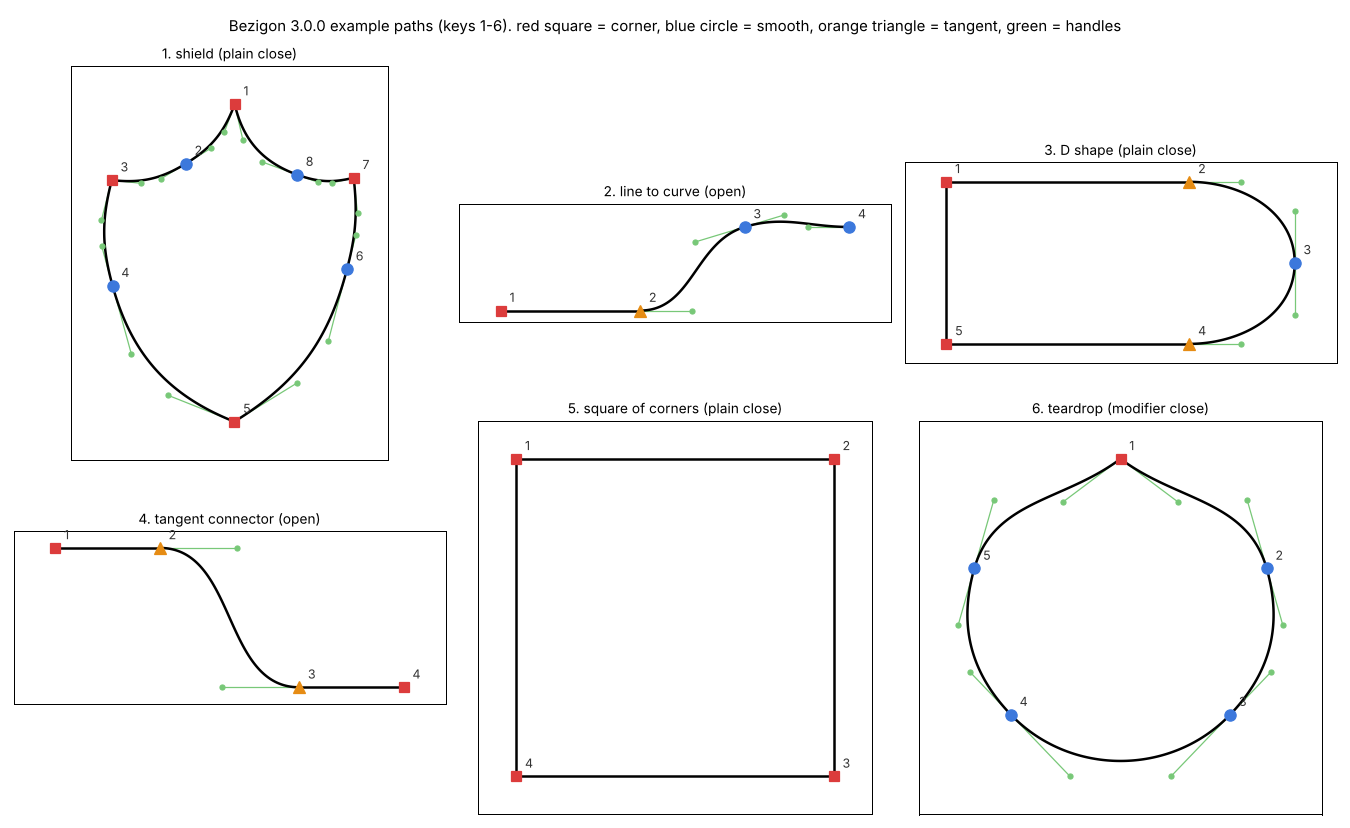
There were still some edge cases to work out in the code I shared. Which we eventually figured out by comparing outputs exhaustively. In the process of figuring it out, we also cracked Tangent Nodes... Tangent node handles can only be moved along the set line. It is extremely useful when you want to get perfectly smooth transitions.
I am going to post V 3 Code so you can study and integrate. Doing the last bit of checks. Again, MIT License.
Work: Windows 11 | Intel i9 14900HS (24 Cores/32 Threads) | GeForce RTX 4070 | 64 GB RAM
Personal: Windows 11 | Amd Ryzen 9 7950X (16 Core, 32 Threads) | GeForce RTX 3060 | 32 GB RAM -
@VectorStyler; Also if you want to test Bezigon at your end, use this file - Bezigon Tester.pdf - It lists out 16 permutations. You can compare these permutations against the code V3 code I'll post. If VS does not produce identical results, then its not right. There are still edge cases to work out.
PC means - Plain click
MC means - Modifier clickTake note that these 16 cases only check for smooth, cusp and sharp nodes. Tangent nodes are ignored in these combinations for the present moment.
-
@Daniel I will test this. Thanks!
-
@Daniel Is there an app, where the control points are set manually?
-
@Daniel And what key modifier is used to get the tangent case (orange triangle)?
-
@VectorStyler: In FreeHand, it is Alt Right-Click or more simply - Modifier-Right Click. This can't be changed in FreeHand. However, this is not friendly. We should be able to assign our own key combination.
Whilst working through this, we stumbled upon an accidental behaviour which would be nice to have if possible. "Reset Handle Lengths" - this means you're able to click on a node at any time during the drawing and press R - to reset it to what the bezigon algorithm would have approximated it to when the node was first laid down.
https://ibb.co/pjhS4tRF - Like so.
-
@Daniel I will make a new build with what I have now (may take a day or two).
And then we can improve on that.Thanks a lot for the help!
-
@VectorStyler: Please hang on. To spare you some effort, we've worked out every last bit of kink. Would you rather I give you the clean code for just the sharp, cusp and smooth node - ignoring Tangent Node? I have that ready to go. But tangent node conversions are turning into a devilishly tricky problem because converting a smooth/sharp node into a tangent depends very heavily on the neighbouring nodes. And this means, both the sequence of conversion and the type of neighbouring node matters. That is proving difficult. Seriously, I am so tempted to decompile and look into the FreeHand code. But I won't! FUCK ADOBE for not doing the right thing.
-
@VectorStyler What do you mean? FreeHand allows you to set every single point manually.
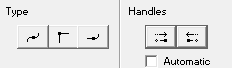
Those are the three types of points. Smooth, Sharp, and Tangent. And on the right you have the option to convert each of the sides a smooth node to a cusp node.
For instance say you have a smooth node, with two symmetric handles. Pressing the left hand side handle button converts that portion of the shape into a straight line. When you press the right hand side handle button, the second handle also collapses, meaning you have a square node.

