VectorStyler
    • Categories
    • Unread
    • Recent
    • Tags
    • Popular
    • Register
    • Login

    Curve Comb to monitor curvature

    Scheduled Pinned Locked Moved Features and Ideas
    10 Posts 3 Posters 14 Views 2 Watching
    Loading More Posts
    • Oldest to Newest
    • Newest to Oldest
    • Most Votes
    Reply
    • Reply as topic
    Log in to reply
    This topic has been deleted. Only users with topic management privileges can see it.
    • DanielD Offline
      Daniel
      last edited by

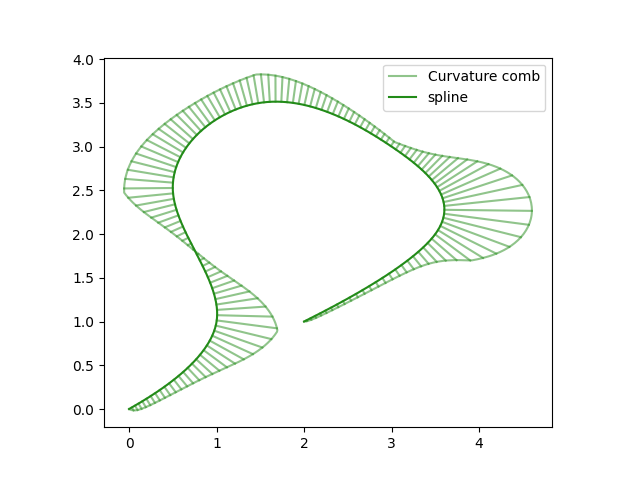
      492ae062-1e4f-4d7c-8a4e-27a18fe41618-image.png

      A curvature comb allows you to monitor the energy of the curve without having to click the node. Affinity only recently introduced it. I was told that it only requires a few lines of code change.

      Caveat: If this already exists in VS, let me know, I'll delete this post. I couldn't find it. šŸ™‚

      Work: Windows 11 | Intel i9 14900HS (24 Cores/32 Threads) | GeForce RTX 4070 | 64 GB RAM
      Personal: Windows 11 | Amd Ryzen 9 7950X (16 Core, 32 Threads) | GeForce RTX 3060 | 32 GB RAM

      BoldlineB 1 Reply Last reply Reply Quote 2
      • DanielD Offline
        Daniel
        last edited by

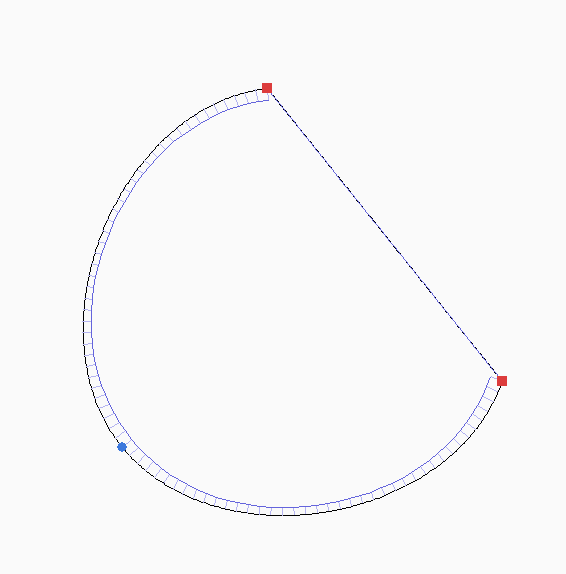
        8dc5dbd0-0a2f-4f7d-bf52-b7529dc7eec6-image.png

        That was surprisingly easy to get it into our bezigon demo!

        Work: Windows 11 | Intel i9 14900HS (24 Cores/32 Threads) | GeForce RTX 4070 | 64 GB RAM
        Personal: Windows 11 | Amd Ryzen 9 7950X (16 Core, 32 Threads) | GeForce RTX 3060 | 32 GB RAM

        DanielD 1 Reply Last reply Reply Quote 1
        • DanielD Offline
          Daniel @Daniel
          last edited by

          https://limewire.com/d/YMroh#WokdgEKxXh - Here's the demo with the curvature comb too. If you wish to try.

          Work: Windows 11 | Intel i9 14900HS (24 Cores/32 Threads) | GeForce RTX 4070 | 64 GB RAM
          Personal: Windows 11 | Amd Ryzen 9 7950X (16 Core, 32 Threads) | GeForce RTX 3060 | 32 GB RAM

          1 Reply Last reply Reply Quote 1
          • BoldlineB Offline
            Boldline @Daniel
            last edited by

            @Daniel I just saw this for the first time in a social media post about the affinity version of the feature. Looks like a useful tool

            šŸŽ macOS Tahoe 26.2, Mac mini (M1, 2020), Chip Apple M1, Memory 16 GB
            Cintiq 27QHD Display and LG Ultra HD Display

            DanielD 1 Reply Last reply Reply Quote 1
            • DanielD Offline
              Daniel @Boldline
              last edited by

              @Boldline: It is a somewhat esoteric mathematical feature useful in type design work.

              Work: Windows 11 | Intel i9 14900HS (24 Cores/32 Threads) | GeForce RTX 4070 | 64 GB RAM
              Personal: Windows 11 | Amd Ryzen 9 7950X (16 Core, 32 Threads) | GeForce RTX 3060 | 32 GB RAM

              H 1 Reply Last reply Reply Quote 1
              • H Offline
                Honor @Daniel
                last edited by

                @Daniel I think the SpeedPunk plugin for Glyphs is probably one of the best implementations of this feature.

                DanielD 1 Reply Last reply Reply Quote 1
                • DanielD Offline
                  Daniel @Honor
                  last edited by Daniel

                  @Honor: I haven't seen it. Do you have a video. I hate Glyph because they're so snobby and turn up their noses at Windows Users. So I refuse to use it. I use FontCreator exclusively. Although, Affonts - this is a one-time payment plugin that turns your vector files in Affinity directly into fonts - it is extremely promising. I have to try it out.

                  To be honest, I think it is such an easy feature to add. And at least the basic version of it is available in Open Source MIT Code.

                  Work: Windows 11 | Intel i9 14900HS (24 Cores/32 Threads) | GeForce RTX 4070 | 64 GB RAM
                  Personal: Windows 11 | Amd Ryzen 9 7950X (16 Core, 32 Threads) | GeForce RTX 3060 | 32 GB RAM

                  H 1 Reply Last reply Reply Quote 1
                  • H Offline
                    Honor @Daniel
                    last edited by

                    @Daniel You can see it in action starting at 2:48 in this video:

                    https://www.youtube.com/watch?v=LtyQ3r_S740&t=168s

                    I’m curious to see how the tools you mentioned work in Affinity. Might be worth giving them a try!

                    DanielD 1 Reply Last reply Reply Quote 1
                    • DanielD Offline
                      Daniel @Honor
                      last edited by Daniel

                      @Honor: No. I actually think while it is visually appealing to have a gradient, it is practically not useful as a typical comb. The comb's teeth show exactly where the curve is unbalanced and the degree of change which is required. The solid curve energy simply makes it harder to read. So I think Affinity's one - which is box standard version - is the most practical version.

                      Work: Windows 11 | Intel i9 14900HS (24 Cores/32 Threads) | GeForce RTX 4070 | 64 GB RAM
                      Personal: Windows 11 | Amd Ryzen 9 7950X (16 Core, 32 Threads) | GeForce RTX 3060 | 32 GB RAM

                      H 1 Reply Last reply Reply Quote 1
                      • H Offline
                        Honor @Daniel
                        last edited by

                        @Daniel I agree with you. I actually requested something similar here a few months ago, and this kind of simple, straightforward implementation is exactly what I had in mind.

                        1 Reply Last reply Reply Quote 1
                        • First post
                          Last post