Bezigon Tool
-
@Daniel said in Bezigon Tool:
This might be far simpler than introducing a third node type. What do you think folks? @larsherold?
It makes sense, as I guess the FH tangent Connector point can be viewed as a special case of a Cusp or Smooth Node.
But the Connector Node is only useful/sensible as a tangent constraint if the neighbouring segment is straight. So when you "lock the handle of a smooth node e.g. to the chord" to enforce tangency, you will have to decide which handle to lock and staighten up the segment by retracting the handle downstream. (Or lock the downstream handle to the chord as well.)
Actually the FH Connector node has two handles as well. The hidden handle can be extracted by Alt-dragging from the triangular node.
Only, the second handle direction is locked, and seems arbitrary, like it has an undefined value when hidden.The FH Connector node can be forced to expose its second handle when placing it, resulting in a sort of direction-frozen Cusp node.
Use the FH Bezigon tool to place 3 nodes: 1 smooth, 1 connector, 1smooth: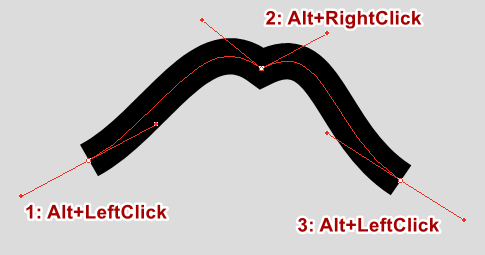
The middle point is a Connector node alright, but not much tangency going on.The "stray" outgoing handle can be retracted, and the Connector node behaves like a tangent node again...
BR/ Lars Herold
-
@larsherold: Yes, all of these can be reproduced with a simple flag for each of the two types of nodes. Including the two handled connector node. Thankfully, because we have mapped out every single rule, writing it back into the simple two node scheme is easy. Thank you for confirming this!
Technically, and ideally, a tangent node is only every useful if it follows one direction. We can force this in the tool setting, but I'd rather not. FreeHand allows you the choice to have both handles available which you can manually collapse. I prefer that freedom.
-
@Daniel said in Bezigon Tool:
FreeHand allows you the choice to have both handles available
You are right, the direction of the second (rarely seen) Connector handle is not arbitrary at all. Both visible Connector handles lie on the chord extension towards each neighbour node! Makes sense. You can retract either, and depending on what segment is (made) straight, you have tangency in one direction or the other..

There would have to be some visible indication that a handle is locked to a chord, and a means of unlocking it, I guess.
-
So the ideal way to proceed with this so that we can test it one step at a time is this:
--> Fix bezigon rules for smooth and cusp as it currently exists in VS.
--> Introduce flags for tangent nodes so that the handle is locked to chord and aligns to the chords of neighbouring nodes. --> Release --> Test --> Fix.
--> Introduce true circle option from TikZ Lib --> Release -->Test --> Fix.
--> Introduce handle clamps from Blender --> Release --> Test --> FixYou get this right, you'll have outright the single best pen tool option in the market.
-
@larsherold: Yup, figuring this out has been notoriously difficult. It is right under your nose and extremely simple once you see it. So is the 0.39 X Segment = Handle Length. Already worked out by several others. But putting these two pieces together has taken so long. More intelligent people would have seen it right away.
-
@larsherold: Yes. We can simply turn it into a triangle! Just like in FreeHand. Except it's just a locked node!
-
Re: ”More intelligent people would have seen it right away”.
All due respect - I think the level of bezier-intelligence is maxed out in this neighbourhood..
Impressive dedication to the Bezigon implementation! -
said in Bezigon Tool:
Just to add to this: We managed to test our algorithm further and we're extremely happy to say: We're off from FreeHand's at most by 0.008%, and typically about 0.005%, of each handle’s length. That is, 1 part in 13,000–20,000. The direction difference is effectively zero, at most 0.0003°. So that is a level of accuracy that you thankfully do not need to reproduce painfully. Please have a look at our algorithms! Thank you!
Do you recall this comment? Well, now that I have decompiled and looked at the code. I can tell you exactly why it is 0.008% deviation from FreeHand output. Because FreeHand uses the constant of 0.3899994: 16.16 fixed-point, 1.6 millionths below 0.39.
Now you know that mine is indeed a clean-room RE and not a decompiled bullshit. Besides, there are other exceptions and edges cases that I have accounted for that I couldn't get in the decompiled code. Those are all accounted for in mine. Finally, I have also made the whole function much more intuitive by allowing handles to remember their lengths after conversions from node types - something FH does not do.
-
@Daniel Got it.
-
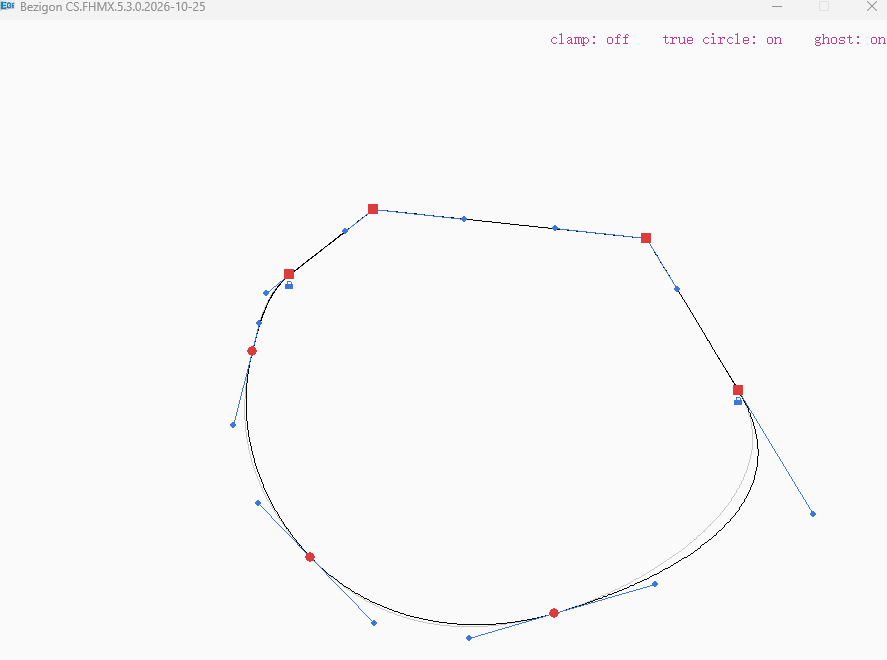
@VectorStyler: Just an update; Over the weekend, we managed to figure out how to set per node flag and lock the nodes: It works beautifully and reproduces the tangent node behaviour within the two node scheme that we now have in VS. You'll see the little blue lock under the node. That's the node locked to chord!
You'll also notice the clamping function, true-circle approximation as well as ghost lines for comparison. We managed to simplify the APIs, cut down the entire library by about 30% in length.
We did use AI to run tests (as before) and tests produce FreeHand's results across millions of random paths.
I'll document everything thoroughly and do a handover. After this, it's entirely up to you how you wish to implement it. But I've handed you all the pieces you need.