Show selection with transform tool/etc
-
I had used the magic wand to select all the black in this dog vector and it did a good job - it selected all of the black perfectly - but it was hard to visually know it was successful. This is how it looked with all the black selected:

Based on the simplistic selection references, I was unable to know for sure if or what had actually been selected until I switched over to the shape editor and everything was selected...
Doing a similar thing in Illustrator for example:
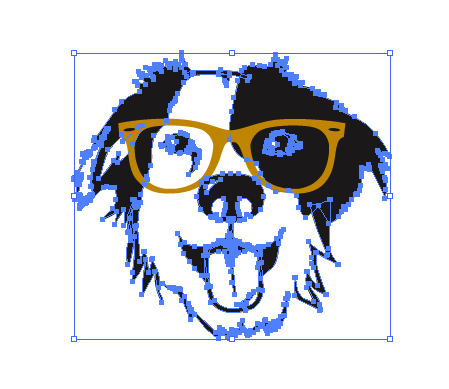
I like that I KNOW just from visual cues that the black is actually selected -could there be an option for this in VS? In Illustrator it's an option to "Hide edges" (as well as the option to "hide selection box"). Hiding/showing edges hides/reveals all the selection of making all nodes within the selection visible or not
here is a video of me turning on and off the bounding box and the edge selection
You can't see the very top of the screen - but the settings in Illustrator are under the "View" tab. my apologies if this is already implemented in VS! -
@Boldline If I understand correctly, I think you need to enable 'Show Nodes of Selected Shapes' in Preferences > Editing Options.

