VectorStyler
    • Categories
    • Unread
    • Recent
    • Tags
    • Popular
    • Register
    • Login

    Stray gradient presets outside their folder?
    Scheduled Pinned Locked Moved Questions and Support
    2 Posts 2 Posters 3.8k Views
    Loading More Posts
    • Oldest to Newest
    • Newest to Oldest
    • Most Votes
    Reply
    • Reply as topic
    Log in to reply
    This topic has been deleted. Only users with topic management privileges can see it.
    • BoldlineB Offline
      Boldline
      last edited by

      I was playing around with gradients and halftones today. When I had a gradient selected and was in the gradient panel, there's the option to change the shape and below that is a "shapes preset" menu... but there are two presets sitting above it. Would it not make more sense for these to be included inside the "shapes" sub-menu and not sitting outside of it?
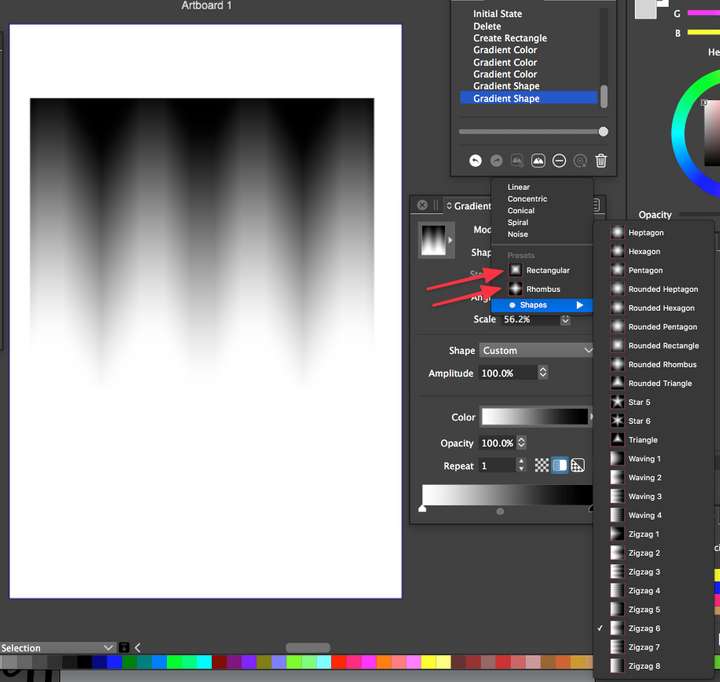
      0_1632602831420_89a04240-ceec-4f2e-b6d4-38b0b23a12f3-image.png

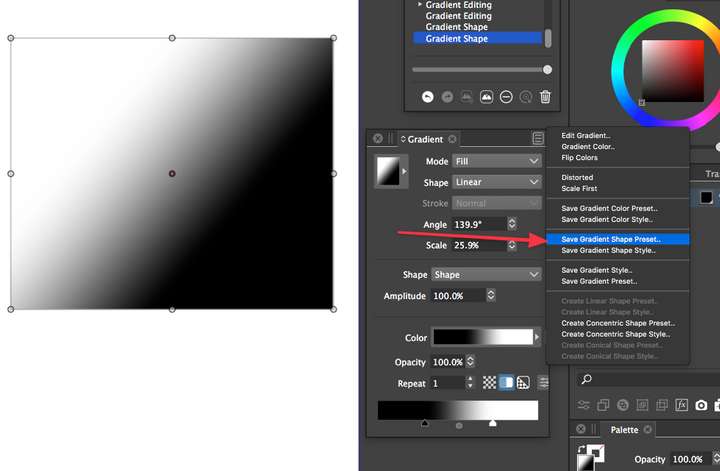
      Could we also go into how to add out own presets into here? Is there a way to add an additional folder below the "shapes" one? or inside there that we could add out own into? I tried making my own and saving it as a "gradient shape preset" but I did not see it listed there. 0_1632603600339_e899c3e1-681d-42df-b032-58ca6d76c5d2-image.png
      🍎 macOS Tahoe 26.2, Mac mini (M1, 2020), Chip Apple M1, Memory 16 GB
      Cintiq 27QHD Display and LG Ultra HD Display

      VectorStylerV 1 Reply Last reply Reply Quote 0
      • VectorStylerV Offline
        VectorStyler @Boldline
        last edited by

        @Boldline When creating new presets, these are added to the root of the group (specific to the preset type).
        The Panels -> Presets -> Presets panel, or the Styles -> Preset Manager view can be used to place these into folders, or to create new folders.


        1 Reply Last reply Reply Quote 0
        • First post
          Last post