VectorStyler
    • Categories
    • Unread
    • Recent
    • Tags
    • Popular
    • Register
    • Login

    Double clicking selected object query

    Scheduled Pinned Locked Moved Questions and Support
    3 Posts 2 Posters 4.8k Views 1 Watching
    Loading More Posts
    • Oldest to Newest
    • Newest to Oldest
    • Most Votes
    Reply
    • Reply as topic
    Log in to reply
    This topic has been deleted. Only users with topic management privileges can see it.
    • J Offline
      Jono
      last edited by

      Not sure if this happens for a reason, but when I double click a selected object it separates itself from the other objects on the page. That's all ok except you now have to select it again in the layers panel to edit it. (not a big deal, but it confused me to start with).

      The first screenshot below is the selected object before double clicking, and the second after (now unselected). I tried looking for info in the help, but didn't know what the feature was called.
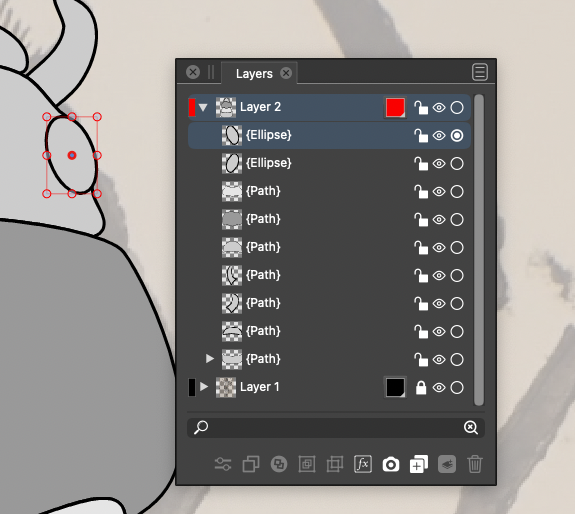
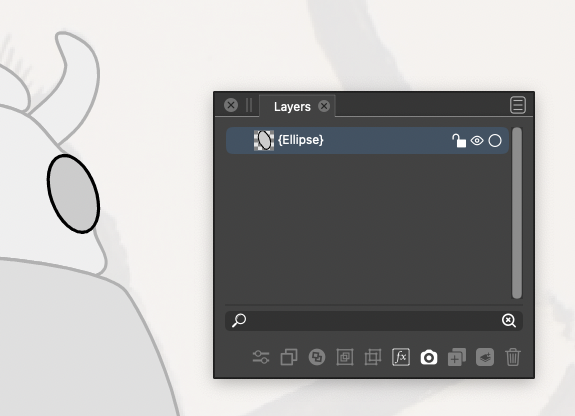
      0_1632778795827_Screenshot 2021-09-27 at 22.28.25.png

      0_1632778831733_Screenshot 2021-09-27 at 22.22.06.png

      Mac mini (M1, 2020) | Tahoe 26.1 | Wacom Cintiq 16 (1920 x 1080 px)

      b77B 1 Reply Last reply Reply Quote 0
      • b77B Offline
        b77 @Jono
        last edited by b77

        @Jono When you double-click an object, the app lets you draw or place other objects inside it — that’s why everything else around it is greyed out.

        To exit isolated mode, just double-click anywhere outside the object.

        MacBook Pro (Intel) running Monterey 12.6.4

        1 Reply Last reply Reply Quote 1
        • J Offline
          Jono
          last edited by

          Thanks for the info, that's clever. I'm going to use that a lot now! 😀

          0_1632825894851_Screenshot 2021-09-28 at 11.40.53.png

          Mac mini (M1, 2020) | Tahoe 26.1 | Wacom Cintiq 16 (1920 x 1080 px)

          1 Reply Last reply Reply Quote 4
          • First post
            Last post