VectorStyler
    • Categories
    • Unread
    • Recent
    • Tags
    • Popular
    • Register
    • Login

    Perspective and Extrude Tool

    Scheduled Pinned Locked Moved Features and Ideas
    12 Posts 5 Posters 19.6k Views 1 Watching
    Loading More Posts
    • Oldest to Newest
    • Newest to Oldest
    • Most Votes
    Reply
    • Reply as topic
    Log in to reply
    This topic has been deleted. Only users with topic management privileges can see it.
    • BoldlineB Offline
      Boldline
      last edited by

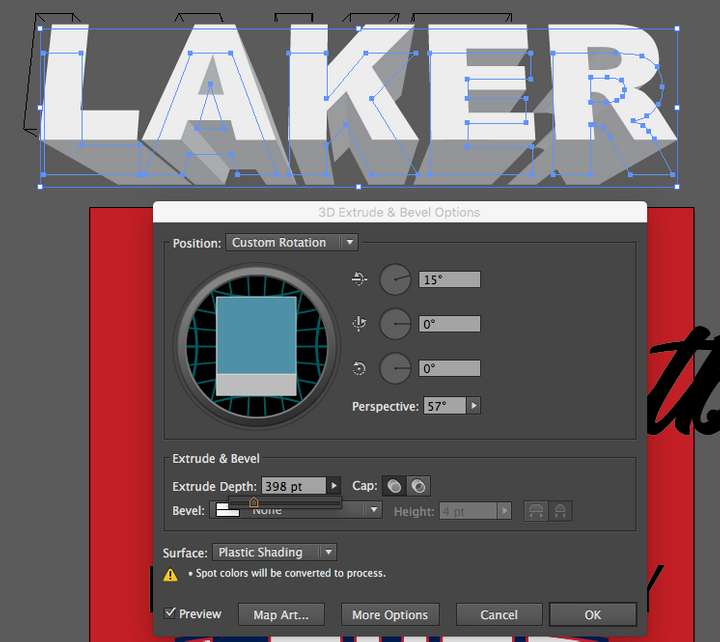
      @Subpath2 Thanks for sharing - seems like endless possibilities. The image I attached here is from illustrator showing their version of 3D text and extrude. Something like this would be super helpful in VS
      I design t-shirts for a libing and having this kind of built in functionality would go a long way for me
      0_1632679979784_3c719848-c51a-4d6b-bcd5-9a0117a20bc9-image.png

      🍎 macOS Tahoe 26.2, Mac mini (M1, 2020), Chip Apple M1, Memory 16 GB
      Cintiq 27QHD Display and LG Ultra HD Display

      S b77B 2 Replies Last reply Reply Quote 1
      • S Offline
        Subpath @Boldline
        last edited by

        @Boldline ,
        the illustrator version looks cool too.

        Win 11
        CPU: AMD Ryzen 5 9600X, 6-core.
        GPU: Nvidia Geforce RTX 5070.

        1 Reply Last reply Reply Quote 0
        • b77B Offline
          b77 @Boldline
          last edited by b77

          @Boldline A combination of 'Find Edge', 'Noise Blur' and the 'Zoom Blur' effect can be used to simulate centered extrusion like this:

          0_1632803965361_extr.png

          It's not vector-based extrusion, but…

          MacBook Pro (Intel) running Monterey 12.6.4

          S BoldlineB 2 Replies Last reply Reply Quote 3
          • S Offline
            Subpath @b77
            last edited by

            @b77 like the middle one 😉
            rust never sleeps 😉

            Win 11
            CPU: AMD Ryzen 5 9600X, 6-core.
            GPU: Nvidia Geforce RTX 5070.

            1 Reply Last reply Reply Quote 0
            • BoldlineB Offline
              Boldline @b77
              last edited by

              @b77 Fun to see the possibilities - thanks for sharing

              🍎 macOS Tahoe 26.2, Mac mini (M1, 2020), Chip Apple M1, Memory 16 GB
              Cintiq 27QHD Display and LG Ultra HD Display

              1 Reply Last reply Reply Quote 0
              • S Offline
                Subpath
                last edited by Subpath

                Hi, I was just looking around on Youtube a bit.

                And came across this Program, It's called "Art Text" (Mac only)
                It has a very impressive set of features built in.
                (also a few transform Cages for 3D or Bended Text)
                I must say that I am quite jealous, because I am on Windows 😉

                Here's a video ( is in German, but shows some tools ).
                Art Text Video

                Here is the homepage:
                https://text.design/art-text/

                These are the same developers who created the Amadine vector app.

                0_1632901592508_Art-Text.png

                Win 11
                CPU: AMD Ryzen 5 9600X, 6-core.
                GPU: Nvidia Geforce RTX 5070.

                VectorStylerV 1 Reply Last reply Reply Quote 1
                • VectorStylerV Offline
                  VectorStyler @Subpath
                  last edited by

                  @Subpath2 said in Perspective and Extrude Tool:

                  Here's a video ( is in German, but shows some tools ).
                  Art Text Video

                  Interesting tool. It looks like most of those effects are image based, and the result is an image, not vectors.

                  Maybe something related to this: it is possible to add collections of SVG image effects to VS, using the preset manager.

                  • download SVG files containing filter effect definitions
                  • create a folder and copy the files there
                  • in VS open Styles -> Preset Manager.
                  • click Create Group.
                  • set a Name and click at the end of the Folder field to select the folder where the SVG effects are stored.
                  • confirm the preset group creation, and close the preset manager.
                  • now the Image Effects panel should contain the downloaded SVG effects when clicking the + button.

                  You can find SVG filter / effect definitions on the internet.
                  Also Inkscape has a nice collection: https://gitlab.com/inkscape/inkscape/-/blob/master/share/filters/filters.svg

                  S 1 Reply Last reply Reply Quote 2
                  • F Offline
                    fde101 Global Moderator
                    last edited by

                    The output from Art Text is raster, but you can for the most part manipulate things as if vector within the tool itself and thus scale things appropriately prior to export, other than obviously the raster images used as textures.

                    There was a Windows version at one point (I think it lagged behind the Mac version in terms of feature set - like when Art Text 3 came out on the Mac the Windows version was basically Art Text 2?), but I'm not seeing that officially on the company's web site right now, so not sure if they dropped that. I do remember when I came across it before that it was kind of hidden away somewhere, but as I don't really use Windows for this sort of thing I'm afraid I don't remember exactly how I found it before.

                    S 1 Reply Last reply Reply Quote 1
                    • S Offline
                      Subpath @VectorStyler
                      last edited by

                      @vectoradmin

                      I don't really need such a tool.
                      Because I would and could use 3D programs for something like that, e.g. MOI 3d, Cinema 4d or Blender.

                      Thanks for the tip with the .SVG filters. I have Inkscape on my PC, will have a look at the filters and try them also in VS.

                      Win 11
                      CPU: AMD Ryzen 5 9600X, 6-core.
                      GPU: Nvidia Geforce RTX 5070.

                      1 Reply Last reply Reply Quote 0
                      • S Offline
                        Subpath @fde101
                        last edited by Subpath

                        @fde101

                        ...The output from Art Text is raster...
                        Thats what i already guessed. Because that's
                        often the case.

                        The Windows version is no longer available since version 2.
                        The demand from Windows users is said to have been too low.

                        Win 11
                        CPU: AMD Ryzen 5 9600X, 6-core.
                        GPU: Nvidia Geforce RTX 5070.

                        1 Reply Last reply Reply Quote 0
                        • First post
                          Last post
