VectorStyler
    • Categories
    • Unread
    • Recent
    • Tags
    • Popular
    • Register
    • Login

    What would be the best way to warp several lines at one time?

    Scheduled Pinned Locked Moved Questions and Support
    3 Posts 3 Posters 3.9k Views
    Loading More Posts
    • Oldest to Newest
    • Newest to Oldest
    • Most Votes
    Reply
    • Reply as topic
    Log in to reply
    This topic has been deleted. Only users with topic management privileges can see it.
    • BoldlineB Offline
      Boldline
      last edited by

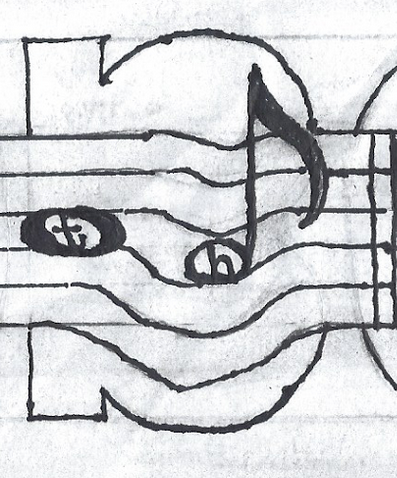
      What would be the best way to achieve this bend look in VS? The horizontal music bar lines are straight and then have a warp bend in them with the bend greater on some than others
      0_1634074263022_ea74da06-ef82-4710-b385-bcf94853880d-image.png

      🍎 macOS Tahoe 26.2, Mac mini (M1, 2020), Chip Apple M1, Memory 16 GB
      Cintiq 27QHD Display and LG Ultra HD Display

      VectorStylerV S 2 Replies Last reply Reply Quote 0
      • VectorStylerV Offline
        VectorStyler @Boldline
        last edited by

        @Boldline Mesh -> Mesh Warp. The issue here is that the distortion is only in some local area, and the bending grows downwards.
        Mesh Warp can handle this, but it is difficult to control. The mesh warp starts out with a single box grid. The grid can be set in the Shape Effects panel, or use double click to add new internal nodes.

        1 Reply Last reply Reply Quote 0
        • S Offline
          Subpath @Boldline
          last edited by Subpath

          @Boldline

          Hi

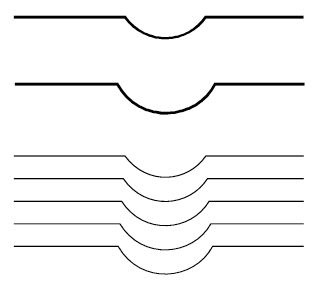
          I would use "Blend" for this and then refine it
          with the "Corner Editor" Tool

          This way you would also have better control
          0_1634111666860_Blend-1.png

          0_1634113563557_Blend-2.png

          Win 11
          CPU: AMD Ryzen 5 9600X, 6-core.
          GPU: Nvidia Geforce RTX 5070.

          1 Reply Last reply Reply Quote 1
          • First post
            Last post