VectorStyler
    • Categories
    • Unread
    • Recent
    • Tags
    • Popular
    • Register
    • Login

    Editing nodes in one area negatively affects nodes in another area
    Scheduled Pinned Locked Moved Questions and Support
    10 Posts 3 Posters 10.3k Views
    Loading More Posts
    • Oldest to Newest
    • Newest to Oldest
    • Most Votes
    Reply
    • Reply as topic
    Log in to reply
    This topic has been deleted. Only users with topic management privileges can see it.
    • BoldlineB Online
      Boldline
      last edited by

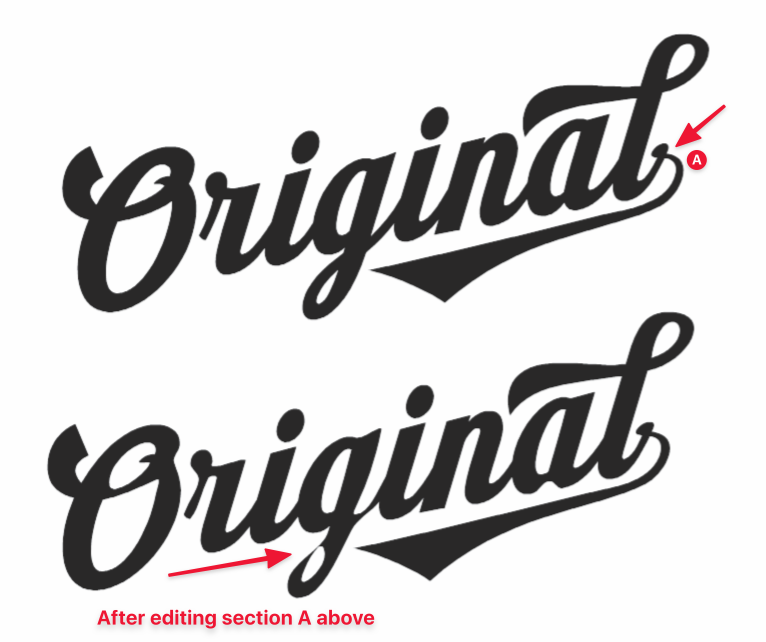
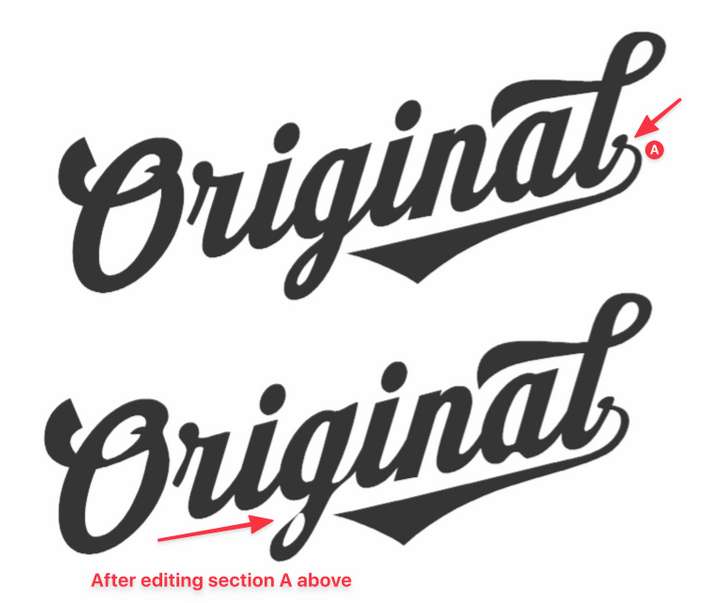
      I was trying to clean up the nodes and tighten things up in the area marked "A" on the far right side of this text shape. The entire thing has been united using union prior. After making the adjustments, other areas of the design get negatively affected - like the lower section of the "g" and other areas as well.

      Is there a setting I need to adjust to fix this from happening?
      0_1635001640765_308937ad-f76b-4273-b505-146a98d2f6ea-image.png

      🍎 macOS Tahoe 26.2, Mac mini (M1, 2020), Chip Apple M1, Memory 16 GB
      Cintiq 27QHD Display and LG Ultra HD Display

      VectorStylerV 1 Reply Last reply Reply Quote 0
      • VectorStylerV Offline
        VectorStyler @Boldline
        last edited by

        @Boldline Was this imported or pasted from AI? It could be that the type of the node at stem of the "g" is wrong.
        Send me the file, and I will try to replicate this issue.

        BoldlineB 2 Replies Last reply Reply Quote 0
        • BoldlineB Online
          Boldline @VectorStyler
          last edited by

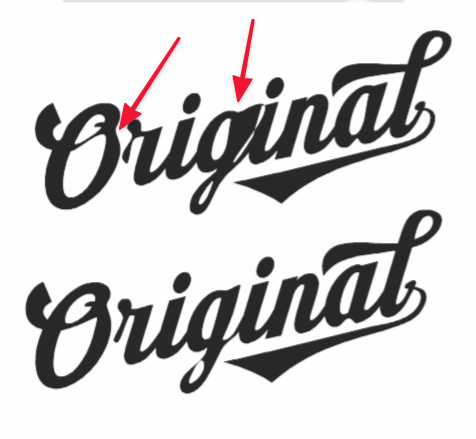
          @vectoradmin Just emailed you the file. The file is getting even crazier as I was prepping to send. Just moving around and pasting the original in place to send over - look at the results of that! I can't get it to go back to how it looked in the picture I sent initially in this thread
          0_1635002443878_49773d5d-aaaf-4983-b655-5c40c701a11d-image.png

          🍎 macOS Tahoe 26.2, Mac mini (M1, 2020), Chip Apple M1, Memory 16 GB
          Cintiq 27QHD Display and LG Ultra HD Display

          1 Reply Last reply Reply Quote 0
          • BoldlineB Online
            Boldline @VectorStyler
            last edited by

            @vectoradmin I had written out the main word in Illustrator and it was in live text mode there. I copied the live text and pasted it into VS to test things out with it.
            It copied just fine but it automatically expended the text to fills. I added the flourishes to the "O", the "L" and the swoosh underneath myself in VS

            🍎 macOS Tahoe 26.2, Mac mini (M1, 2020), Chip Apple M1, Memory 16 GB
            Cintiq 27QHD Display and LG Ultra HD Display

            VectorStylerV 1 Reply Last reply Reply Quote 0
            • VectorStylerV Offline
              VectorStyler @Boldline
              last edited by

              @Boldline Could be a font conversion issue. Some nodes end up with the wrong type.

              BoldlineB 2 Replies Last reply Reply Quote 0
              • BoldlineB Online
                Boldline @VectorStyler
                last edited by Boldline

                @vectoradmin Interesting... that makes sense because Illustrator or another vector app would not be using the same classification of nodes that VS has. So this could be a potential issue any time a vector is imported into VS from elsewhere? Or might the issue be that VS had to convert the live text to a vector and that's the main issue? Is pasting live text from a vector application different than copying and pasting text from a web browser? I assume it is, since the text from a browser remains live text and live text from within Illustrator did not

                🍎 macOS Tahoe 26.2, Mac mini (M1, 2020), Chip Apple M1, Memory 16 GB
                Cintiq 27QHD Display and LG Ultra HD Display

                VectorStylerV 1 Reply Last reply Reply Quote 0
                • VectorStylerV Offline
                  VectorStyler @Boldline
                  last edited by

                  @Boldline I think the main issue here was with the conversion from text, but I have to look into this more.

                  1 Reply Last reply Reply Quote 0
                  • BoldlineB Online
                    Boldline @VectorStyler
                    last edited by

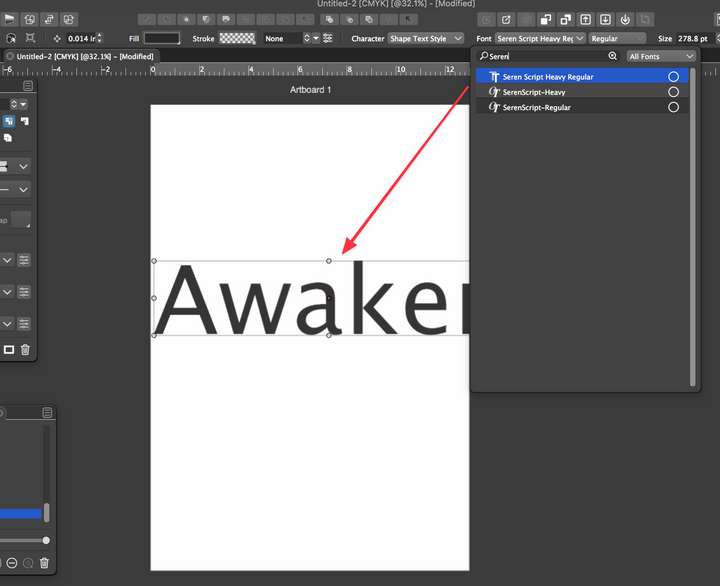
                    @vectoradmin When I went to type out a word using that same font in VS, it did not register correctly. At first it showed nothing, the second time I tried, it gave me a default font (not the correct one) - the other two in the font list do work properly
                    0_1635003851946_f8209d7f-8a5e-48ff-a7a7-8baaf8af262f-image.png

                    🍎 macOS Tahoe 26.2, Mac mini (M1, 2020), Chip Apple M1, Memory 16 GB
                    Cintiq 27QHD Display and LG Ultra HD Display

                    encartE 1 Reply Last reply Reply Quote 1
                    • encartE Offline
                      encart @Boldline
                      last edited by

                      This is an issue I have been struggling with for a few releases.
                      But I still don't know where it comes from. Sometimes while working, the fonts disappear from the font list, or the name on the list does not match the font. Usually restart helps.

                      MacBook Air M4 24Gb, Tahoe 26.2

                      VectorStylerV 1 Reply Last reply Reply Quote 0
                      • VectorStylerV Offline
                        VectorStyler @encart
                        last edited by

                        @encart I will try to replicate this with that font.

                        1 Reply Last reply Reply Quote 1
                        • First post
                          Last post
