VectorStyler
    • Categories
    • Unread
    • Recent
    • Tags
    • Popular
    • Register
    • Login

    How to get exact rotation setting to object on screen?
    Scheduled Pinned Locked Moved Questions and Support
    2 Posts 2 Posters 3.6k Views
    Loading More Posts
    • Oldest to Newest
    • Newest to Oldest
    • Most Votes
    Reply
    • Reply as topic
    Log in to reply
    This topic has been deleted. Only users with topic management privileges can see it.
    • BoldlineB Offline
      Boldline
      last edited by

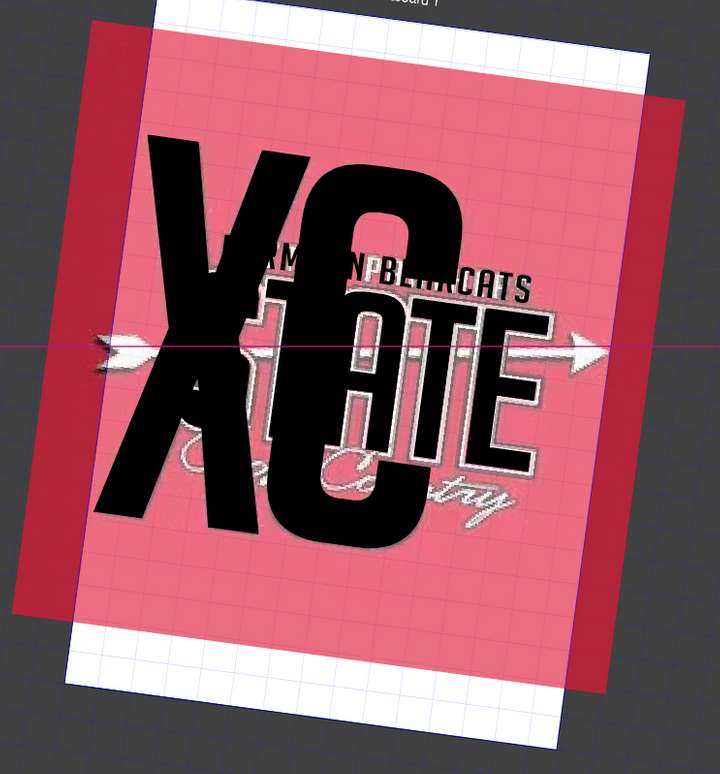
      I rotated the canvas the make the slanted arrow straight across horizontally for easier tracing over. Is there a way to rotate the canvas and visually be sure it's as close to a certain position as possible?
      I would think to just lay down a guideline horizontally and then rotate the canvas until the arrow aligned with my guideline setting, but the guidelines rotate with the canvas, not independently. This is a great thing really. I love the way I can edit the design in relation to that rotated position and then return the canvas to normal view.
      Is there a way to set a guideline to be independent of the canvas?
      0_1635717287422_f838bfb1-7369-4712-aa3e-bdf6cf52e518-image.png

      🍎 macOS Tahoe 26.2, Mac mini (M1, 2020), Chip Apple M1, Memory 16 GB
      Cintiq 27QHD Display and LG Ultra HD Display

      VectorStylerV 1 Reply Last reply Reply Quote 0
      • VectorStylerV Offline
        VectorStyler @Boldline
        last edited by

        @Boldline No, guidelines will rotate with the view (they are in document coordinates).

        The view rotation can be set to a specific angle at the bottom left part of the window, the second number.


        1 Reply Last reply Reply Quote 0
        • First post
          Last post