Idea, to maybe extend the Forum a little ?
-
I'm a little unsure if this is a good idea.
But I was thinking of a Tips & Tricks Section in the Forum.
Or maybe expand the Tutorials Section in Tutorials / Tips and Tricks.Where by Tips I was also thinking of other software that might be helpful for working with vector graphics
or with graphics in general. But I'm open to hear what others think about this idea.Win 11
CPU: AMD Ryzen 5 9600X, 6-core.
GPU: Nvidia Geforce RTX 5070. -
@Subpath Sharing tips and tricks is an awesome thing. The tutorials section to me, was made encompass all of that. I'm very interested in seeing the different user settings, art methods, eventually share brushes, templates, color palettes, etc.
I foresee myself and others creating VS tutorials on youtube and posting the links here on the forum.
I've been building my own "tips and settings" by bookmarking informative answers and settings descriptions in the forum to go back to. Each time I need to refresh my memory on previously discussed topics, I can quickly find them and re-read. -
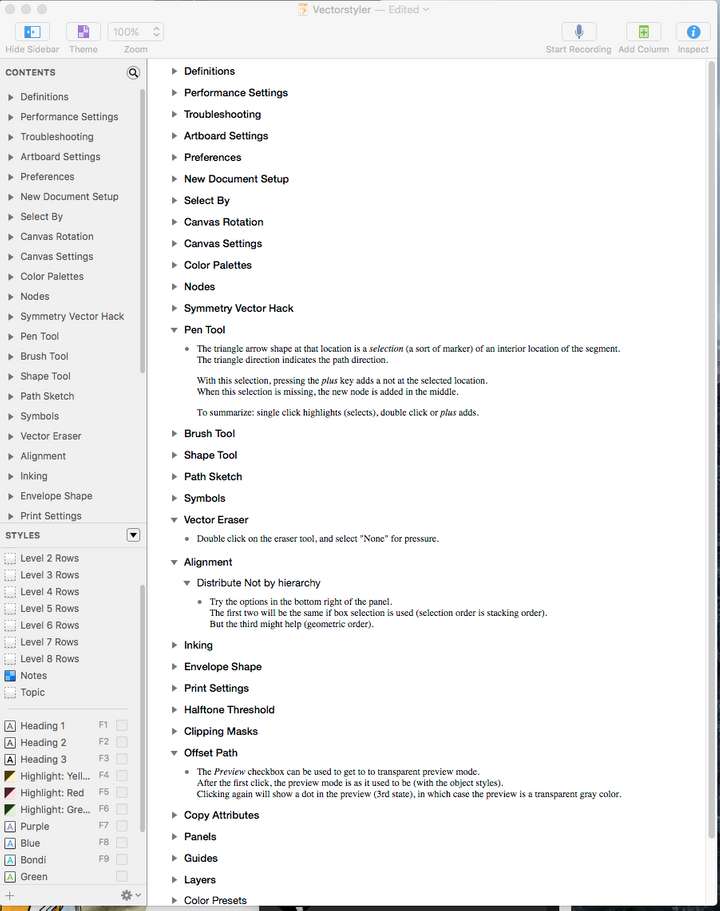
@Subpath I've created my own VS cheat-sheet of notes, tips and tricks. It's a constant work in progress so it's not all organized perfectly. each section is collapsible (I only have a few opened at the moment) I went through all the archived posts that I had saved over the last few months and collected the information into one spot.
Now I have all my preference settings saved in one location, I can review clipping masks with all relevant notes from the forum, etc. It also helps me learn the program deeper if I am going through and reviewing the notes and adding to them. This is my own personal way of learning, not an attempt to replace the official VS documentation on the website.
🍎 macOS Tahoe 26.2, Mac mini (M1, 2020), Chip Apple M1, Memory 16 GB
Cintiq 27QHD Display and LG Ultra HD Display -
@Boldline
Wow, respect. That's quite a collection of tips and looks super organized.I write info/ideas in a text file for one thing and when I'm messing around in a program,
I write what I found/or ideas directly into the file. -
@Boldline
I stumbled across this post and I am new to VectorStyler.
Seeing the value of this sheet to help accelerate the learning of the noobs like me, would you kindly consider posting your latest cheat sheet? Your preview looks great and it would sure help!Thanks,
Victor -
@Victor-Vector said in Idea, to maybe extend the Forum a little ?:
@Boldline
I stumbled across this post and I am new to VectorStyler.
Seeing the value of this sheet to help accelerate the learning of the noobs like me, would you kindly consider posting your latest cheat sheet? Your preview looks great and it would sure help!Thanks,
VictorWell, I can't speak for Boldline, but I would like to mention that what you saw
was his personally collected knowledge list of tips for VS and I don't think
I'm wrong that it took a lot of time and work to collect them.If you look around a bit here in the forum you can already get a lot of good tips.
Pay attention in the threads especially on video links these can also explain some.
In addition to this, there is usually an answer to questions.There is also a Vimeo Chanel with some Videos, down below the Webpage.
Unfortunately not public at the moment. But I mention this to the vectoradmin.Look at this:

Here the Link, works now:
VS Vimeo Videos -
@Victor-Vector hey there! welcome to Vectorstyler. We're glad you are here.
I appreciate your kind words about my notes. I am happy to share what I have so far - it's mainly a collection of tips and advice and settings discussed on the forum over the last year that I felt would be important things to go back and look at later as I try to learn the program better.
What I had started doing was bookmarking important posts that gave valuable info I wanted to not forget. Later on I decided to start copying and pasting information from the bookmarked posts into an organized note app for easy reference based on topic - because sometimes one topic would have tips in four different bookmarked posts lol. I'm happy to share what I have so far with you and anyone who might benefit from it.
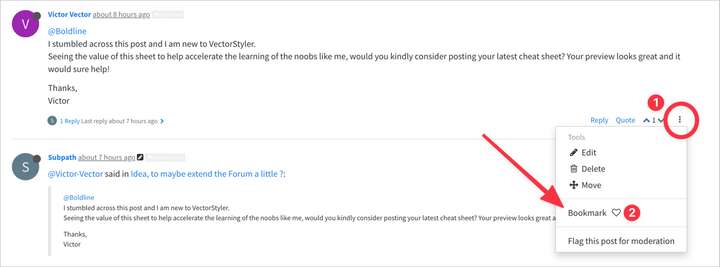
It does seem you're already doing some of that legwork by combing through the old posts from the last couple years.Feel free to also start bookmarking posts you find of great value. You can do this with any post (your own posts or that of anyone else) you see that has something you care about easily going back to by clicking on the three dots on the right bottom side of the post. (#1 in my image below). Then click the heart next to "bookmark".
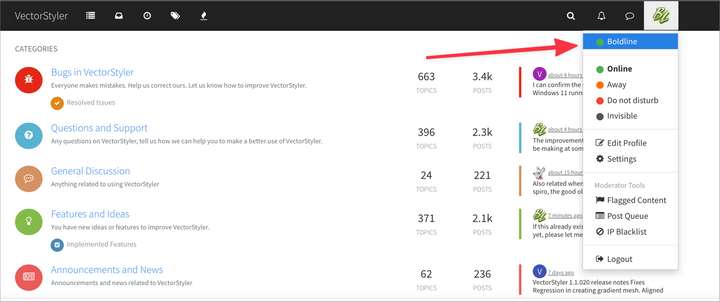
To access your saved bookmarked posts, go up to your profile to access your own profile page
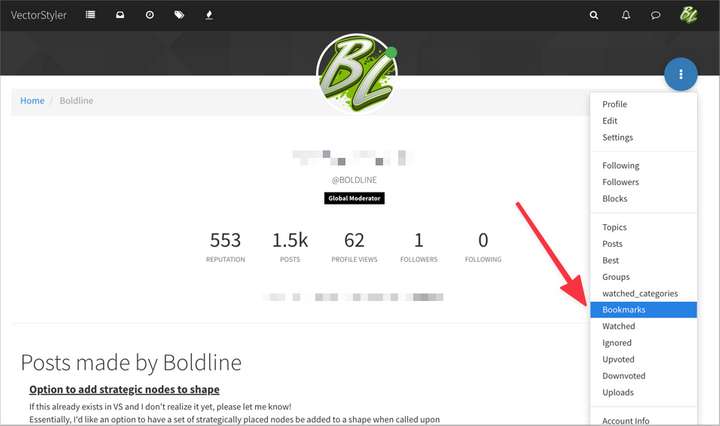
Then click on the blue three dot circle at the top right and then click on "bookmarks" from that dropdown
-
@Subpath
Thank you for the link to the Vimeo videos! I have already started going through them, already learning some of the VectorStyler nuances. I was surprised to find very little on YouTube, but great to see there is a presence on Vimeo; awesome!@Boldline
Thank you for the mini tutorial on saving bookmarks. I did not realize this forum had that powerful functionality built in and I am using it for sure. Also, I appreciate you sharing what you have so far in whatever form you choose. On behalf of myself and other beginners, we are very grateful!What a warm reception to the VectorStyler forums! Thanks again, you too.
-
@Victor-Vector , your welcome
-
@Victor-Vector you're welcome. We're all about helping spread the genius that is VS to other users fed up with Adobe's bloated programs and predatory SaaS and Affinity's glacial pace of innovation and improvement. While always a work in progress and with some growing pains ahead, VS is cutting edge and a unique program in the vector design world and one that the majority of users here believe in. I made VS my primary vector design program at the beginning of this year after using it selectively the previous two years as it grew and was able to handle more and more of what I needed. We're all about helping one another get up to speed with it, especially the newbies! That said, there's so much to VS, I've been exploring it for 2 + years now and still find new things to learn all the time.
Feel free to ask any question you have -big or small. The entire community benefits when we ask questions and share ideas. I've learned a lot about topics in VS I would not have thought to ask but saw someone else discuss. I know others have benefited from what I've asked as well - it's a complete circle. Also share any issues you find, bugs, problems, etc... @vectoradmin is terrific at responding and fixing issues quickly. The more testers we have, the faster VS becomes a more stable and complete program for all of us to enjoy -
@Boldline
Haha, I am here for all the reasons you described!
I look forward to learning enough about VectorStyler to be able to fully integrate it into my graphic design production pipeline.
Thanks again!

