Highlighting nodes or items within a group

-
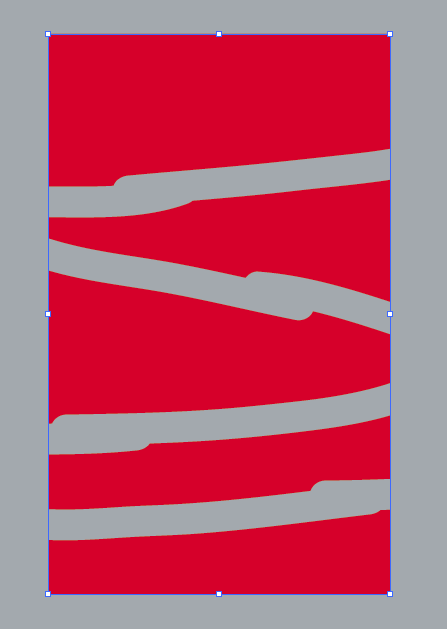
Is there a way to highlight the nodes and paths within a group while selecting it with the transform arrow? These gray stripes are all grouped together, but it's really hard to see what is actually grouped unless I switch over to the shape editor

-
@Boldline Enable the: Preferences -> Editing Options -> Show Nodes of Selected Shapes
-
@vectoradmin From BoldLine's screenshot, it looks like that option is already enabled (see the blue dots where nodes are).
What he asks for is a way to see that objects are grouped when simply selected.
A dashed instead of continuous line for the bounding box doesn't seem like a good idea. Unless it's the other way around… ungrouped-dashed, grouped-continuous.
Maybe using different shapes (squares) for the corner and size handles?

.
Or thicker lines around the corner handles, like this?
-
@vectoradmin @b77 - yes I already had "Enable the: Preferences -> Editing Options -> Show Nodes of Selected Shapes" selected prior to this screenshot.
I think this issue is more user error on my part looking at it fresh today. The nodes when selected in this case turn a dark blue and are hard to see. see first pic below: (What setting in preferences>user interface> interaction indicators changes that color from blue? Same with handles? Thanks in advance)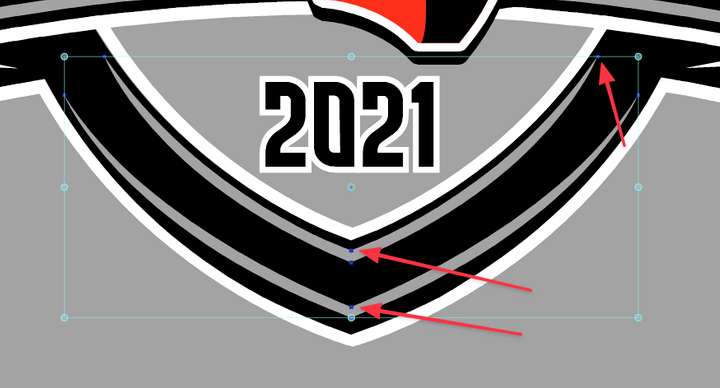
This is what I'm used to in Illustrator - in the pic below, I have numerous red shapes I grouped together into one group. the light blue outline of the selection is around all the shapes contained within that group. The highlight around each piece and the nodes can be hidden by pressing command-H, resulting in the last image below.
I like having the option to show all parts of a grouping, and the ability to hide the selection interior depending on what I am doing on screen