VectorStyler
    • Categories
    • Unread
    • Recent
    • Tags
    • Popular
    • Register
    • Login

    Create a complex template with editable words that can be saved as a style?

    Scheduled Pinned Locked Moved Questions and Support
    7 Posts 4 Posters 7.4k Views 3 Watching
    Loading More Posts
    • Oldest to Newest
    • Newest to Oldest
    • Most Votes
    Reply
    • Reply as topic
    Log in to reply
    This topic has been deleted. Only users with topic management privileges can see it.
    • BoldlineB Offline
      Boldline
      last edited by

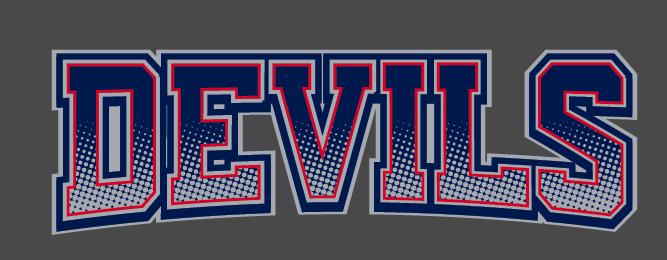
      I designed this using an expanded font and adding a vector halftone shape and strokes and fills. Is this something I could reasonably recreate in VS as a template using styles and symbols to allow me to swap out the wording and ultimately expand it all as 100% vector?
      I would like to automate some of this process and I assume in VS, this could be accomplished.
      0_1637094728402_2c6356a1-15cd-47a8-9d2a-60e341542376-image.png

      🍎 macOS Tahoe 26.2, Mac mini (M1, 2020), Chip Apple M1, Memory 16 GB
      Cintiq 27QHD Display and LG Ultra HD Display

      b77B VectorStylerV 2 Replies Last reply Reply Quote 0
      • b77B Offline
        b77 @Boldline
        last edited by b77

        @Boldline You also want the halftone effect to be expanded to vector? If so, I don't think it can be done.

        MacBook Pro (Intel) running Monterey 12.6.4

        BoldlineB 1 Reply Last reply Reply Quote 0
        • BoldlineB Offline
          Boldline @b77
          last edited by

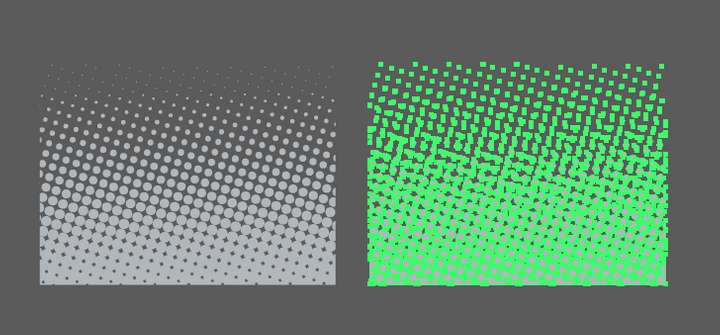
          @b77 Good point. I have vectored halftones like this one in the attached image below, that I was thinking I could set up as a repeating pattern symbol or attribute in VS
          0_1637095864833_3ec97c89-96c2-482b-878c-9b0743a8e8a7-image.png

          🍎 macOS Tahoe 26.2, Mac mini (M1, 2020), Chip Apple M1, Memory 16 GB
          Cintiq 27QHD Display and LG Ultra HD Display

          1 Reply Last reply Reply Quote 0
          • VectorStylerV Offline
            VectorStyler @Boldline
            last edited by

            @Boldline Create a pattern using the halftone, and set the tile size to be large (at least the height of the text).

            b77B 1 Reply Last reply Reply Quote 1
            • b77B Offline
              b77 @VectorStyler
              last edited by

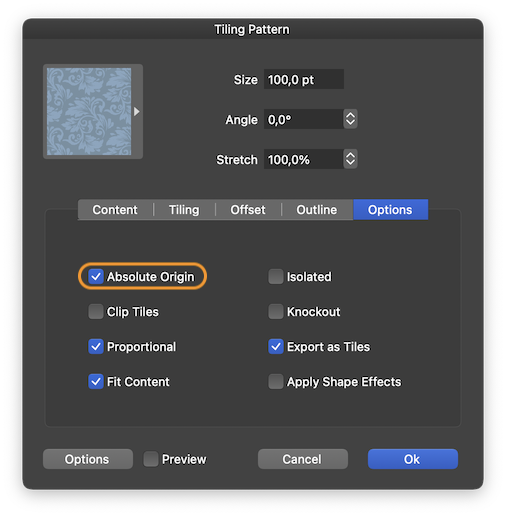
              @Boldline You'll need to uncheck 'Absolute Origin' in the pattern's additional settings, so the pattern moves with the text or object.
              0_1637099952855_Captură de ecran din 2021-11-16 la 23.57.35.png

              @vectoradmin Is there a setting/checkbox that makes a pattern fill scale with the object? I assume BL wants to create a style that scales the pattern inside along with the text.

              MacBook Pro (Intel) running Monterey 12.6.4

              b77B 1 Reply Last reply Reply Quote 1
              • b77B Offline
                b77 @b77
                last edited by b77

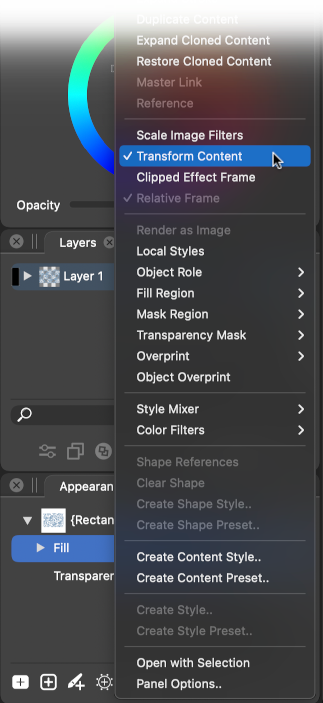
                @Boldline To scale the pattern along with the object, go into the Fill's settings and enable 'Transform Content':
                0_1637152986144_Transform_Content.png

                MacBook Pro (Intel) running Monterey 12.6.4

                1 Reply Last reply Reply Quote 1
                • S Offline
                  Subpath
                  last edited by

                  @Boldline

                  look here, you may be interested.

                  Halftone Tip

                  Win 11
                  CPU: AMD Ryzen 5 9600X, 6-core.
                  GPU: Nvidia Geforce RTX 5070.

                  1 Reply Last reply Reply Quote 1
                  • First post
                    Last post
