VectorStyler
    • Categories
    • Unread
    • Recent
    • Tags
    • Popular
    • Register
    • Login

    How do I get material cut from one layer to paste on new layer?

    Scheduled Pinned Locked Moved Questions and Support
    6 Posts 2 Posters 6.9k Views 1 Watching
    Loading More Posts
    • Oldest to Newest
    • Newest to Oldest
    • Most Votes
    Reply
    • Reply as topic
    Log in to reply
    This topic has been deleted. Only users with topic management privileges can see it.
    • BoldlineB Online
      Boldline
      last edited by Boldline

      I've tried this several ways with the same unwanted result. If I cut material from one layer, it's impossible to get it to paste on any other layer unless I lock down every alternative layer option. It only wants to paste back on it's original layer source.
      My assumption was that if I cut from one layer and then select another layer, then paste while that new layer is selected, it would paste there.

      🍎 macOS Tahoe 26.2, Mac mini (M1, 2020), Chip Apple M1, Memory 16 GB
      Cintiq 27QHD Display and LG Ultra HD Display

      VectorStylerV 1 Reply Last reply Reply Quote 0
      • VectorStylerV Offline
        VectorStyler @Boldline
        last edited by

        @Boldline I tried this just now and it worked. Is there a recording of your steps?

        BoldlineB 1 Reply Last reply Reply Quote 0
        • BoldlineB Online
          Boldline @VectorStyler
          last edited by Boldline

          @vectoradmin

          Here are a couple times I tried it this morning. I leave room for the idea I am missing a step or setting somewhere.

          This one it worked in the end but not the first few tries

          Tried a second time

          🍎 macOS Tahoe 26.2, Mac mini (M1, 2020), Chip Apple M1, Memory 16 GB
          Cintiq 27QHD Display and LG Ultra HD Display

          VectorStylerV 1 Reply Last reply Reply Quote 0
          • VectorStylerV Offline
            VectorStyler @Boldline
            last edited by

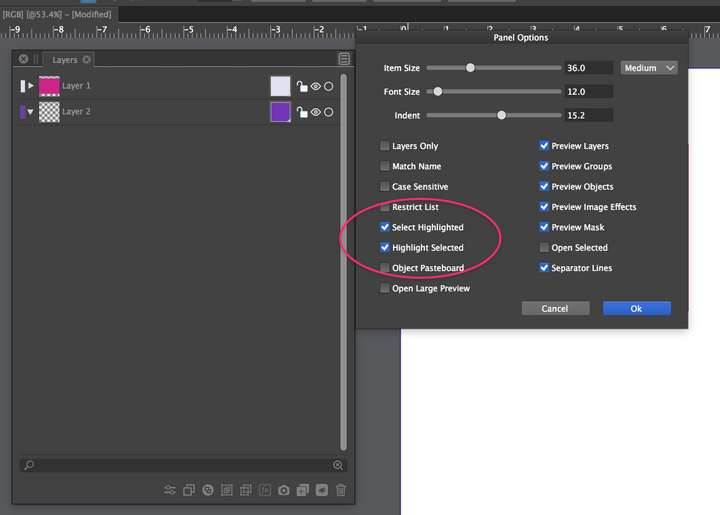
            @Boldline Are the "Select Highlighted" and "Highlight Selected" options enabled.
            These do cause a bug in layer selection.

            BoldlineB 1 Reply Last reply Reply Quote 0
            • BoldlineB Online
              Boldline @VectorStyler
              last edited by

              @vectoradmin yes they are. do I need to turn those features off to have it paste correctly each time?
              0_1637676080728_520d35f0-4a84-40ac-8d9c-d7522f857b71-image.png

              🍎 macOS Tahoe 26.2, Mac mini (M1, 2020), Chip Apple M1, Memory 16 GB
              Cintiq 27QHD Display and LG Ultra HD Display

              VectorStylerV 1 Reply Last reply Reply Quote 0
              • VectorStylerV Offline
                VectorStyler @Boldline
                last edited by

                @Boldline Try turning them off. If there are no other cause for this issue, then it should work.
                The fix for the problems caused by these two options will be in the next build.

                1 Reply Last reply Reply Quote 0
                • First post
                  Last post
