VectorStyler
    • Categories
    • Unread
    • Recent
    • Tags
    • Popular
    • Register
    • Login

    Shortcut for pulling both handles on a non-symmetrical node

    Scheduled Pinned Locked Moved Questions and Support
    10 Posts 4 Posters 9.3k Views 3 Watching
    Loading More Posts
    • Oldest to Newest
    • Newest to Oldest
    • Most Votes
    Reply
    • Reply as topic
    Log in to reply
    This topic has been deleted. Only users with topic management privileges can see it.
    • IngolfI Offline
      Ingolf
      last edited by Ingolf

      Shortcut for pulling both handles simultaneously on a non-symmetrical node - does it exist? Could be very useful from time to time - and be one of those shortcuts that could be displayed in the status bar that might be on its way.

      🍏 macOS Sequoia Apple Silicon

      b77B 1 Reply Last reply Reply Quote 0
      • b77B Offline
        b77 @Ingolf
        last edited by b77

        @Ingolf Do you want to change a non-symmetrical node to symmetrical? Shift-dragging any of its Bézier handles should do that — the node is changed to symmetrical and the opposite handle jumps to the same length as the one you are Shift-dragging.

        Or do you mean changing the length of both Bézier handles proportionally — the opposite handle mirrors the current one but it's length is adjusted proportionally?

        (Btw, Option-dragging the Bézier handle of a symmetrical or smooth node changes it to cusp).

        MacBook Pro (Intel) running Monterey 12.6.4

        IngolfI 1 Reply Last reply Reply Quote 0
        • IngolfI Offline
          Ingolf @b77
          last edited by Ingolf

          @b77 said in Shortcut for pulling both handles on a non-symmetrical node:

          Or do you mean changing the length of both Bézier handles proportionally — the opposite handle mirrors the current one but it's length is adjusted proportionally?

          Length adjusted proportionally 🙂

          🍏 macOS Sequoia Apple Silicon

          BoldlineB b77B 2 Replies Last reply Reply Quote 0
          • BoldlineB Offline
            Boldline @Ingolf
            last edited by b77

            @Ingolf said in Shortcut for pulling both handles on a non-symmetrical node:

            Length adjusted proportionally

            This is something I'd like to see in VS if it's not there already for sure. I run into this frequently, especially when editing symmetrical design elements

            🍎 macOS Tahoe 26.2, Mac mini (M1, 2020), Chip Apple M1, Memory 16 GB
            Cintiq 27QHD Display and LG Ultra HD Display

            1 Reply Last reply Reply Quote 1
            • b77B Offline
              b77 @Ingolf
              last edited by b77

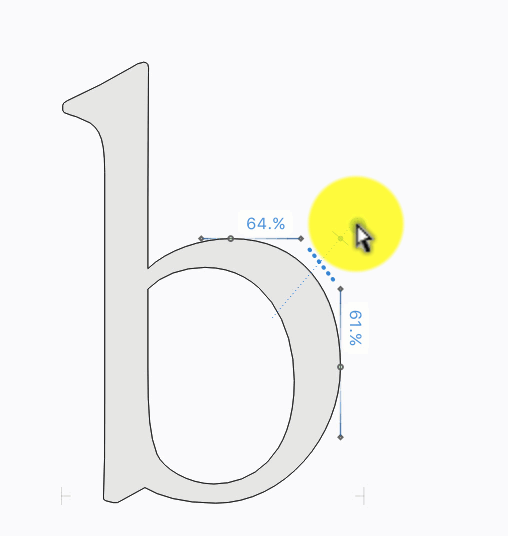
              The Cmd key is available for something like this, but wouldn't Tunni handles for symmetrical editing of a curved segment be more useful?

              MacBook Pro (Intel) running Monterey 12.6.4

              BoldlineB 1 Reply Last reply Reply Quote 1
              • BoldlineB Offline
                Boldline @b77
                last edited by b77

                @b77 said in Shortcut for pulling both handles on a non-symmetrical node:

                wouldn't Tunni handles for symmetrical editing of a curved segment be more useful?
                0_1637792673880_1b6e945f-19cb-49a5-8ca9-00665d48a35f-image.png

                I had to google "Tunni handles" lol. Yes that would be very helpful indeed. I don't know the purpose @Ingolf was requesting it for but the a shortcut for pulling both handles simultaneously on a non-symmetrical node would also be nice.

                🍎 macOS Tahoe 26.2, Mac mini (M1, 2020), Chip Apple M1, Memory 16 GB
                Cintiq 27QHD Display and LG Ultra HD Display

                b77B IngolfI 2 Replies Last reply Reply Quote 0
                • b77B Offline
                  b77 @Boldline
                  last edited by

                  @Boldline Yes, both are welcome, but which one should get the shortcut? 🙂

                  MacBook Pro (Intel) running Monterey 12.6.4

                  1 Reply Last reply Reply Quote 0
                  • IngolfI Offline
                    Ingolf @Boldline
                    last edited by

                    @Boldline

                    I don't know the purpose @Ingolf was requesting it for but the a shortcut for pulling both handles simultaneously on a non-symmetrical node would also be nice.

                    Personally I just need a shortcut for quick adjustments of a single non-symmetrical node (like you describe in the qouted paragraph above).

                    🍏 macOS Sequoia Apple Silicon

                    VectorStylerV 1 Reply Last reply Reply Quote 0
                    • VectorStylerV Offline
                      VectorStyler @Ingolf
                      last edited by

                      @Ingolf I add this to the backlog.
                      There are only shortcuts to convert the node type (all tree: Shift to Symmetric, Option to Cusp and Command to Smooth).

                      If I understood correctly, this would work on a Smooth node, by changing the other side proportionally (not symmetrically)?

                      That tunni handle idea is excellent, I added it into the features backlog, for further down the road.

                      IngolfI 1 Reply Last reply Reply Quote 0
                      • IngolfI Offline
                        Ingolf @VectorStyler
                        last edited by

                        @vectoradmin said in Shortcut for pulling both handles on a non-symmetrical node:

                        If I understood correctly, this would work on a Smooth node, by changing the other side proportionally (not symmetrically)?

                        Correct 🙂

                        🍏 macOS Sequoia Apple Silicon

                        1 Reply Last reply Reply Quote 0
                        • First post
                          Last post
