Does the Font Manager in VS link to font files?
-
Does the Font manager inside VS link to the existing font location as opposed to creating a full new copy for VS use? I assume the former? Can VS font manager work in conjunction with another font manager? For example, I try to not populate the Mac font manager with all the fonts I own and instead have a font folder organized on my desktop that I reference my main font manager to link to.
I own thousands of fonts and want to be able to use them in multiple programs and not have them all active all the time - hence why I use a font manager....I think the internal font manager in VS is genius and I want to create a custom set of folders to store fonts in. If a font is not activated on the main font manager, will it still be activated in VS or does it require it first be activated in the main font manager?
Can I "import" (link) fonts from a folder outside of the default Mac font manager? -
@Boldline VS font manager can only link to the fonts.
If you have some folder(s) with fonts, that are not installed, then in the font manager just use "Add Folder". This creates a font "group" that points to the content of the folder (and its sub folders).
Adding / removing font files from the folder will automatically update the "font group" (it is a sort of "virtual" group linked to the folder content).It is always a good idea to have large collections of fonts organized in folders (and not add these to the OS).
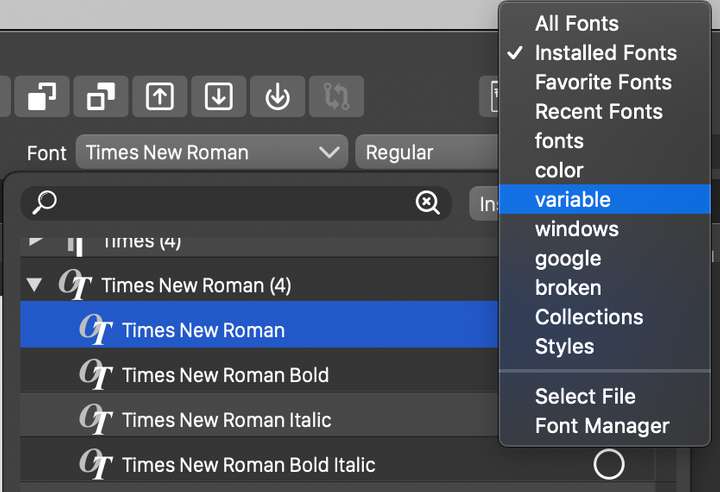
In VS these groups can also be accessed separately (improving the font scrolling time) by selecting the font group, or merged "virtually" by selecting the "All Fonts" group (clicking on the button next to the font name search field).Here is how I have for testing, "color", "variable" etc fonts in separate folders (even testing "windows" fonts on mac).