VectorStyler
    • Categories
    • Unread
    • Recent
    • Tags
    • Popular
    • Register
    • Login

    Help! Custom toolbox merged with context panel
    Scheduled Pinned Locked Moved Questions and Support
    6 Posts 2 Posters 6.1k Views 2 Watching
    Loading More Posts
    • Oldest to Newest
    • Newest to Oldest
    • Most Votes
    Reply
    • Reply as topic
    Log in to reply
    This topic has been deleted. Only users with topic management privileges can see it.
    • IngolfI Offline
      Ingolf
      last edited by Ingolf

      Help! Monkeyed around with panels and toolboxes and this happened - far left - how can I remove it again?
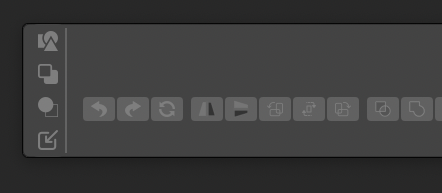
      0_1638021760751_Skærmbillede 2021-11-27 kl. 15.01.21.png

      🍏 macOS Sequoia Apple Silicon

      IngolfI 1 Reply Last reply Reply Quote 0
      • IngolfI Offline
        Ingolf @Ingolf
        last edited by

        Now somehow got it separated from the context panel but it is still cursed:
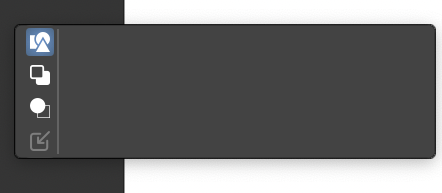
        0_1638022044110_Skærmbillede 2021-11-27 kl. 15.06.34.png

        🍏 macOS Sequoia Apple Silicon

        IngolfI 1 Reply Last reply Reply Quote 0
        • IngolfI Offline
          Ingolf @Ingolf
          last edited by

          Hiding custom toolbox and showing again solved the issue

          🍏 macOS Sequoia Apple Silicon

          1 Reply Last reply Reply Quote 0
          • IngolfI Offline
            Ingolf
            last edited by

            Dragged the path panel that was stuck in a vertical kind of mode to the right side and is now stuck with this? 😄

            0_1638025430470_Skærmbillede 2021-11-27 kl. 16.02.25.png

            🍏 macOS Sequoia Apple Silicon

            1 Reply Last reply Reply Quote 0
            • IngolfI Offline
              Ingolf
              last edited by

              Got it all working by toggling toolbox to horisontal and back.

              🍏 macOS Sequoia Apple Silicon

              VectorStylerV 1 Reply Last reply Reply Quote 0
              • VectorStylerV Offline
                VectorStyler @Ingolf
                last edited by

                @Ingolf Restoring the workspace to default may also help in some of these cases: VectorStyler -> Restore Workspace on Mac


                1 Reply Last reply Reply Quote 1
                • First post
                  Last post