VectorStyler
    • Categories
    • Unread
    • Recent
    • Tags
    • Popular
    • Register
    • Login

    Star symbol to denote unsaved document

    Scheduled Pinned Locked Moved Features and Ideas
    12 Posts 4 Posters 18.0k Views 3 Watching
    Loading More Posts
    • Oldest to Newest
    • Newest to Oldest
    • Most Votes
    Reply
    • Reply as topic
    Log in to reply
    This topic has been deleted. Only users with topic management privileges can see it.
    • VectorStylerV Offline
      VectorStyler @Boldline
      last edited by

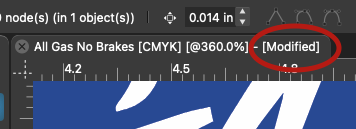
      @Boldline Go to Preferences -> Document Editor and edit the "Modified Document" text. This is appended as a suffix to a modified document title.

      BoldlineB 1 Reply Last reply Reply Quote 1
      • BoldlineB Offline
        Boldline @VectorStyler
        last edited by

        @vectoradmin Neat! that's cool. thank you!

        🍎 macOS Tahoe 26.2, Mac mini (M1, 2020), Chip Apple M1, Memory 16 GB
        Cintiq 27QHD Display and LG Ultra HD Display

        1 Reply Last reply Reply Quote 0
        • IngolfI Offline
          Ingolf @Boldline
          last edited by Ingolf

          @Boldline said in Star symbol to denote unsaved document:

          Instead of using the word "modified" to denote that the file has unsaved content, what about switching it over to the star (*)? Illustrator is set up this way and I prefer it because it takes up less space in the file name tab at the top of the screen. It's more subtle
          0_1637955826247_Screen Shot 2021-11-26 at 2.42.50 PM.png

          UPDATE: I had not checked to see what Affinity does - they have the file name at the top of the program, not in a tabbed layout like VS or Illustrator. They do use a star symbol for denote unsaved work as well though.

          Not all Affinity does is great - they had some great ideas but also some disastrous. For examle the almost invisible top-right "Loading document" with the smallest known font in the universe. I still forget to look there when loading a huuuuge SVG in Affinity which takes some time. Non-standard, crappish idea with next to invisible feedback. Fail.

          Back to VS. I discovered this setting and changed the text to something in my own langauge for the coziness. I think the default English text should be "Unsaved changes" which tells the user what is the actual situation they need to consider action upon. A star is a former minimalist approach from a time with much less screen estate, but some may prefer it. Adobe use the star as the only indicator - it would just drown in the other information in your example.

          🍏 macOS Sequoia Apple Silicon

          BoldlineB 1 Reply Last reply Reply Quote 1
          • IngolfI Offline
            Ingolf
            last edited by

            Apple Pages uses "Modified" (I guess, something similar in my language is used) so it is probably a macOS standard that VS should stick to on macOS at least.

            🍏 macOS Sequoia Apple Silicon

            1 Reply Last reply Reply Quote 1
            • BoldlineB Offline
              Boldline @Ingolf
              last edited by

              @Ingolf "Modified" works for me, it's been a common use term forever. I do like there is the option to customize it and you can make it say "unsaved changes" and I can add a *. lol
              VS is amazingly customizable - its crazy!

              🍎 macOS Tahoe 26.2, Mac mini (M1, 2020), Chip Apple M1, Memory 16 GB
              Cintiq 27QHD Display and LG Ultra HD Display

              IngolfI 1 Reply Last reply Reply Quote 2
              • IngolfI Offline
                Ingolf @Boldline
                last edited by Ingolf

                @Boldline said in Star symbol to denote unsaved document:

                @Ingolf "Modified" works for me, it's been a common use term forever. I do like there is the option to customize it and you can make it say "unsaved changes" and I can add a *. lol
                VS is amazingly customizable - its crazy!

                I just remembered the year is 2021- I tried copying an emoji into the preferences and it works. 😃

                0_1637969869585_Skærmbillede 2021-11-27 kl. 00.36.04.png

                0_1637969933988_Skærmbillede 2021-11-27 kl. 00.38.41.png

                🍏 macOS Sequoia Apple Silicon

                1 Reply Last reply Reply Quote 2
                • BoldlineB Offline
                  Boldline
                  last edited by

                  haha NICE!

                  🍎 macOS Tahoe 26.2, Mac mini (M1, 2020), Chip Apple M1, Memory 16 GB
                  Cintiq 27QHD Display and LG Ultra HD Display

                  IngolfI 1 Reply Last reply Reply Quote 2
                  • IngolfI Offline
                    Ingolf @Boldline
                    last edited by

                    @Boldline said in Star symbol to denote unsaved document:

                    haha NICE!

                    Win. Give me my floppies back. Need more colors, Apple.

                    0_1637970095934_Skærmbillede 2021-11-27 kl. 00.40.20.png

                    🍏 macOS Sequoia Apple Silicon

                    b77B 1 Reply Last reply Reply Quote 1
                    • b77B Offline
                      b77 @Ingolf
                      last edited by b77

                      @vectoradmin I was thinking… isn't the suffix after the edited document a bit redundant? We have the save icon/button at the bottom, the one that goes red.

                      An alternative I would prefer is the time elapsed working on the document.

                      MacBook Pro (Intel) running Monterey 12.6.4

                      VectorStylerV 1 Reply Last reply Reply Quote 1
                      • VectorStylerV Offline
                        VectorStyler @b77
                        last edited by

                        @b77 The suffix is needed as it is a common indicator in other apps also, and the save button barely changes for a single change in the document while the suffix is shown immediately.

                        The Document Info panel should contain the time.

                        b77B 1 Reply Last reply Reply Quote 1
                        • b77B Offline
                          b77 @VectorStyler
                          last edited by

                          @vectoradmin Well… the save button could go in just 4 or 5 steps from gray to red.

                          Or all this could be optional — time elapsed or modified status — the same way the user can choose what info is displayed in the space at the bottom of the window.

                          OK, it's a minor thing anyway. 👍

                          MacBook Pro (Intel) running Monterey 12.6.4

                          1 Reply Last reply Reply Quote 0
                          • First post
                            Last post


