On the go radius setting for style picker

-
I use the color picker (I, shift click) to select the fill color from a scanned photo (or drawing) constantly. Photos and scans contain hundres of pixels with various degrees of saturation, light or different hue values. Picking a color sometimes gives unwanted results until you hit the right pixel. I have a feeling I am selecting a single pixel.
Some programs - Affinity foremost - has this setting available in the context bar where you can set the picker radius on the go. Some sort of average of the radius is then calculated. A global setting in preferences would not make sense alone - you need to adjust the radius depending on the resolution of the scan/photo.

I suggest a similar context bar setting in VS - and of couse the context bar should show it immidiately when the style picker is actived as discussed elsewhere.
Thanks!
🍏 macOS Sequoia Apple Silicon
-
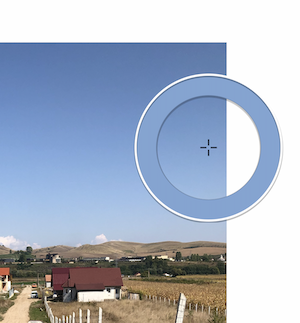
@Ingolf Another improvement would be displaying a round circle around the crosshairs of the color picker, displaying the color of a single pixel or the averaged color of four, nine or sixteen pixels:
-
@b77 said in On the go radius setting for style picker:
@Ingolf Another improvement would be displaying a round circle around the crosshairs of the color picker, displaying the color of a single pixel or the averaged color of four, nine or sixteen pixels:
That would add even more joy to a radius setting, good suggestion!
-
@Ingolf Yes it does select the color from a single pixel.
I add this to the feature request list.


