VectorStyler
    • Categories
    • Unread
    • Recent
    • Tags
    • Popular
    • Register
    • Login

    Option to toggle color bar in UI
    Scheduled Pinned Locked Moved Features and Ideas
    10 Posts 5 Posters 9.8k Views 4 Watching
    Loading More Posts
    • Oldest to Newest
    • Newest to Oldest
    • Most Votes
    Reply
    • Reply as topic
    Log in to reply
    This topic has been deleted. Only users with topic management privileges can see it.
    • BoldlineB Offline
      Boldline
      last edited by

      Would it be possible to add an option to toggle the color bar typically located at the bottom of the UI? I don't mind it being there and I saw where I can choose a location (top bottom left or right sides). I think it's a good tool to have there and I think it should be on by default - but the ability to hide it or show it would be nice.
      0_1639281850042_e796641e-10bb-459c-82c5-515005c39178-image.png

      🍎 macOS Tahoe 26.2, Mac mini (M1, 2020), Chip Apple M1, Memory 16 GB
      Cintiq 27QHD Display and LG Ultra HD Display

      VectorStylerV 1 Reply Last reply Reply Quote 1
      • VectorStylerV Offline
        VectorStyler @Boldline
        last edited by

        @Boldline It is a bit hidden in the application menu: Panels -> Palettes -> Color Palette Bar (uncheck to hide).

        b77B 1 Reply Last reply Reply Quote 2
        • b77B Offline
          b77 @VectorStyler
          last edited by

          @vectoradmin Having a simple 'Hide' command in the color bar's menu would be easier to find.

          MacBook Pro (Intel) running Monterey 12.6.4

          F 1 Reply Last reply Reply Quote 1
          • F Offline
            fde101 Global Moderator @b77
            last edited by

            @b77 said in Option to toggle color bar in UI:

            @vectoradmin Having a simple 'Hide' command in the color bar's menu would be easier to find.

            Yes, but once it is gone, the user would be left clueless as to how to get it back. Being forced to find the current option will give more of a clue as to how to get it back again later.

            b77B 1 Reply Last reply Reply Quote 1
            • b77B Offline
              b77 @fde101
              last edited by b77

              @fde101 You're not wrong, but… moving it in the Panels menu (in the same section with Toolbox, Toolboxes, Context Panel and Properties) would make it easy to find.

              MacBook Pro (Intel) running Monterey 12.6.4

              BoldlineB 1 Reply Last reply Reply Quote 0
              • BoldlineB Offline
                Boldline @b77
                last edited by

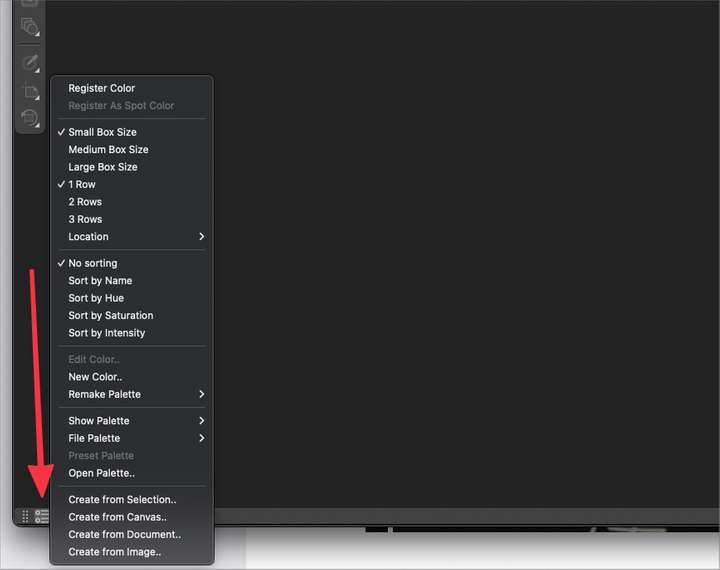
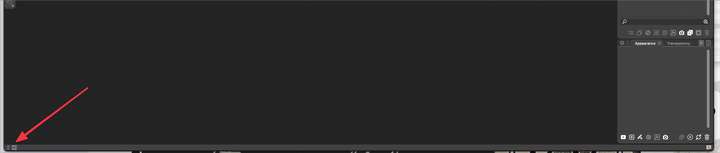
                @b77 @fde101 There's a menu button at the bottom where all the other features of the color bar are located. Why not just leave it there as an on or off option?
                0_1639331208795_005af18b-8cb9-4785-9909-d5c5d2f841c8-image.png

                When the color bar is closed, you still see the menu icon there to click on to bring it back
                0_1639331407710_097f43b6-f9ab-4bea-90fd-6e85f62b4fe7-image.png

                🍎 macOS Tahoe 26.2, Mac mini (M1, 2020), Chip Apple M1, Memory 16 GB
                Cintiq 27QHD Display and LG Ultra HD Display

                b77B IngolfI 2 Replies Last reply Reply Quote 1
                • b77B Offline
                  b77 @Boldline
                  last edited by b77

                  @Boldline The screenshots would look different with an active document.

                  Fde101 pointed out that if a 'Hide' command would be included in the menu of the color bar, it would be practical only when you want to hide it — after you do you still need to know where the command to enable it is (Panels > Palettes > Color Palette Bar).

                  I would say that 'Hide' can be included in the menu and maybe move the 'Color Palette Bar' entry one level up, in the second 'Panels' menu section, with Toolbox and the others, simply because it is so important.

                  MacBook Pro (Intel) running Monterey 12.6.4

                  BoldlineB 1 Reply Last reply Reply Quote 1
                  • BoldlineB Offline
                    Boldline @b77
                    last edited by

                    @b77 said in Option to toggle color bar in UI:

                    I would say that 'Hide' can be included in the menu and maybe move the 'Color Palette Bar' entry one level up, in the second 'Panels' menu section, with Toolbox and the others, simply because it is so important.

                    Yes that is a compromise that makes good sense to me. Provides a local and immediate solution and an easy place to go reinstate it later if needed.

                    We often talk about how full the contextual menu bar gets and how space is limited there. There's a lot of potential real estate at the bottom of the UI, especially if the color bar is moved to the right or left side. That could be a place to put options at some point

                    🍎 macOS Tahoe 26.2, Mac mini (M1, 2020), Chip Apple M1, Memory 16 GB
                    Cintiq 27QHD Display and LG Ultra HD Display

                    1 Reply Last reply Reply Quote 0
                    • IngolfI Offline
                      Ingolf @Boldline
                      last edited by

                      When the color bar is closed, you still see the menu icon there to click on to bring it back

                      Negative, all gone here.

                      🍏 macOS Sequoia Apple Silicon

                      BoldlineB 1 Reply Last reply Reply Quote 0
                      • BoldlineB Offline
                        Boldline @Ingolf
                        last edited by

                        @Ingolf yeah I didnt have a document open when I made that comment... so I was assuming that lower look in my second image would stay that way or that it could stay that way if we wanted....


                        🍎 macOS Tahoe 26.2, Mac mini (M1, 2020), Chip Apple M1, Memory 16 GB
                        Cintiq 27QHD Display and LG Ultra HD Display

                        1 Reply Last reply Reply Quote 0
                        • First post
                          Last post