VectorStyler
    • Categories
    • Unread
    • Recent
    • Tags
    • Popular
    • Register
    • Login

    Please explain more about Repeater and Node Type symbols

    Scheduled Pinned Locked Moved Questions and Support
    10 Posts 5 Posters 9.5k Views 4 Watching
    Loading More Posts
    • Oldest to Newest
    • Newest to Oldest
    • Most Votes
    Reply
    • Reply as topic
    Log in to reply
    This topic has been deleted. Only users with topic management privileges can see it.
    • BoldlineB Online
      Boldline
      last edited by

      @vectoradmin - I know you've been super busy getting this really impressive build updated.
      I've been really excited to try everything out and test things. So many nice updates and fixes!
      At some point would you be able to explain how to use the repeater (I saw it has a dedicated panel now ) with a demonstration video or a step by step written example? Could as well as share more of your vision for the shapes for the nodes -are they set up in a default case now of what you feel are most effective?
      I appreciate it!

      🍎 macOS Tahoe 26.2, Mac mini (M1, 2020), Chip Apple M1, Memory 16 GB
      Cintiq 27QHD Display and LG Ultra HD Display

      VectorStylerV 1 Reply Last reply Reply Quote 0
      • VectorStylerV Offline
        VectorStyler @Boldline
        last edited by

        @Boldline There will be a documentation on repeater before the 1.1 beta is over (2-3 weeks).
        I will also try to produce some tutorials.

        About the node type shapes: for now the these are set to defaults but can be customized.
        There will be some new shapes (was requested) and I will look into how to simplify it.

        1 Reply Last reply Reply Quote 1
        • encartE Offline
          encart
          last edited by encart

          @Boldline
          I don't know how I could have missed the information about this tool in the changelog.
          This plugin has a lot of parameters. I just started, but below I am sending you a video that will help you achieve the effect you asked for.
          Repeater vid

          @vectoradmin Great job! I don't know why , but have to move object after changing parameter to see the changes.
          It's because the B letter and the shape are black.

          MacBook Air M4 24Gb, Tahoe 26.2

          BoldlineB 1 Reply Last reply Reply Quote 3
          • BoldlineB Online
            Boldline @encart
            last edited by

            @encart Thanks for sharing that example with the repeater. I'm glad I could inadvertently make you aware of it's existence! 🙂
            That seems to do exactly the kind of job I want it to do for many things - certainly for making a sweater looking pattern without doing it all by hand
            I will check it out more and watch your video again when I have time to play around with it more - it looks awesome!

            🍎 macOS Tahoe 26.2, Mac mini (M1, 2020), Chip Apple M1, Memory 16 GB
            Cintiq 27QHD Display and LG Ultra HD Display

            1 Reply Last reply Reply Quote 2
            • IngolfI Offline
              Ingolf
              last edited by Ingolf

              Whow. Impressive tool.

              @vectoradmin
              With a spray tool like the one in Inkscape then VS would be more or less be feature complete for my use. Almost is in the neighborhood of version 1.1... insane! But great.

              🙂

              🍏 macOS Sequoia Apple Silicon

              BoldlineB VectorStylerV 2 Replies Last reply Reply Quote 0
              • BoldlineB Online
                Boldline @Ingolf
                last edited by

                @Ingolf I've heard of the spray tool in Inkscape being good - but I've never used it. What do you feel VS could utilize? Maybe that should be a different thread? lol
                VS has more tools than I imagined, I can still think of a few things that would help me with my work: namely a simple 3d effect for letters and a stylus/mouse based smooth tool

                🍎 macOS Tahoe 26.2, Mac mini (M1, 2020), Chip Apple M1, Memory 16 GB
                Cintiq 27QHD Display and LG Ultra HD Display

                1 Reply Last reply Reply Quote 0
                • VectorStylerV Offline
                  VectorStyler @Ingolf
                  last edited by

                  @Ingolf said in Please explain more about Repeater and Node Type symbols:

                  With a spray tool like the one in Inkscape then VS would be more or less be feature complete for my use.

                  There are a few new tools regarding symbol insertion and editing of symbol groups (towards the bottom of the toolbox).

                  0_1639552922680_tools.png

                  1 Reply Last reply Reply Quote 2
                  • J Offline
                    Jono
                    last edited by

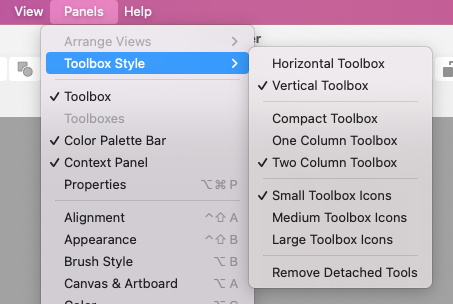
                    I don't think I'm seeing these icons in my toolbox!
                    0_1640003430952_Screenshot 2021-12-20 at 12.29.35.png

                    0_1640003492821_Screenshot 2021-12-20 at 12.31.14.png

                    Mac mini (M1, 2020) | Tahoe 26.1 | Wacom Cintiq 16 (1920 x 1080 px)

                    VectorStylerV 1 Reply Last reply Reply Quote 0
                    • VectorStylerV Offline
                      VectorStyler @Jono
                      last edited by VectorStyler

                      @Jono Yes, this is a bug, these got added to the default toolbox only, by mistake.

                      EDIT: this means that a workspace reset is required to show these.

                      Otherwise, they should be available in the toolbox customization view.

                      1 Reply Last reply Reply Quote 0
                      • J Offline
                        Jono
                        last edited by

                        Excellent thanks, resetting workspace did the trick.

                        Mac mini (M1, 2020) | Tahoe 26.1 | Wacom Cintiq 16 (1920 x 1080 px)

                        1 Reply Last reply Reply Quote 0
                        • First post
                          Last post

