Proportional numeric scaling and values reset on transform panel
-
Hi there,
5 minutes into the trial and I must say that I already have good vibes using VSI have only 2 remarks so far.
-
I miss the possibility to numerically scale an object. In graphic design is common that you have a shape, let's say a rectangle 450x100mm and then you want to scale it at 500x? where ? is the result of scaling proportionally from 450 to 500
On Illustrator you hold option while inputing 500 and hitting return, it then scales the height accordingly. No need to manually activate the proportional lock, scale and deactivate it. Quick and easy.
Is there something like that I'm missing out? -
transform panel... reset values. I'd prefer that either the panel forgets the last values used or, preferably, to be able to hold option and have the cancel button become a reset button so I don't have to manually reset all the values.
Anyway so far so good. I'll be back playing with it. I have the feeling that for basic technical drawing I could already see myself using this program instead of illustrator.
Thanks.
MacBook M1 Pro 10/16 - Monterey
-
-
@Torakikiii Hi, and Welcome to VectorStyler!
(1) for now proportional mode is only possible by enabling it. I add this to the feature requests.
(2) same here, transform is "non-destructive", but it can be improved. -
@vectoradmin hey there, thanks for the quick answer. Although not a deal breaker those 2 functions would be tremendously useful in a technical workflow. Glad they made it into a possible future release.
-
@Torakikiii Forgot to mention one detail:
Proportional scaling is enabled by clicking on the lock icon next to the W/H boxes.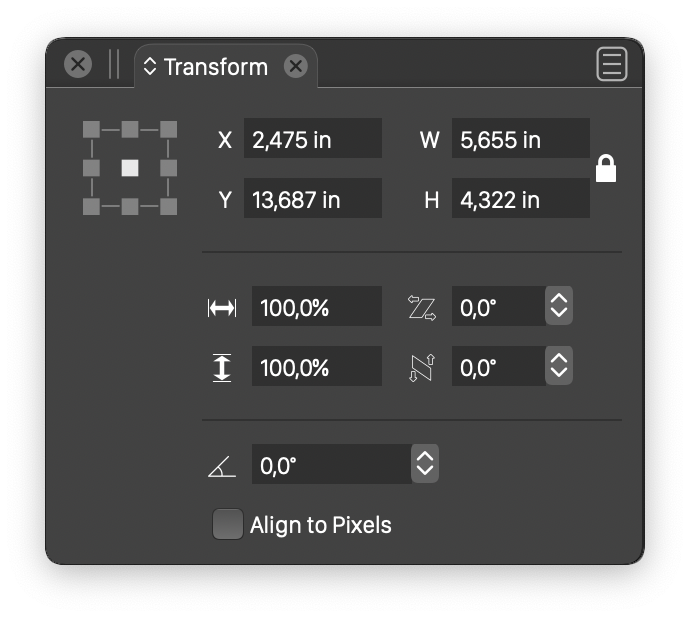
-
@Torakikiii said in Proportional numeric scaling and values reset on transform panel:
On Illustrator you hold option while inputting 500 and hitting return, it then scales the height accordingly. No need to manually activate the proportional lock, scale and deactivate it. Quick and easy.
This is something I did not know about Illustrator, but then again for me, most of my work I want things to always be proportionally scaled so I've left the lock on by default. Does this also work in reverse? If I have the proportion lock on and I hold down option, will it override the lock? I'll have to check this out. Could be a nice addition to VS