VectorStyler
    • Categories
    • Unread
    • Recent
    • Tags
    • Popular
    • Register
    • Login

    "scale by distributing mode" setting location?

    Scheduled Pinned Locked Moved Questions and Support
    5 Posts 3 Posters 5.7k Views 2 Watching
    Loading More Posts
    • Oldest to Newest
    • Newest to Oldest
    • Most Votes
    Reply
    • Reply as topic
    Log in to reply
    This topic has been deleted. Only users with topic management privileges can see it.
    • BoldlineB Offline
      Boldline
      last edited by

      I know this is a bug being fixed in the next build - but in the meantime, I'd like to try to play around more with the new feature "scale by distributing mode" . I was attempting to track down where the settings for this new feature were now located in VS without success. I assumed it would be in the scale settings panel?

      🍎 macOS Tahoe 26.2, Mac mini (M1, 2020), Chip Apple M1, Memory 16 GB
      Cintiq 27QHD Display and LG Ultra HD Display

      VectorStylerV 1 Reply Last reply Reply Quote 0
      • VectorStylerV Offline
        VectorStyler @Boldline
        last edited by

        @Boldline For now it only works when scaling multiple objects on the canvas.
        Once the scaling started (mouse is pressed), press (and release) spacebar to swap the scaling mode.

        b77B 1 Reply Last reply Reply Quote 0
        • b77B Offline
          b77 @VectorStyler
          last edited by

          @vectoradmin Nice!

          MacBook Pro (Intel) running Monterey 12.6.4

          BoldlineB 1 Reply Last reply Reply Quote 0
          • BoldlineB Offline
            Boldline @b77
            last edited by

            I'm still running into this problem in the new build. Sometimes when I go to scale a selection of objects, grouped or not, it still wants to default to scaling by distributing mode", and I can't get it to stop and go back to just regular scaling mode.
            i tried the option suggested prior to the new build, to tap space bar once, but that does not fix the issue.

            I included a video to show the issue still occurring for me in the new build today. Halfway through the video I am holding down the corner to scale and tapping once on spacebar hoping it will switch back to regular scaling.... at the very end of the video I am holding down spacebar

            🍎 macOS Tahoe 26.2, Mac mini (M1, 2020), Chip Apple M1, Memory 16 GB
            Cintiq 27QHD Display and LG Ultra HD Display

            BoldlineB 1 Reply Last reply Reply Quote 0
            • BoldlineB Offline
              Boldline @Boldline
              last edited by Boldline

              UPDATE: I think I found the issue - I was playing around with the second selection arrow - allowing me to move/transform members of a grouped item.... I had not put it back to the default.
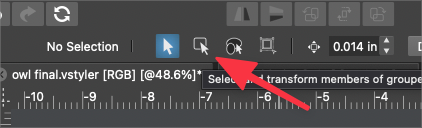
              0_1640720988524_8fecfa5c-b5ea-48dc-b81c-88a28b6958b3-image.png

              This probably also answers where the "scale by distributing mode" is located - my original question on this thread


              🍎 macOS Tahoe 26.2, Mac mini (M1, 2020), Chip Apple M1, Memory 16 GB
              Cintiq 27QHD Display and LG Ultra HD Display

              1 Reply Last reply Reply Quote 1
              • First post
                Last post