VectorStyler
    • Categories
    • Unread
    • Recent
    • Tags
    • Popular
    • Register
    • Login

    A way to show Keyboard Shortcuts

    Scheduled Pinned Locked Moved Features and Ideas
    6 Posts 3 Posters 9.4k Views 3 Watching
    Loading More Posts
    • Oldest to Newest
    • Newest to Oldest
    • Most Votes
    Reply
    • Reply as topic
    Log in to reply
    This topic has been deleted. Only users with topic management privileges can see it.
    • S Offline
      Subpath
      last edited by Subpath

      Hi

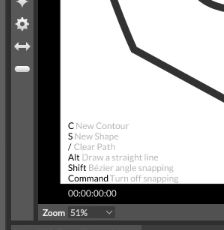
      I found an idea in Cavalry that might also be helpful in dealing with shortcuts in VS.
      (Cavalry is a new vector program for motion graphics, for anyone who is interested,
      here a Link)
      Cavalry Homepage

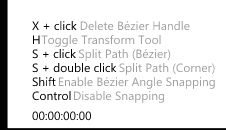
      The relevant keyboard shortcuts for the Tool are always shown in the lower
      left corner of the canvas.

      Here some Pictures:
      0_1642152463761_Cavalry-Bildschirm-Menu.jpg

      0_1642152474818_Cavalry-Text.jpg

      Win 11
      CPU: AMD Ryzen 5 9600X, 6-core.
      GPU: Nvidia Geforce RTX 5070.

      VectorStylerV 1 Reply Last reply Reply Quote 3
      • VectorStylerV Offline
        VectorStyler @Subpath
        last edited by

        @Subpath Interesting idea, I will add this to the feature request list. There is already a task for a status panel/bar, and an Info panel. Maybe this type of info can be integrated there.

        S 1 Reply Last reply Reply Quote 1
        • S Offline
          Subpath @VectorStyler
          last edited by

          @vectoradmin

          nice to hear 🙂

          Win 11
          CPU: AMD Ryzen 5 9600X, 6-core.
          GPU: Nvidia Geforce RTX 5070.

          1 Reply Last reply Reply Quote 0
          • IngolfI Offline
            Ingolf
            last edited by Ingolf

            This is a good idea. Easy to understand, a quick read. Keyboard shortcuts displayed in the status bar like in Inkscape and Affinity runs out of space because of the very limited space available. And screen resolution matters so on laptops even less can be displayed. So this is ideal.

            Maybe a keyboard icon or whatever down here:

            0_1642153609142_7ade1d41-4618-4a07-866c-82d1931c7ac0-image.png

            that enabled displays a tooltip like box:

            0_1642153669026_8e9e9997-374d-40cb-92ed-0d9371bc1d69-image.png

            I wouldn't want the shortcuts displayed like that all the time and certainly not never either. On demand - while the icon is activated would work for me. It would certainly become the most used feature down there for me - by far. Fast, easy, high value help.

            🍏 macOS Sequoia Apple Silicon

            S 1 Reply Last reply Reply Quote 0
            • S Offline
              Subpath @Ingolf
              last edited by Subpath

              @Ingolf

              In Cavalry it shows only the shortcuts to the relevant tool.
              But in VS there could also be a switch in the preferences to turn this
              on or off.

              It might also be helpful if we could set the transparency
              of the text info individually.

              Win 11
              CPU: AMD Ryzen 5 9600X, 6-core.
              GPU: Nvidia Geforce RTX 5070.

              IngolfI 1 Reply Last reply Reply Quote 0
              • IngolfI Offline
                Ingolf @Subpath
                last edited by

                @Subpath said in A way to show Keyboard Shortcuts:

                @Ingolf
                In Cavalry it shows only the shortcuts to the relevant tool.

                Yes, of course it shall only show shortcuts for the active tool. That is the point of that info. 🙂 Just like the information shown in the status bar in Affinity or Inkscape about shortcut keys for the active tool - but displayed like this instead:

                alt text

                But in VS there could also be a switch in the preferences to turn this on or off.

                Yes, also in the preferences but not only. I would myself (want to) enable or disable it quickly several times a day without going all the way to preferences.

                It might also be helpful if we could set the transparency of the text info individually.

                Indeed.

                🍏 macOS Sequoia Apple Silicon

                1 Reply Last reply Reply Quote 0
                • First post
                  Last post