Shortcuts for Boolean operations
-
@b77 You kind of beat me to the punch on this thought. I'm sure everyone has their own preferences as to what boolean operations are most used. For example, my most common used ones are merge, union, divide, trim.
Looking more closely at the UI with this - I just noticed there's a gap between what I assume you refer to as the more common ones and the less common use ones. I don't think I had noticed this before as I am now. That helps some.

I remember @vectoradmin had mentioned a potential future addition of a dedicated section of the contextual menu for customization. I could see the addition of a similar thing in the main UI, where certain things could be selected in preferences to fit in there. Hiding the least used boolean operations with a temporary drop-down could help eliminate confusion and provide more real estate for a custom addition
Maybe that's not best? I don't know for sure - I'm throwing ideas out there to see what sticks lol -
@b77 said in Shortcuts for Boolean operations:
@Boldline and @Ingolf
Why should part of the Boolean buttons be hidden with so much UI estate available? And the most used ones are the first — they are not mixed with the less used ones.You shouldn't use UI estate just because it is there. That is the mistake that everyone made when the graphical interface arised.
I don't think 14 different boolean operations are widely and regularly used by anyone - not even 7 - so removing clutter from the interface is what is common practice. That makes it much more easy for the eyes to navigate and identify. That is what we did in software development for 25 years now assisted by user experience designers and user tests and many iterations of user interfaces. I have been inside that world for just as long.
In this case being able to customize the toolbar if you are among the 10 people that use that many booleans is a great service. But the interface should not cater for these extreme use cases in its default setup.
-
@Ingolf said in Shortcuts for Boolean operations:
Identifying and picking the boolean operations is difficult - too many buttons I still didn't memorize.
If part of the Boolean buttons are hidden by default, there's even less chance for users to get familiarized with them.
Anyway, are there more useful buttons that can't be included in this Context bar because those 5 buttons take up space by being always visible? If there are, I would agree to have these five hidden and display those instead. Otherwise, let them stay.
But the Context panel can be edited — any of the buttons can be removed. From the 'VectorStyler' menu, choose 'Customize Toolboxes':
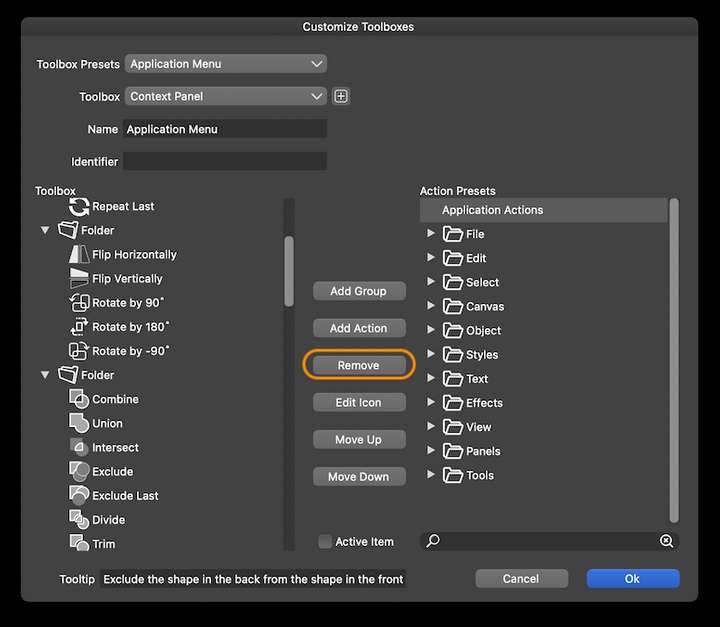
-
@b77 If users don't need them, there is no reason why they should get familiarized with them. You don't teach software via static toolbar buttons.
I can easily remove them myself - but I can assure you they will only cause confusion for a lot of users and will be among the least used buttons in VS. I have witnessed a few hundreds user tests myself. Users request a focused interface with relevant choices. Not a sky full of stars.
-
@Ingolf said in Shortcuts for Boolean operations:
@b77 If users don't need them, there is no reason why they should get familiarized with them.
But some users do need those less used Boolean operations, some of them quite often I suspect (see the difference between 'Combine' and 'Remove Overlaps', for instance).
You don't teach software via static toolbar buttons.
Which one is faster and has more chances of happening — searching the documentation for ‘combine/Boolean operations’ or seeing and clicking a button to see what happens?
I can assure you they will only cause confusion for a lot of users and will be among the least used buttons in VS. I have witnessed a few hundreds user tests myself. Users request a focused interface with relevant choices. Not a sky full of stars.
I appreciate your feedback in trying to make the app palatable to as many users as possible —
-
Some users are hobbyists, I totally agree. They need the basics. For them a simplified interface is preferable, otherwise confusion can make them abandon the app and even give bad reviews.
-
Some older users are not even familiar with computers. Same need for a simple UI here, I understand.
-
For pro users however that value having lots of tools at their fingertips (which makes for a fast workflow), having the UI almost filled with buttons is not a problem. I for one like that. And VS is and looks like a professional app.
The idea is that the app has to also impress pro users and serve them well — it has so many more features than AD and Amandine after all.
So… would a simplified UI the user can choose when first running the app be a solution that can accommodate all kinds of users?
-
-
Boolean operations are a ordinary tool
to me, which i use when it fits.Have no Problem with the displayed number of operations
but often with the Order of the Symbols. That way VS irritated
me at the beginning and partly still today. Also with its unusual
names for some Boolean functions.Subtract in VS is called Exclude why I have not understood yet. But
if I want to cut something I take the 4th icon.That the Symbol for Combine is so close to the boolean operations
is also irritating for me. I would like a little more distance.The order I am used to from Boolean operations is
is Merge, Subtract, Divide and then the others.Here the Order in CorelDraw 2020

Combine is on the left side a little seperated.Here in Affiniy Designer

-
@Subpath …And I’m used to ‘Subtract’ instead of ‘Exclude’ or ‘Cut’.

-
yes you right, typo from me, thanks

-
@Subpath As long as the icons depict the operation clearly, the name differences for some operations are not a problem, I think.
-
Well icons are not always clear either.
In VS I just made experiments and looked at the results.
Then I knew which icon to use and when.It is true that the terminology does not really have to bother, it just
eases the learning process in some circumstances.


