VectorStyler
    • Categories
    • Unread
    • Recent
    • Tags
    • Popular
    • Register
    • Login

    Color Selector for Artboard Obstructs preview color bar

    Scheduled Pinned Locked Moved Features and Ideas
    8 Posts 3 Posters 7.7k Views 3 Watching
    Loading More Posts
    • Oldest to Newest
    • Newest to Oldest
    • Most Votes
    Reply
    • Reply as topic
    Log in to reply
    This topic has been deleted. Only users with topic management privileges can see it.
    • BoldlineB Online
      Boldline
      last edited by

      This may have already been mentioned, but just in case it was not, I noticed that when I change the color of the artboard, the color selector box obstructs the preview color bar. Could this be offset just below the preview box?
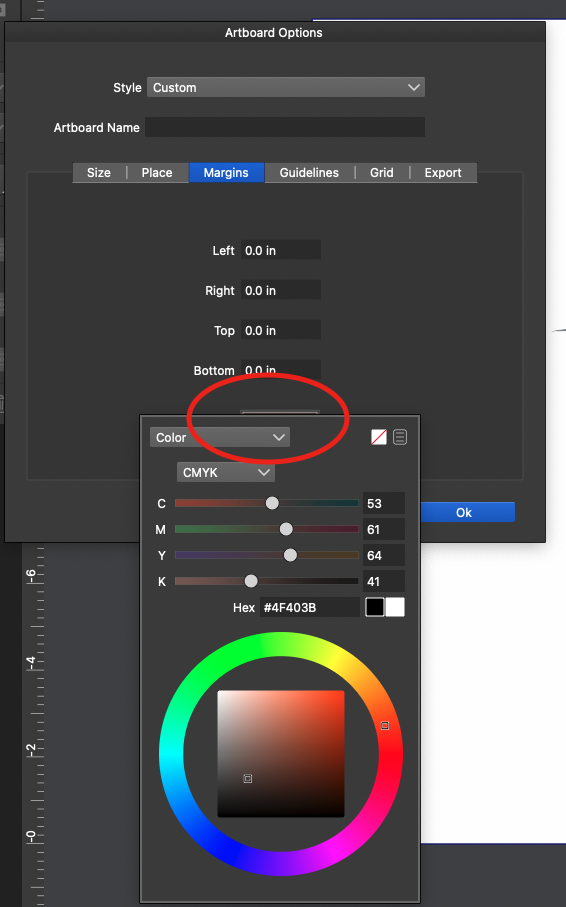
      0_1643685461030_Screen Shot 2022-01-31 at 10.13.43 PM.png

      🍎 macOS Tahoe 26.2, Mac mini (M1, 2020), Chip Apple M1, Memory 16 GB
      Cintiq 27QHD Display and LG Ultra HD Display

      VectorStylerV 2 Replies Last reply Reply Quote 1
      • VectorStylerV Offline
        VectorStyler @Boldline
        last edited by

        @Boldline I added this to the backlog. Does this mean to not obstruct the button that was used to open the color selector?

        BoldlineB 1 Reply Last reply Reply Quote 0
        • IngolfI Offline
          Ingolf
          last edited by Ingolf

          I get this neat result every time on macOS, I assume this is exactly what @Boldline expects. 🙂

          0_1643707474570_Skærmbillede 2022-02-01 kl. 10.23.10.png

          When I move the Artboard options dialog down and retry though the color selector starts to cover the underlying dialog.
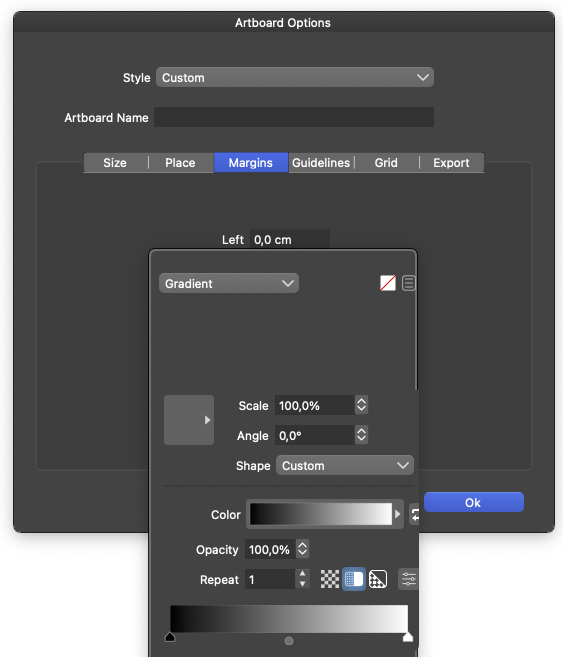
          0_1643708140132_Skærmbillede 2022-02-01 kl. 10.35.28.png

          So there are several scenarios where moving it a bit down is not possible. Popping it up slightly to the right is probably safer but somewhat non-standard. A side-by-side before < > after color view in the active dialogs is probably the ideal choice that will work across devices and resolutions if the goal is to always offer the user a view of the new color compared to the one already in use. But that requires a lot of effort across VS's features.

          Pssst: I don't have a preference or personal interest in this particular feature. 🙂

          Pssst... The gradient content in the dialog needs more space. 🙂

          🍏 macOS Sequoia Apple Silicon

          1 Reply Last reply Reply Quote 1
          • BoldlineB Online
            Boldline @VectorStyler
            last edited by

            @vectoradmin said in Color Selector for Artboard Obstructs preview color bar:

            Does this mean to not obstruct the button that was used to open the color selector?

            Yes! thank you. Sorry for not being more clear on my end.

            🍎 macOS Tahoe 26.2, Mac mini (M1, 2020), Chip Apple M1, Memory 16 GB
            Cintiq 27QHD Display and LG Ultra HD Display

            1 Reply Last reply Reply Quote 0
            • BoldlineB Online
              Boldline
              last edited by Boldline

              The original post was when I was working on a different computer than my main machine (still an M1 and with a large screen). I went to change the fill color of the artboard on my main machine and it appears as it should. Maybe the other monitor is set differently? It's a 27 inch screen, so there was no shortage of space
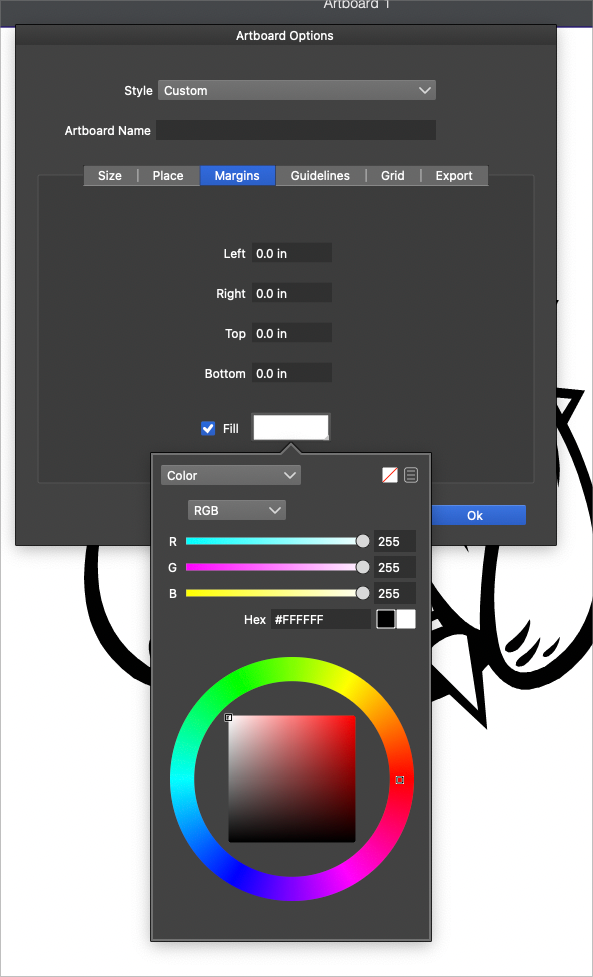
              0_1643735750751_68f50675-e2eb-465a-ae63-8d4d9589cc6d-BLD 2022-02-01 at 12.14.04.png

              🍎 macOS Tahoe 26.2, Mac mini (M1, 2020), Chip Apple M1, Memory 16 GB
              Cintiq 27QHD Display and LG Ultra HD Display

              VectorStylerV 1 Reply Last reply Reply Quote 0
              • VectorStylerV Offline
                VectorStyler @Boldline
                last edited by

                @Boldline yes, space can be an issue.

                BoldlineB 1 Reply Last reply Reply Quote 0
                • BoldlineB Online
                  Boldline @VectorStyler
                  last edited by

                  @vectoradmin Would it make sense to have the color wheel set to the left side or right side of the color bars? That would greatly reduce the height

                  🍎 macOS Tahoe 26.2, Mac mini (M1, 2020), Chip Apple M1, Memory 16 GB
                  Cintiq 27QHD Display and LG Ultra HD Display

                  1 Reply Last reply Reply Quote 1
                  • VectorStylerV Offline
                    VectorStyler @Boldline
                    last edited by

                    @Boldline This problem should be fixed in build 1.1.024

                    1 Reply Last reply Reply Quote 0
                    • First post
                      Last post