VectorStyler
    • Categories
    • Unread
    • Recent
    • Tags
    • Popular
    • Register
    • Login

    Importing/Placing artwork in VS

    Scheduled Pinned Locked Moved Features and Ideas
    8 Posts 3 Posters 8.5k Views 1 Watching
    Loading More Posts
    • Oldest to Newest
    • Newest to Oldest
    • Most Votes
    Reply
    • Reply as topic
    Log in to reply
    This topic has been deleted. Only users with topic management privileges can see it.
    • W Offline
      William Kansepa
      last edited by

      Can it be made possible to click and drag imported artwork rather than just automatically placing the artwork into the middle of the page? I personally would prefer the click and drag method since it gives me some sense of control as I can place imported artwork to predetermined positions. Efficiency is key. One shot one kill...
      I would like to hear from the other users. What's your take on this?

      HP•Windows 11 Pro•11th Gen Intel(R) Core(TM) i7-1165G7 @ 2.80GHz 2.70 GHz• RAM: 16.0 GB (DDR4)

      VectorStylerV 1 Reply Last reply Reply Quote 2
      • VectorStylerV Offline
        VectorStyler @William Kansepa
        last edited by

        @William-Kansepa yes, this looks like a bug. Drag&drop files exists, but it will center the import to the artboard it is dropped on.

        1 Reply Last reply Reply Quote 0
        • W Offline
          William Kansepa
          last edited by

          @vectoradmin This feature is still broken on Windows 10.

          HP•Windows 11 Pro•11th Gen Intel(R) Core(TM) i7-1165G7 @ 2.80GHz 2.70 GHz• RAM: 16.0 GB (DDR4)

          VectorStylerV 1 Reply Last reply Reply Quote 0
          • VectorStylerV Offline
            VectorStyler @William Kansepa
            last edited by

            @William-Kansepa I will keep the issue open, and try to replicate it.

            1 Reply Last reply Reply Quote 0
            • W Offline
              William Kansepa
              last edited by

              @vectoradmin Maybe I wasn't clear enough the first time and I need to clarify some more…
              I want the freedom to place my imported artwork to specified positions. I suggest that VS needs to show an import cursor icon before placing artwork.

              Please refer to this video: https://recordit.co/a2rsF6UkVf

              HP•Windows 11 Pro•11th Gen Intel(R) Core(TM) i7-1165G7 @ 2.80GHz 2.70 GHz• RAM: 16.0 GB (DDR4)

              VectorStylerV BoldlineB 3 Replies Last reply Reply Quote 1
              • VectorStylerV Offline
                VectorStyler @William Kansepa
                last edited by

                @William-Kansepa said in Importing/Placing artwork in VS:

                I want the freedom to place my imported artwork to specified positions. I suggest that VS needs to show an import cursor icon before placing artwork.

                Now I got it! This is different from the drag&drop bug that just god fixed. Sorry for the mixup.
                Yes, this kind of feature has been in the feature request list for some time.

                1 Reply Last reply Reply Quote 1
                • BoldlineB Offline
                  Boldline @William Kansepa
                  last edited by

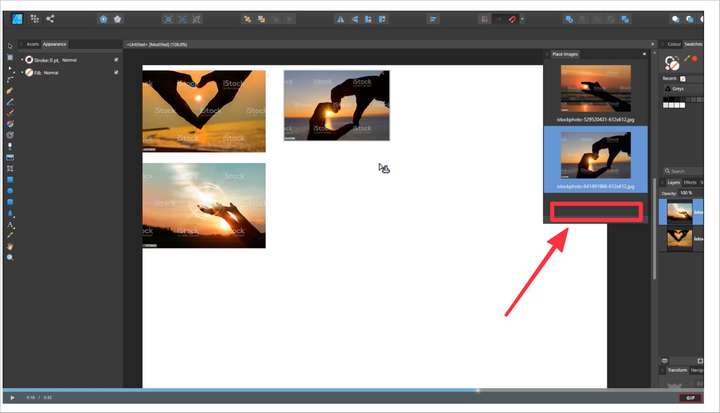
                  @William-Kansepa I haven't ever placed multiple images in Affinity Designer before, so I never saw the "queue" before. That would be a great feature in VS as well, if not already in there.
                  Until I switched to VS, I was always using Illustrator CS6 and the only way to get multiple items imported into a file there was to click and drag them into an open file and even then it was just a literal pile of images stacked on top of each other. If you tried to import via the file>place, it only gave you one at a time options.

                  🍎 macOS Tahoe 26.2, Mac mini (M1, 2020), Chip Apple M1, Memory 16 GB
                  Cintiq 27QHD Display and LG Ultra HD Display

                  1 Reply Last reply Reply Quote 1
                  • BoldlineB Offline
                    Boldline @William Kansepa
                    last edited by Boldline

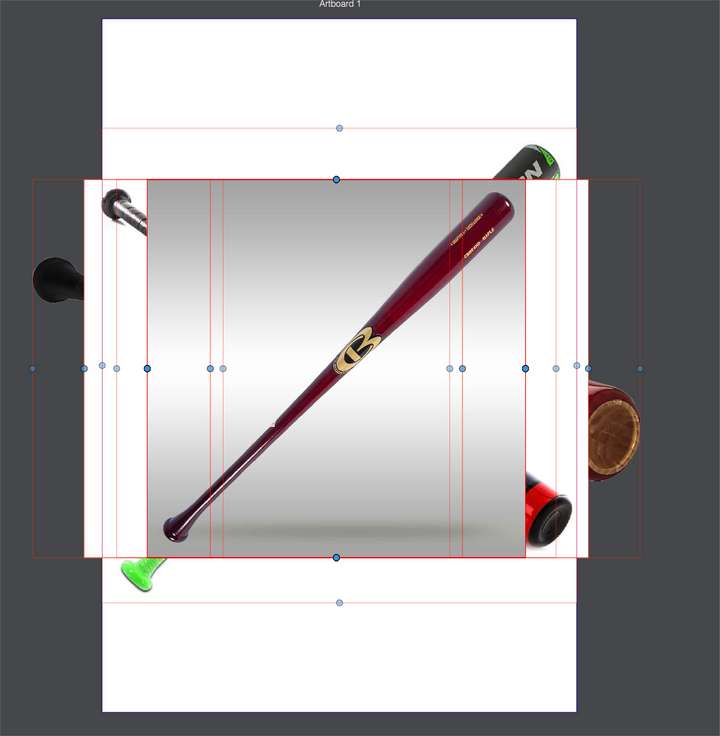
                    @William-Kansepa I had a situation where I finally needed to import a large set of images into a VS and I thought of you with this thread.
                    They all pasted together as expected.
                    0_1644179689522_178282a1-2558-4c1a-9885-f2f0efc1b7b3-BLD 2022-02-06 at 15.30.05.png

                    I like the idea of the "import queue" like what you demonstrated in Affinity in the screen video you included. I wonder if it would be feasible to add an option at the bottom of the queue to essentially distribute the rest of the photos into the document. In this case, the rest would just pile up like they do currently. This way the option is there to just drop them all in the file or go through and manually apply sizing and such to each
                    0_1644180120259_fce1b605-cbe5-4390-b583-423f9ca04ae5-BLD 2022-02-06 at 15.38.31.png

                    🍎 macOS Tahoe 26.2, Mac mini (M1, 2020), Chip Apple M1, Memory 16 GB
                    Cintiq 27QHD Display and LG Ultra HD Display

                    1 Reply Last reply Reply Quote 2
                    • First post
                      Last post
