VectorStyler
    • Categories
    • Unread
    • Recent
    • Tags
    • Popular
    • Register
    • Login

    Reset Center

    Scheduled Pinned Locked Moved Questions and Support
    9 Posts 3 Posters 11.7k Views 1 Watching
    Loading More Posts
    • Oldest to Newest
    • Newest to Oldest
    • Most Votes
    Reply
    • Reply as topic
    Log in to reply
    This topic has been deleted. Only users with topic management privileges can see it.
    • badcatB Offline
      badcat
      last edited by

      Sometimes I need to reset the center of an object. Sometimes I need to set the center of an object (for rotations etc) to be elsewhere on the page. How can I reset to the object's center? How can I numerically position the center rotation point?

      b77B 1 Reply Last reply Reply Quote 0
      • b77B Offline
        b77 @badcat
        last edited by b77

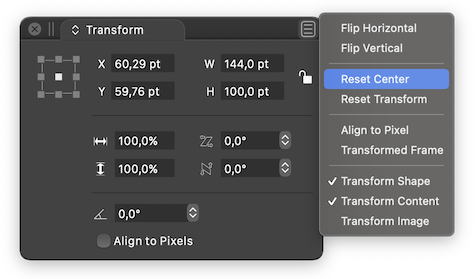
        @badcat To reset the pivot, choose 'Reset Center' from the options menu of the Transform panel:
        0_1609451934078_Screenshot 2020-12-31 at 23.56.41.png

        You can also drag it with Option-Shift, which lets you move it back to the center of the bounding box.

        I don't think numerical positioning of the pivot is possible atm.

        MacBook Pro (Intel) running Monterey 12.6.4

        badcatB 1 Reply Last reply Reply Quote 2
        • badcatB Offline
          badcat @b77
          last edited by

          @b77 thank you. Still would like numeric positioning.

          1 Reply Last reply Reply Quote 1
          • badcatB Offline
            badcat
            last edited by badcat

            Not sure the Reset Center / Transform is fully functioning. Tried a few times in this video. This is v199 - what am I missing?

            https://vimeo.com/496699464/3f6bb0f0aa

            VectorStylerV 1 Reply Last reply Reply Quote 0
            • VectorStylerV Offline
              VectorStyler @badcat
              last edited by

              @badcat Seems that the group or shape has its center off.
              Could you send a small sample of this issue, the specific shape / object with the center problem will do.

              badcatB 1 Reply Last reply Reply Quote 0
              • badcatB Offline
                badcat @VectorStyler
                last edited by

                @vectoradmin sure - linked
                The issue here after further experimentation is a complex path.
                I "solved" this by breaking the path apart and then regrouping, but I think reset center / transform would have fixed that for me with the original path?

                VectorStylerV 1 Reply Last reply Reply Quote 0
                • VectorStylerV Offline
                  VectorStyler @badcat
                  last edited by

                  @badcat Yes it should work, but there seems to be something missing. Was this shape imported from some file format?

                  badcatB 1 Reply Last reply Reply Quote 0
                  • VectorStylerV Offline
                    VectorStyler
                    last edited by

                    Build 200 improves the Reset Center command.

                    1 Reply Last reply Reply Quote 0
                    • badcatB Offline
                      badcat @VectorStyler
                      last edited by

                      @vectoradmin Yes - the original shape was an all vector SVG.

                      1 Reply Last reply Reply Quote 0
                      • First post
                        Last post
