How to distribute objects with a precise distance between them ?
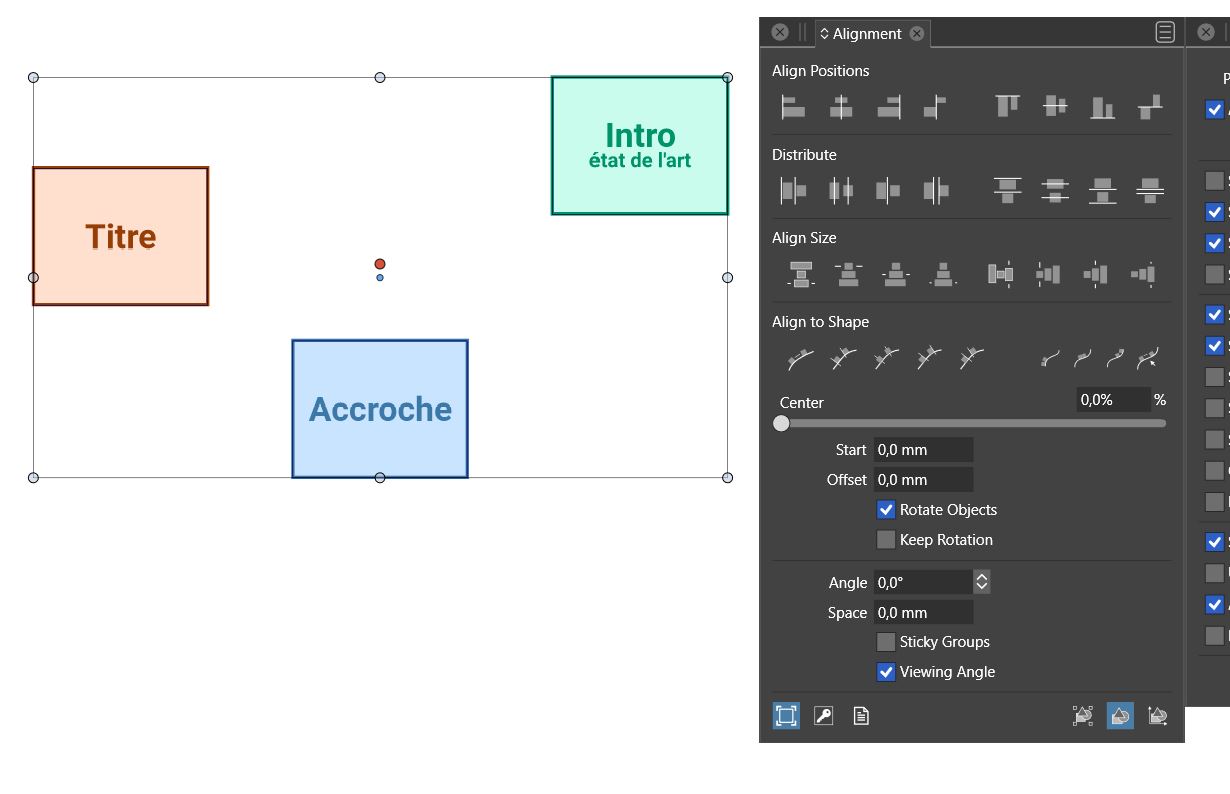
-
@PatrickM @Subpath - Certainly we are here to not only test VS but also offer our feelings and ideas and preferences. I'm not trying to shut down communication at all.
We may be on the same page that VS has areas that require taking time and practice to fully understand and until it's in muscle memory, it's going to be somewhat laborious. I feel that way as I get past the basics and areas that are very similar to Illustrator and Affinity that I already know well and move on to the unique deeper options that VS offers.
Prompted by this thread, I was intrigued and spent more time playing around with the alignment panel and spacing. Understanding how the panel works, it was pretty quick and non-laborious to perform two different tasks using the same panel.
Grab your squares, align them to their tops, deselect, change the spacing, apply spacing horizontally. It's much faster this way than adding a stroke line to align with.I spent more time trying to understand the way VS was handling the other alignment options when there was an amount in the "space" input. This allows for more options for controlled spacing. There is value in that option as well and if we took that away so that it was easier to just space the squares and quickly align at the top, we'd all be missing out.
If you have a way to accomplish what you are wanting to do faster, I'm all for it. but so far your idea would take away spacing options, limiting what can be done in VS. This was what I was referring to when I was reminding everyone that VS is full-featured. There's a fine balance between how much can be streamlined without sacrificing tools and options
-
I dont want to take away spacing options ? Dont know
where you read this in my lines.No offense. I know that Vs use a different philosophy and that you
have to get used the way it works. I have no Problems with that.But i don't really understand why we have to call the alignment options
options first, this option could be there from the beginning.Then I also don't understand the last 3 steps needed.
(6) set the distance to 0, (6) select the objects again,
(7) align with the ad hoc tool.If you do these things often in a day, they are, in my eyes
just unnecessarily time consuming.That are just different views on the same thing. What fits for you, doesn't fit for others
and this has nothing to do with to do with making things overly simple.
And if I understand it correctly then "incomprehensible" means "not understandable". -
@Subpath said in How to distribute objects with a precise distance between them ?:
But i don't really understand why we have to call the alignment options options first, this option could be there from the beginning.
You don't have to do the main top alignment first - you can do it after the spacing, but you have to set the spacing back to zero first when doing it this way. If you do the top alignment first, you can then add in the space amount and be done and move on quickly.
You said it could "be there from the beginning" - this is where I was asking for more clarification and explanation. It is there from the beginning. You can grab your squares and immediately align them to their tops for example. If you care more about set spacing, you use the spacing input box and then align for that spacing. If you have a faster way to do it, I'm all ears for it because I want to see VS be it's best. What is your idea specifically?
@Subpath said in How to distribute objects with a precise distance between them ?:
I dont want to take away spacing options ? Dont know where you read this in my lines.
I don't think you meant it, but it's the direct consequence of changing the way the alignment panel is used currently. Right now the alignment panel offers multiple functions based on if there is a number on the "spaces" input box or not. Having no number in there gives you a certain number of options, adding a number gives you more options to work with. If the alignment worked the same with or without numbers in the spacing section, we'd lose all the options for spacing with specified numbers, therefore limiting what VS can do. that was what I meant.
You're coming into the alignment panel looking to accomplish two different tasks; align to tops and have a set amount of spacing between them. It makes sense that would require two different steps to complete - one action for each thing.
I genuinely would like to hear what your idea is to make this part faster without compromising the tools and options currently in place.
-
"...why we have to call the alignment options
options first, this option could be there from the beginning..."I mean this Option could be in the Panel without
to have to call them.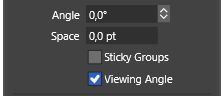
and the Panel could look like this if you open it
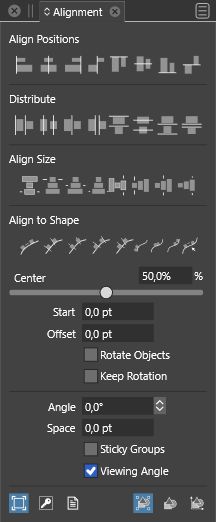
so i dont know why i have to call this option, any time
i call this panel, for a Function that is often needed.And Corel have no Problem to set a defined Space
between Shapes and align them then.
Without any extra Steps.
https://recordit.co/1rVqMoF4iuWin 11
CPU: AMD Ryzen 5 9600X, 6-core.
GPU: Nvidia Geforce RTX 5070. -
@Subpath I think the solution here is to have the Alignment panel (content) state be persistent.
-
@vectoradmin
yes and if it is possible to discard these extra steps.
-
@Subpath Clicking on the up and down arrow next to the panel name will alter how much of the panel you see each time you open it. This is how you could achieve seeing the "space" section without adding another step each time.
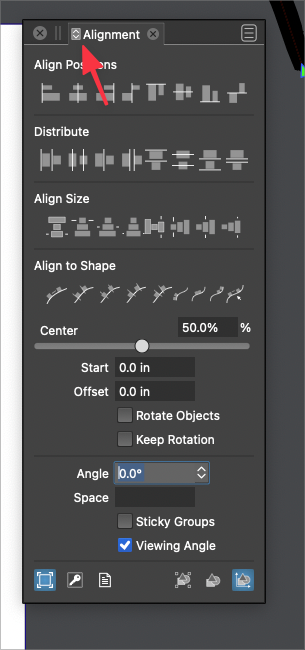
-
@Subpath said in How to distribute objects with a precise distance between them ?:
And Corel have no Problem to set a defined Space between Shapes and align them then. Without any extra Steps.
It's hard for me to tell from your video fully, but if @vectoradmin can find a way to do this without losing all the other functions VS already has - I'm all for it. From the video it appears limiting. While it achieves top alignment and setting the amount between selected objects easier, I'm wondering if it takes away the dual function other options to space using the "space: amount
-
cool, didnt know that. thanks
Win 11
CPU: AMD Ryzen 5 9600X, 6-core.
GPU: Nvidia Geforce RTX 5070. -
@Boldline
...but if @vectoradmin can find a way to do this without losing all the other functions VS ...its also my wish, to do this only if its possible.
but maybe @vectoradmin find yet another way. -
@vectoradmin said in How to distribute objects with a precise distance between them ?:
@Subpath I think the solution here is to have the Alignment panel (content) state be persistent.
@vectoradmin - can you clarify what you mean by "persistent"?
Do you mean having all the options open all the time by default? Or do you mean whatever arrangement the user sets it to using the double arrow at the top at the panel name will remain persistent?the power of the double arrow to customize the panel to hide less used tool options is awesome already. I would rather not have everything be displayed all the time by default
-
@Subpath said in How to distribute objects with a precise distance between them ?:
cool, didnt know that. thanks
You're welcome!
 Hopefully that helps reduce the steps a little.
I didn't know that feature myself either until someone showed me . Many of the panels have this option - go through and experiment to get the most used settings showing all throughout VS -
While this option is nice, seems that is not
really helpful in this case.You cannot switch between two states,
You must follow the entire procedure.
https://recordit.co/71IQxeUKd2 -
@Subpath once you get it set to the way you want it, it should stay in that arrangement going forward, so you dont have to click ten times each time you go to use it
-
yes i figure it out allready. It even keep his state
when you close VS and open it again.
Thats nice to have. -
@vectoradmin
The case about Aligment Option seems solved.
I figure out that if i set the Panel in the State i wish
then Vs keep it, even if i close VS and open it again.
So no need to change things in this case.
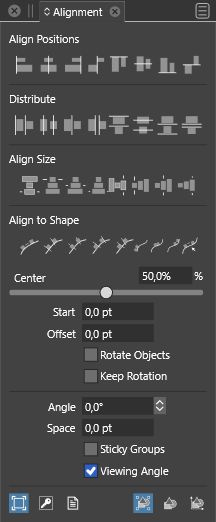
But if those extra Steps could be reduced, would be nice.
-
@Subpath said in How to distribute objects with a precise distance between them ?:
But if those extra Steps could be reduced, would be nice.
using what Corel currently has that you demonstrated in part, how would you tell corel to align using the other align options with the specified amount?
Right now you're showing how it can be done if Corel does not apply the spacing amount to the alignment. What if someone wants to use a specified alignment to space specifically within a selection?
🍎 macOS Tahoe 26.2, Mac mini (M1, 2020), Chip Apple M1, Memory 16 GB
Cintiq 27QHD Display and LG Ultra HD Display -
@Boldline I think (based on the video) that in Corel, the spacing is set for Distribute (not align) and it has a separate horizontal (H) and vertical (V) spacing.
And the alignment is not affected by the distribute spacing. -
@vectoradmin it's easy for me to get a little lost in the weeds with this one
It sounds like you understand what @Subpath is wanting and you also understand my concerns. We all want the same thing really - I have no doubt we can leave it in your capable hands to modify if possible for easier use without compromising options -
@Boldline said in How to distribute objects with a precise distance between them ?:
@Subpath said in How to distribute objects with a precise distance between them ?:
But if those extra Steps could be reduced, would be nice.
using what Corel currently has that you demonstrated in part, how would you tell corel to align using the other align options with the specified amount?
Right now you're showing how it can be done if Corel does not apply the spacing amount to the alignment. What if someone wants to use a specified alignment to space specifically within a selection?
@Boldline if you could show me in a Video what aligment features/options
you mean it would be easier for me to follow. Because english is not my
native language, its sometimes hard to understand your topic. And Deepl
Translator is also often not that helpful.I can then look how Corel do that, if they has this option.

