Starting node options
-
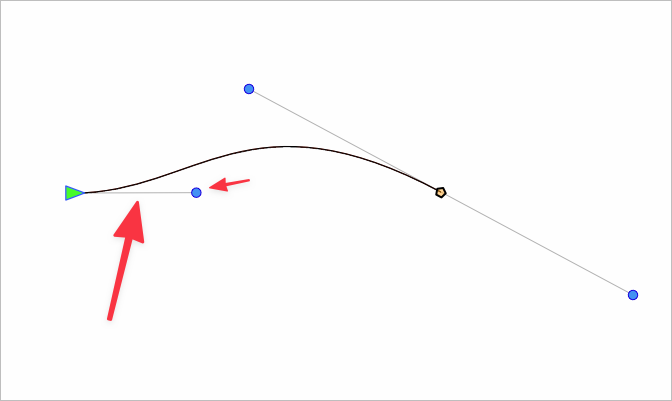
When I am using the pen tool, it always seems to begin with an immediate handle and counter-bend to where I am headed next. (as I show in the pic below)
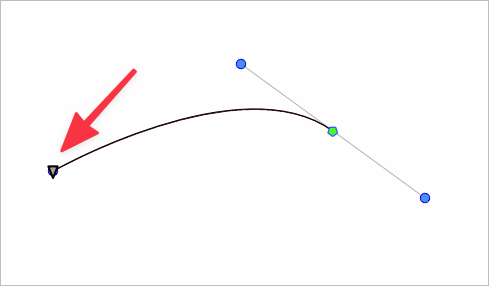
Sometimes I want the first node to not have a bend or handles like in this pic below:
Is this related to the predictive nature feature in VS? By the way I love how I can delete an existing node in VS and the curve adapts to it - this is an amazing feature and one I use a LOT. Maybe what I am discussing here in my example is part of the talk we had about making it easier to switch between predictive and straightforward edits of the path? Making it an option available in the UI rather than buried in the preferences?
🍎 macOS Tahoe 26.2, Mac mini (M1, 2020), Chip Apple M1, Memory 16 GB
Cintiq 27QHD Display and LG Ultra HD Display -
@Boldline Yes that first handle should not be there if we do not drag. But in VS it always start with the handle.
Mac Mini M4 Pro | 24Gb
WIndows 11 | Intel i5 11Gen
Wacom Intuos Pro -
@Boldline I add it to the backlog to improve the Pen tool, and fix the first handle issue.
-
@Jayanta-Das said in Starting node options:
@Boldline Yes that first handle should not be there if we do not drag. But in VS it always start with the handle.
It also seems possible from my viewpoint that this issue you mentioned may also relate to the false starts I often get trying to get a path started with the pen tool.
-
@Boldline I'm not sure about the explanation of the second image — do you mean you want the first control handle to be retracted?
-
@b77 said in Starting node options:
@Boldline I'm not sure about the explanation of the second image — do you mean you want the first control handle to be retracted?
yes, I want that as an option - I was thinking the node handle and immediate curve in the path ties in with the predictive curve feature in VS that I have grown to love. I could be wrong on that. This is in part why I was wanting the option to easily access the toggle between predictive and non-predictive. Personally I prefer the predicative feature more when I am editing paths than creating them.
This also ties in to my request to allow the node editor arrow tool to allow for total deletion of a shape using a double tap of the delete key when one or more nodes of that shape is selected. Right now when I delete a node, the predictive feature tries to rework the path and while that is great at times, at other times, I just want to delete the entire shape. hopefully that makes sense
-
@Boldline It's not about the direction of the segment here, as I also prefer the variant in the second image and hope it gets changed to that.
What I mean is Bézier control handles retracted under the node are bad — no two points should share the same coordinates IMO. You have less control over the segment with only one control handle — having both control handles available is more flexible.
(Last time I checked, Illustrator lets you draw curve segments with only one control handle for a curved segment. But what Illustrator really does is hide the second control handle under one of the nodes).


