VectorStyler
    • Categories
    • Unread
    • Recent
    • Tags
    • Popular
    • Register
    • Login

    Stablize tool missing on brush - brush size missing from contextual menu?

    Scheduled Pinned Locked Moved Questions and Support
    5 Posts 2 Posters 7.8k Views
    Loading More Posts
    • Oldest to Newest
    • Newest to Oldest
    • Most Votes
    Reply
    • Reply as topic
    Log in to reply
    This topic has been deleted. Only users with topic management privileges can see it.
    • BoldlineB Offline
      Boldline
      last edited by

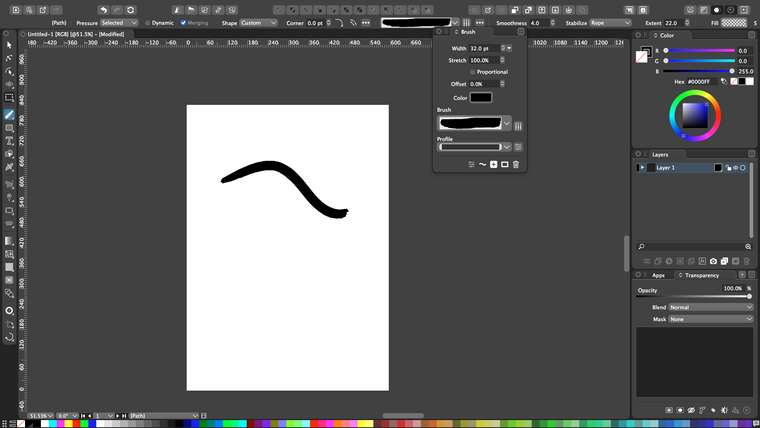
      I just installed the newest update beta 202. When I went to the brush tool, the stabilizer is not visible. Would I still be needing to do the reset? I also noticed the brush size is not an option on the contextual menu.

      I recorded myself as I played around with the brush tool and then as I was searching for the size adjuster - and opened the brush panel to do so. i was able to adjust the size of the brush there.

      🍎 macOS Tahoe 26.2, Mac mini (M1, 2020), Chip Apple M1, Memory 16 GB
      Cintiq 27QHD Display and LG Ultra HD Display

      VectorStylerV 1 Reply Last reply Reply Quote 0
      • VectorStylerV Offline
        VectorStyler @Boldline
        last edited by

        @Boldline The stabilizer is after the Smoothness, it is visible on the linked video.
        The Size is also moved further, it should be after the Fill and Stroke drop downs, and it is outside of the screen in the linked video.

        How large is the screen you are using?

        BoldlineB 1 Reply Last reply Reply Quote 0
        • BoldlineB Offline
          Boldline @VectorStyler
          last edited by

          @vectoradmin I have a 27" screen, I was not recording the full size of the screen when I shot the last video, but I did pan over later on to the right side to show that part as well. I'm looking at the VS app in absolute full screen on my 27" screen and I see the fill option and the "S" in stroke, but the rest gets cut off... the same thing is true when I have it not full screen.0_1610650445335_BLD 2021-01-14 at 13.22.53.png

          🍎 macOS Tahoe 26.2, Mac mini (M1, 2020), Chip Apple M1, Memory 16 GB
          Cintiq 27QHD Display and LG Ultra HD Display

          VectorStylerV 1 Reply Last reply Reply Quote 0
          • VectorStylerV Offline
            VectorStyler @Boldline
            last edited by VectorStyler

            @Boldline I see. There are some things in the panel that are not necessary for the brush tool. I will rearrange this a bit.

            The Stabilize is OK, but the width is not visible. I added this to the backlog.

            In the meantime, the brush panel (or the popover from the screenshot) can be used to set the width.

            BoldlineB 1 Reply Last reply Reply Quote 1
            • BoldlineB Offline
              Boldline @VectorStyler
              last edited by

              @vectoradmin yes, I'd suggest moving the brush sizing over more to the left anyway, it's probably one of the more used adjustments one would make while that contextual menu is showing


              🍎 macOS Tahoe 26.2, Mac mini (M1, 2020), Chip Apple M1, Memory 16 GB
              Cintiq 27QHD Display and LG Ultra HD Display

              1 Reply Last reply Reply Quote 1
              • First post
                Last post