VectorStyler
    • Categories
    • Unread
    • Recent
    • Tags
    • Popular
    • Register
    • Login

    Add shift modifier to magic wand to select multiple types of objects

    Scheduled Pinned Locked Moved Features and Ideas
    12 Posts 3 Posters 11.5k Views 2 Watching
    Loading More Posts
    • Oldest to Newest
    • Newest to Oldest
    • Most Votes
    Reply
    • Reply as topic
    Log in to reply
    This topic has been deleted. Only users with topic management privileges can see it.
    • BoldlineB Offline
      Boldline
      last edited by

      Could we add the shift modifier to the magic wand to be able to select all instances of multiple objects? For example if I have objects that are green and other objects that are blue, if I use the magic wand to select one of the green objects (thereby selecting all green objects) then hold down the shift and click on a blue object, all blue objects are added to the selection as well

      🍎 macOS Tahoe 26.2, Mac mini (M1, 2020), Chip Apple M1, Memory 16 GB
      Cintiq 27QHD Display and LG Ultra HD Display

      VectorStylerV 2 Replies Last reply Reply Quote 2
      • J Offline
        Jayanta Das
        last edited by

        That would be more useful. For now I did the same by going to select tab>select by style>fill style.

        Mac Mini M4 Pro | 24Gb
        WIndows 11 | Intel i5 11Gen
        Wacom Intuos Pro

        BoldlineB 1 Reply Last reply Reply Quote 1
        • BoldlineB Offline
          Boldline @Jayanta Das
          last edited by

          @Jayanta-Das That's a great solution. I need to study out what a "style" represents versus the other selection options available. Right now I'm trudging through it just trying to figure it out.
          That said, adding that shift modifier would be a great value to the magic wand

          🍎 macOS Tahoe 26.2, Mac mini (M1, 2020), Chip Apple M1, Memory 16 GB
          Cintiq 27QHD Display and LG Ultra HD Display

          J 1 Reply Last reply Reply Quote 1
          • J Offline
            Jayanta Das @Boldline
            last edited by

            @Boldline Ya modifier with magic wand tool would be more easier to select similar object base on its style. Like when we click with magic wand and modifier together a popup display where we can select like shape, fill, stroke, etc. and all the shape matching according to our selection got select.

            Mac Mini M4 Pro | 24Gb
            WIndows 11 | Intel i5 11Gen
            Wacom Intuos Pro

            BoldlineB 1 Reply Last reply Reply Quote 0
            • VectorStylerV Offline
              VectorStyler @Boldline
              last edited by

              @Boldline Added this to the backlog.

              1 Reply Last reply Reply Quote 1
              • BoldlineB Offline
                Boldline @Jayanta Das
                last edited by

                @Jayanta-Das said in Add shift modifier to magic wand to select multiple types of objects:

                @Boldline Ya modifier with magic wand tool would be more easier to select similar object base on its style. Like when we click with magic wand and modifier together a popup display where we can select like shape, fill, stroke, etc. and all the shape matching according to our selection got select.

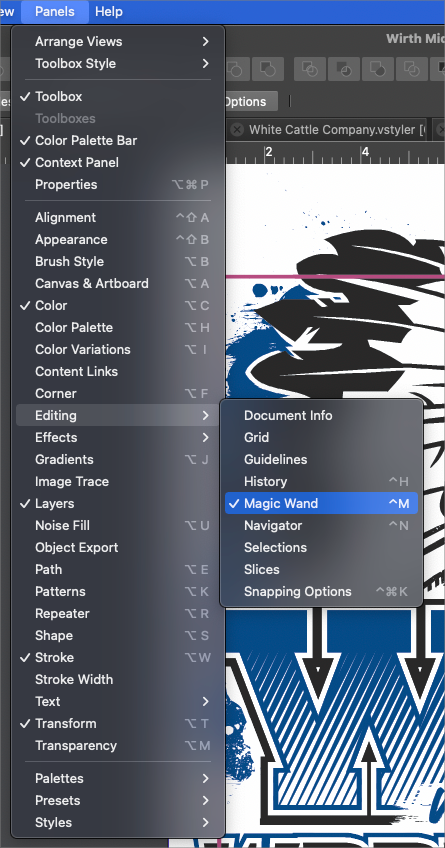
                I like your idea, but I don't think I'd want that tied to the shift modifier necessarily. We already have a magic wand panel that gives us options - would it make more sense to expand upon options there first?
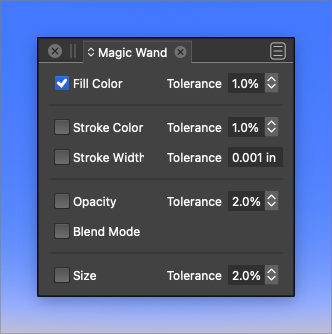
                0_1647626386308_24787bfd-fed8-4bd3-9607-9bc76354758d-BLD 2022-03-18 at 13.58.31.png

                🍎 macOS Tahoe 26.2, Mac mini (M1, 2020), Chip Apple M1, Memory 16 GB
                Cintiq 27QHD Display and LG Ultra HD Display

                J 1 Reply Last reply Reply Quote 2
                • J Offline
                  Jayanta Das @Boldline
                  last edited by

                  @Boldline oh I didn't know that magic wand panel.

                  Mac Mini M4 Pro | 24Gb
                  WIndows 11 | Intel i5 11Gen
                  Wacom Intuos Pro

                  BoldlineB 1 Reply Last reply Reply Quote 1
                  • BoldlineB Offline
                    Boldline @Jayanta Das
                    last edited by

                    @Jayanta-Das
                    0_1647626652681_0ade0cff-503a-4701-9de8-1cca1a19e57a-BLD 2022-03-18 at 14.03.59.png

                    🍎 macOS Tahoe 26.2, Mac mini (M1, 2020), Chip Apple M1, Memory 16 GB
                    Cintiq 27QHD Display and LG Ultra HD Display

                    J 1 Reply Last reply Reply Quote 1
                    • J Offline
                      Jayanta Das @Boldline
                      last edited by

                      @Boldline Thanks, learnt something. Thats the reason I was looking for if there is any search functionality in VS. That would save a lot of time for new users of VS like me.

                      Mac Mini M4 Pro | 24Gb
                      WIndows 11 | Intel i5 11Gen
                      Wacom Intuos Pro

                      BoldlineB 1 Reply Last reply Reply Quote 0
                      • BoldlineB Offline
                        Boldline @Jayanta Das
                        last edited by Boldline

                        @Jayanta-Das said in Add shift modifier to magic wand to select multiple types of objects:

                        new users of VS like me.

                        You're in good company. The only genius here is @vectoradmin. The rest of us are all relatively new to VS and trying to catch up and keep up with everything VS has to offer. I love this forum because until more becomes available online in other locations, this is the best place to get the help and ask the questions. Everyone here is passionate but humble and helpful and that means a lot as well.
                        It's such a fun opportunity to use VS and also be able to collectively influence how it's built; watching it develop over time.
                        I honestly believe VS is going to be one of the most relied upon and used vector programs out there. It's just a matter of time and getting things cleaned up and refined

                        🍎 macOS Tahoe 26.2, Mac mini (M1, 2020), Chip Apple M1, Memory 16 GB
                        Cintiq 27QHD Display and LG Ultra HD Display

                        J 1 Reply Last reply Reply Quote 1
                        • J Offline
                          Jayanta Das @Boldline
                          last edited by

                          @Boldline 100% agree. Love to spent time here in this forum. For any issues, request or help you get instant reply unlike other forum.

                          Mac Mini M4 Pro | 24Gb
                          WIndows 11 | Intel i5 11Gen
                          Wacom Intuos Pro

                          1 Reply Last reply Reply Quote 1
                          • VectorStylerV Offline
                            VectorStyler @Boldline
                            last edited by

                            @Boldline This should be available in build 1.1.024

                            1 Reply Last reply Reply Quote 0
                            • First post
                              Last post