Path panel option to retract both handles of any selected nodes

-
We've been talking a lot lately about the confusion with turning a node into a cusp node does not necessarily create a visible cusp. This topic has been brought up before and I know @Jayanta-Das has recently.
I used to advocate for the cusp node to look like a cusp right away, like it does in other vector programs like Illustrator. Over time, I've seen the value of a cusp node having the flexibility to be as "cusp" as we want it based on how we adjust the handles - now I understand better that converting a node to a cusp node gives me the flexibility to control the handles independently and make it as sharp a corner as I desire.
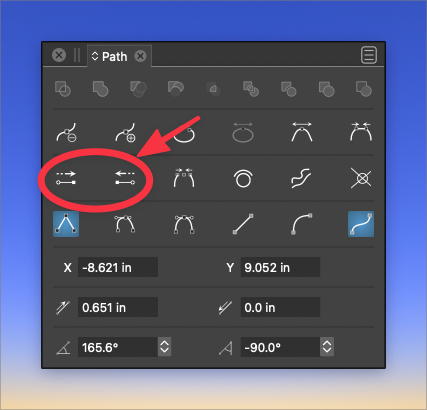
That all led to the need for a "quick and dirty" way to get absolute sharp cusp corners. The ability to delete a node handle or double click the node handle itself to attain a sharp corner is genius and I use it all the time. There are also the options in the path panel allowing for the handle of one side of the selected node(s) or the other to be retracted.What I feel is missing and would satisfy a lot of users looking for that quick method to create visibly sharp corners is a function that retracts BOTH handles of all selected nodes at one time. If we can add this tool option to the path panel and ideally the UI, I think that would speed up workflow. If implemented, I would assign it a keyboard shortcut for myself, because I'd be using it so often

🍎 macOS Tahoe 26.2, Mac mini (M1, 2020), Chip Apple M1, Memory 16 GB
Cintiq 27QHD Display and LG Ultra HD Display -
I also wanted to point out we have this tool in a sense already, Shift-C gives us a tool that retracts both handles of any node when we manually click on it. I use this quite a bit as well, but the option to select multiple nodes at one time and retract both handles of each respective node would be a great addition and timesaver
-
@Boldline In the next build, clicking the second time on the cusp corner icon will retract the handles.
-
@vectoradmin said in Path panel option to retract both handles of any selected nodes:
clicking the second time on the cusp corner icon will retract the handles.
Awesome! can you elaborate a little more though? Is the cusp corner icon the ones I circled in the path panel?
Would this work just as well with multiple nodes selected? - affecting all of them at once? -
@vectoradmin said in Path panel option to retract both handles of any selected nodes:
clicking the second time on the cusp corner icon will retract the handles.
Great. Will we also have the functionality CTRL+ALT while in pen tool to control the handle in that build?
Mac Mini M4 Pro | 24Gb
WIndows 11 | Intel i5 11Gen
Wacom Intuos Pro -
@vectoradmin said in Path panel option to retract both handles of any selected nodes:
clicking the second time on the cusp corner icon will retract the handles.
oh ok I think I get it now, when I double click on a cusp node itself, it will retract both handles? If true, that sounds good, but wouldn't that affect the existing function of the double click of a node - adding a new node halfway between that node and the next existing node?
-
@Jayanta-Das said in Path panel option to retract both handles of any selected nodes:
Will we also have the functionality CTRL+ALT while in pen tool to control the handle in that build?
For now, there will be only ALT+ to set the node to cusp.
-
@Boldline Clicking on the Cusp node button again, should retract both handles.

