VectorStyler
    • Categories
    • Unread
    • Recent
    • Tags
    • Popular
    • Register
    • Login

    Arrow keys move selection box, not fill

    Scheduled Pinned Locked Moved Questions and Support
    9 Posts 3 Posters 10.5k Views 1 Watching
    Loading More Posts
    • Oldest to Newest
    • Newest to Oldest
    • Most Votes
    Reply
    • Reply as topic
    Log in to reply
    This topic has been deleted. Only users with topic management privileges can see it.
    • BoldlineB Offline
      Boldline
      last edited by

      When i try to nudge over a selection with the arrow keys, it's moves the selection bounding box, but the actual subject matter remains still. I've tried this several different ways to see if it's a fluke.
      The screenshot shows the selection bounding box to the far left of the last shape I had made
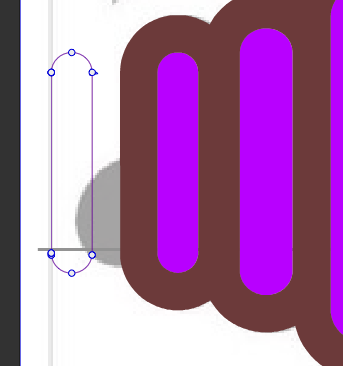
      0_1611002227683_BLD 2021-01-18 at 15.36.54.png

      🍎 macOS Tahoe 26.2, Mac mini (M1, 2020), Chip Apple M1, Memory 16 GB
      Cintiq 27QHD Display and LG Ultra HD Display

      BoldlineB 1 Reply Last reply Reply Quote 0
      • BoldlineB Offline
        Boldline @Boldline
        last edited by

        If I remember correctly there's a purpose behind this - but it's escaping me and I'm not sure how to just move items with the arrow keys if I want to

        🍎 macOS Tahoe 26.2, Mac mini (M1, 2020), Chip Apple M1, Memory 16 GB
        Cintiq 27QHD Display and LG Ultra HD Display

        VectorStylerV 1 Reply Last reply Reply Quote 0
        • VectorStylerV Offline
          VectorStyler @Boldline
          last edited by

          @Boldline Could not replicate this. Could it be a refresh issue? What happens if you press Command+R.

          b77B 1 Reply Last reply Reply Quote 0
          • BoldlineB Offline
            Boldline
            last edited by

            Interesting - when I hit command R - the fill shape once left behind "catches up" with the bounding box

            🍎 macOS Tahoe 26.2, Mac mini (M1, 2020), Chip Apple M1, Memory 16 GB
            Cintiq 27QHD Display and LG Ultra HD Display

            1 Reply Last reply Reply Quote 0
            • b77B Offline
              b77 @VectorStyler
              last edited by b77

              @vectoradmin It happened to me also today, and indeed Cmd-R fixes it.

              Is it possible to lower the quality of the realtime rendering for the bitmap-based effects to something that feels snappy for each individual machine? Similar to going from 300 dpi to 144 or 72 dpi?

              When exporting as bitmap I'll choose 300 dpi when needed, no problem, but when working it looks like the app renders everything at high resolution which I don't really need all the time.

              MacBook Pro (Intel) running Monterey 12.6.4

              VectorStylerV 1 Reply Last reply Reply Quote 1
              • VectorStylerV Offline
                VectorStyler @b77
                last edited by

                @b77 There is a Filter Precision settings in View -> Display -> Display Options -> Images that does something similar.
                But this is unrelated to the bug that causes these refresh issues.

                b77B 1 Reply Last reply Reply Quote 0
                • b77B Offline
                  b77 @VectorStyler
                  last edited by

                  @vectoradmin Great! I looked for that in the Preferences.

                  MacBook Pro (Intel) running Monterey 12.6.4

                  VectorStylerV 1 Reply Last reply Reply Quote 0
                  • VectorStylerV Offline
                    VectorStyler @b77
                    last edited by

                    @b77 This is separate from preferences. Display Options are saved with the document, so different documents can have their own settings.

                    b77B 1 Reply Last reply Reply Quote 0
                    • b77B Offline
                      b77 @VectorStyler
                      last edited by b77

                      @vectoradmin Yes, I figured that out, thanks! 👍

                      MacBook Pro (Intel) running Monterey 12.6.4

                      1 Reply Last reply Reply Quote 0
                      • First post
                        Last post
