Some Handy Color Management UI Suggestions
-
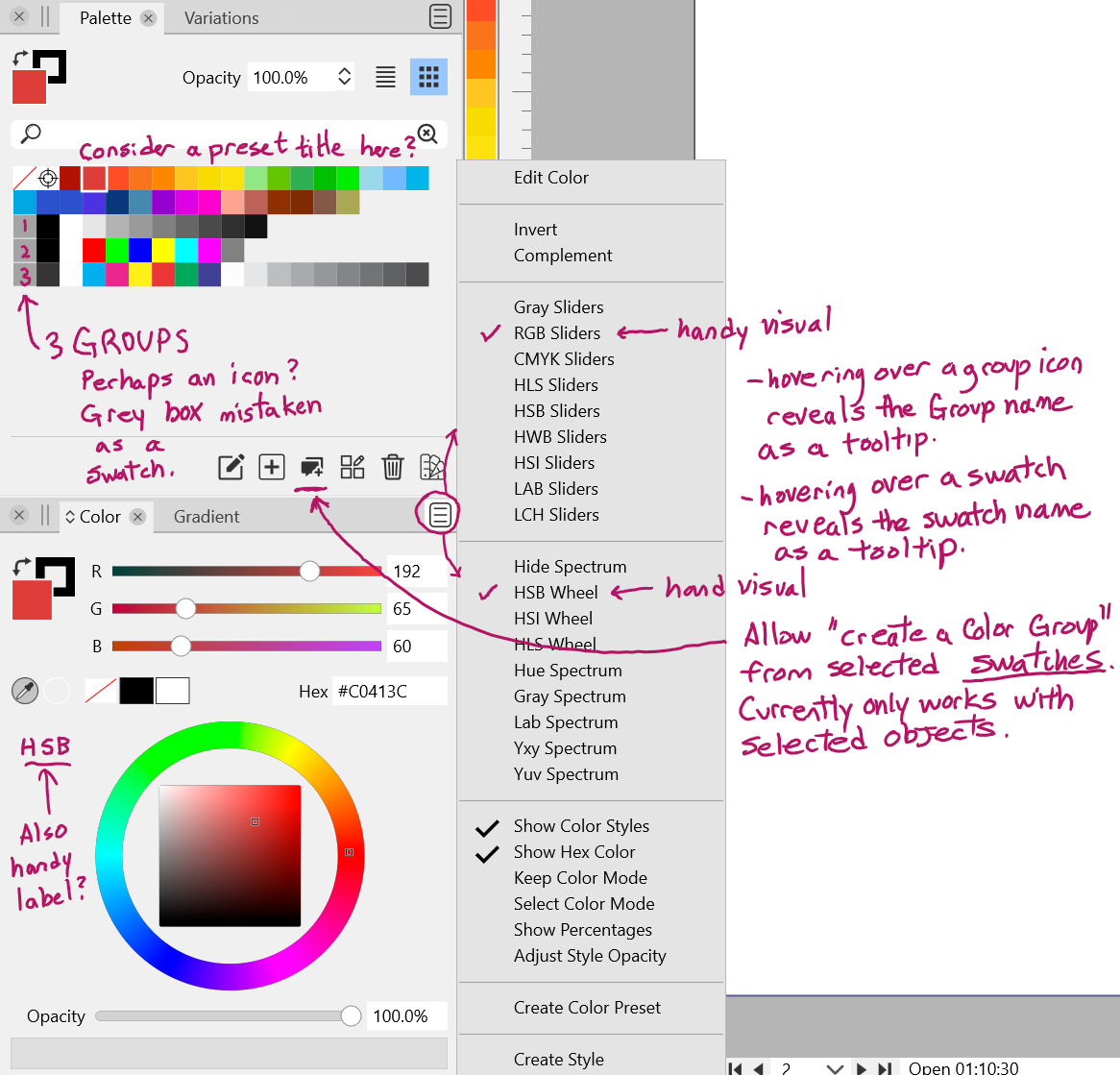
@Victor-Vector I will add these to the backlog. Some observations:
- This should already work for external opened palettes (ASE, ACB and other formats). I will check if it works with palette presets (it should).
- Will do so.
- Will do so.
- I think this should already exists, if not it is a bug.
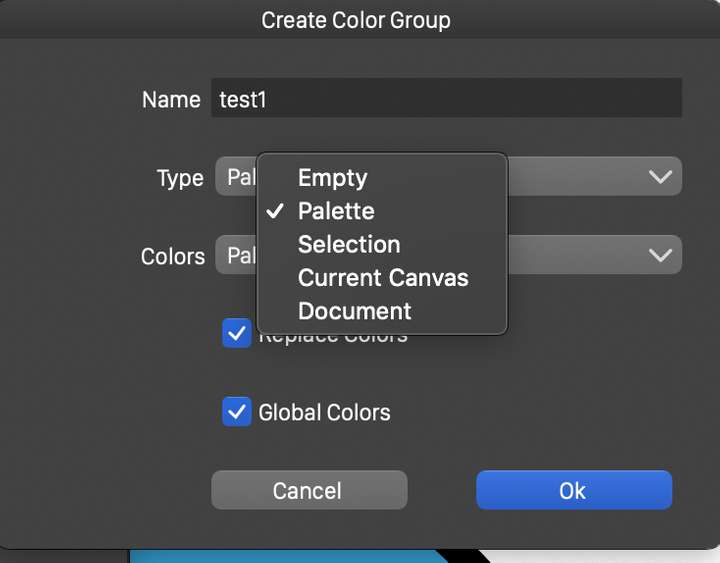
- When creating the color group, select in the Colors field the source: in this case Palette (see image)
- This seems to be a bug on Windows (works on Mac).
- I will add a label.
-
@vectoradmin, thank you for implementing the ideas, identifying the bugs and teaching me about the Create Color Group.
5. I have an odd bug: I select my swatches on the palette, click on the Create Color Group Menu at the bottom of the Palette Panel, select "Palette" from the Colors menu, giving it a name, hit OK, and the selected color swatches disappear completely. No group is formed. I cannot even refresh the palette using the Preset Palette selector and choosing palette. Seems to permanently delete the selected colors.I am using Windows 11.
-
@Victor-Vector Tested (5) here and could not replicate. Send me a file with before creating a group and after. Is this in the default palette, or a separately opened palette?
-
@vectoradmin
Okay, I sent an email with 2 attached "colorset.preset" files, before and after.
The bug happens on an application level, so without opening a new file.To be clear, It started with me in the Palette Panel going to the burger menu in the top right, and clicking the "Save Palette to Preset" function, giving it a name, and saving. After that, trying to create a color group with selected swatches, made the disappear.
I hope that can help, if not let me know what you need.P.S. How do you edit the Palette Presets if you want to remove or rename them? I can see all of them from the burger menu, "Preset Palette", I just don't know how to edit/rename/delete those saved choices.
Thank you!
-
@Victor-Vector Got the files. I will try to replicate the bug.
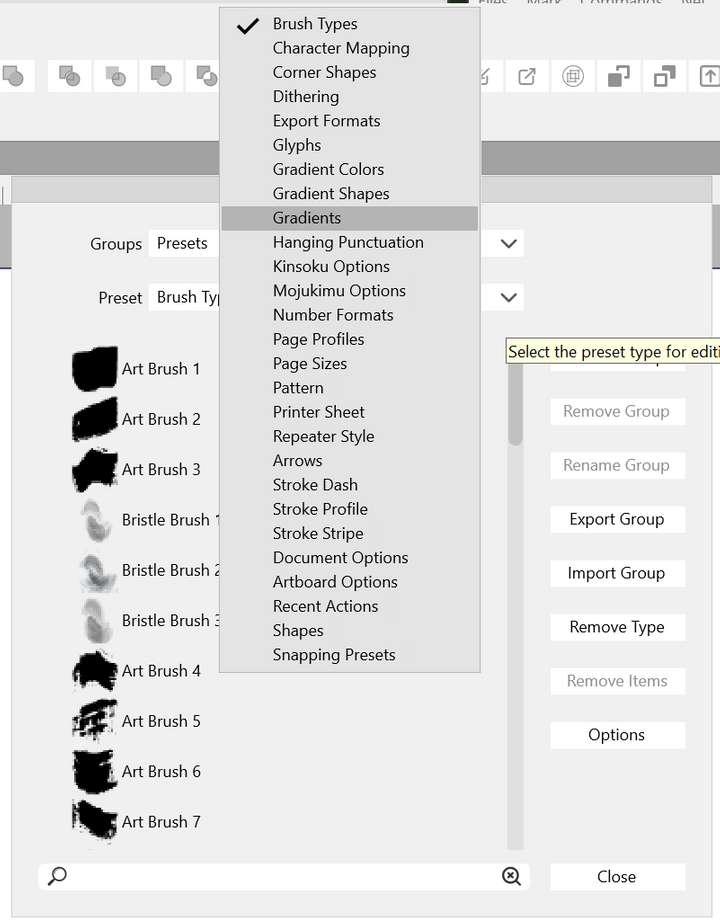
Presets can be managed (renamed, deleted, organized) using the Styles -> Preset Manager action.
There you have to select the preset type (will fix that list, should be alphabetical but it is not), and than the presets with that type are listed.
-
@vectoradmin
Hmm, not sure if I am in the right place, but Styles > Preset Manager gives me an interface where there are no Palette Preset options. I scoured the lists looking for my Presets, to no avail... Please me advise if I am suffering from UI blindness...
-
@Victor-Vector Yes, it could be that palette presets are not listed there. I add this to the backlog as a bug.
-
@Victor-Vector Most of these should be available in build 1.1.024, except (7):
- adding a label to the spectrum area was not possible as some (rectangular) spectrum types cover the whole area, but the menu checkbox should work now on Windows also.
-
@vectoradmin Marvelous! Thank you for taking care of so many suggestions: 1, 2, 5, 6! Also the Styles > Preset Manager now has Color Palette listed and seems to work.
I was testing them all in the new 1.1.024 build and I noticed that (3) and (4), namely showing "tooltip" labels for color swatches and groups, were not working at this time in Windows 11.
I am grateful to you for the improvements.
-
@Victor-Vector Yes there seems to be an issue with palette tool tips on Windows.

