Close curve feedback (inspiration)
-
Something like this from Affinity perhaps - although this is a snapping indicator. And no, the urine color is not a great choice.

-
@Ingolf There is now a better visual feedback in the Pen tool when closing a path.
-
I remember we have had a few go-arounds with ideas about indicators in the past. I'm not opposed to a snapping indicator for closing paths nor to a starting indicator on the first pen click, but the large red "X" feels unprofessional, clunky and distracting. It's large, it's red (so it's overly noticeable and it feels sharp edged and rough.

Could we make it less obtrusive? Perhaps make the symbol a low opacity small circle that fades out after a second? Could the color of that circle be tied to the layer color designation? I tried to capture a screen pic and added a circle to show what I mean - I'd even love to see the opacity of my example lighter
Also, an option to turn this feature on or off in preferences would be helpful
-
@Boldline I'm not sure anyone would want to disable this indicator in the Preferences. Is there a need for such an option?
(Unless I misunderstood something).
I agree with you about the color — I also prefer light blue, but less saturated. Maybe if it's light blue the X won't seem too big:
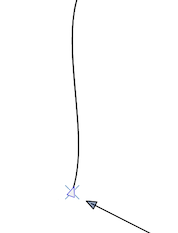
-
@b77 said in Close curve feedback (inspiration):
@Boldline I'm not sure anyone would want to disable this indicator in the Preferences. Is there a need for such an option?
(Unless I misunderstood something).
It's not a bad option if it does not get in the way or take away from the look of VS being a cutting edge design program. Personally, I would disable it for sure, especially the way it is now. It's distracting and clunky. I do not prefer the indicator each time I start a new path with the pen tool. I'm more interested in the closing indicator with a slight snap to it so I know it's closed. I remember we had this overall topic of discussion last year some time. I felt the same way then as I do now. It reminds me a lot of the path indicator option, that shows how the path will look prior to making the decisive next click. It's not horrible, but there are those who want that guide and those who find it less helpful. I fall into the latter camp for that part - but I understand those who do use it
I agree with you about the color — I also prefer light blue, but less saturated. Maybe if it's light blue the X won't seem too big.
The indicator should be subtle in my opinion, it should not distract from the task at hand. In my opinion, the X is really large and awkward and is the wrong shape for this type of thing. Keeping it small and subtle is key - hence a outline of a small circle that has a faded color (one that potentially ties in with the layer indicator color). If that can't be done, a light faded blue that fades out would work. It could also be tied to the preferences where other pen options are adjustable - from colors to fills things.
@b77 - would you concede a small circular ring that fades out would be more subtle and less jarring than the giant X that suddenly appears and then goes away regardless of color?
Edit: Just thought of this - if others are loving the large "X" - why not let this be an option chosen in the preferences? People could choose between a small ring that fades, or a few other options like the large X - and choose a default light faded blue or to link it to the layer designation color
I'm not a developer and don't know how many customization options @vectoradmin wants to incorporate, but I do know having several UI skins did make life easier for all of us to be happy
-
Oh, got it. Yes, I also don't feel the need to see the indicator when starting a path, unless it snaps to another one to extend it.
I'm not particularly fond of the X indicator myself, just thought that a light faded blue will make it… um… less scary.
But I guess users that use the app for technical drawing similar to CAD like the X indicator more.
Yes, a circle is also good, (concentric maybe), but only if that pointy triangle disappears for a split second to display it instead of still showing under it, making a visual mess.
The only problem I see with the indicator taking the color from the color of the layer is that sometimes those colors (usually picked by the app randomly) might be too garish.
So… I like light faded blue the most for this. Light blue makes the X look less obtrusive, and if it gets changed to a circle, it's fine with me as well.
@vectoradmin A limitation I encountered when testing this:
The indicator doesn't show up when you try to close an existing path by Option-dragging one node over the other (start node over end node, or vice versa). -
@b77 I didn't mean to sound overly forceful in my prior post - I apologize if I did.
@b77 said in Close curve feedback (inspiration):
Yes, I also don't feel the need to see the indicator when starting a path, unless it snaps to another one to extend it.
Yes the first seems unnecessary - but you make a good point that if it's being snapped to, then it would help.
@b77 said in Close curve feedback (inspiration):
a light faded blue will make it… um… less scary.
LOL - it is abetter look than the red - it also might be the rough non-rounded edge of the "X" that bother me. It reminds me a little of a Microsoft effect from a long time ago. i think Microsoft still uses that super sharp edge font in their OS, etc.
@b77 said in Close curve feedback (inspiration):
But I guess users that use the app for technical drawing similar to CAD like the X indicator more.
I was actually thinking about this as well - that people more familiar with precise lines and architecture would feel tight at home with it. In a past life, I used to design fire sprinkler systems for commercial buildings in a CAD program and this "X" reminded me of that.

@b77 said in Close curve feedback (inspiration):
Yes, a circle is also good, (concentric maybe), but only if that pointy triangle disappears for a split second to display it instead of still showing under it, making a visual mess.
LOL yeah I can agree to that! I'd like to see it be a little transparent even so it's not jarring.
I was thinking more like this... or if we removed the center, the triangle could remain - it might need to be something tested out to see if the triangle needs to go away for a second, or if we just use a circular ring with no center
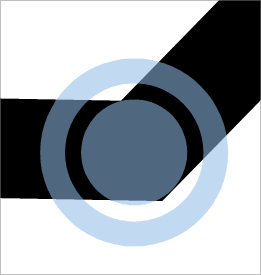
@b77 said in Close curve feedback (inspiration):
sometimes those colors (usually picked by the app randomly) might be too garish
Don't you play layer indicator color roulette?
 To me I'm not as worried about that because the times that color the program picks is too crazy, I would have already swapped it for another color. Because I use that layer color a lot in my design work for example, by the time it's too garish for a stroke snap indicator, it's already too much for doing selections and highlighting the path! My concern is if we are using blue strokes and blue fills, if a blue indicator would be hard to see...
Thanks for sharing your thoughts - sounds like we're mostly on the same page
-
@Boldline said in Close curve feedback (inspiration):
@b77 I didn't mean to sound overly forceful in my prior post - I apologize if I did.
I should copy the above and send it to @Jayanta-Das. But no, I don't think you did.
Probably having the circle semi-transparent is not a good idea and that triggers the above feeling.
A solid color is better imo.Don't you play layer indicator color roulette?
To me I'm not as worried about that because the times that color the program picks is too crazy, I would have already swapped it for another color. Because I use that layer color a lot in my design work for example, by the time it's too garish for a stroke snap indicator, it's already too much for doing selections and highlighting the path! My concern is if we are using blue strokes and blue fills, if a blue indicator would be hard to see...If the X or the concentric circle have a white contour for contrast in all situations, it's fine I think.
Is identifying visually what layer are you on when connecting nodes important? Maybe it is, I really don't know.
-
This if from AD's pen tool visual feedback.
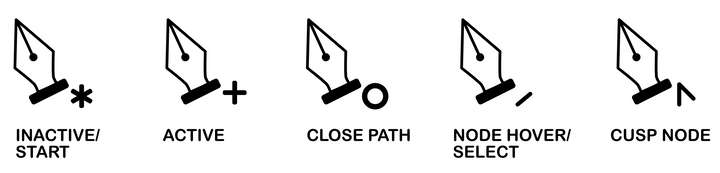
Mac Mini M4 Pro | 24Gb
WIndows 11 | Intel i5 11Gen
Wacom Intuos Pro -
@Jayanta-Das In theory a good idea and especially as a big image in a manual but Affinity obviously made their design decisions in much smaller screen resolutions. On high-res monitors their icons and pointer symbols disappear. The close node symbol is so small it looks like a dot.

Anyway, for this particular feature (close node) I like the feedback to be specific and bigger. The circle around the node itself is great, I think.
Otherwise the other symbols beneath the pointer is not a bad idea - I just don't need them personally.
-
@Jayanta-Das the indicators next to the cursor to choose the node style as you close a shape is cool. How would you as the user choose between them?
-
@Boldline I donot care much about the indicator. And the present implementation of cross to the point of the pointer I dont really like that or hate it either. But I think AD's is visually more satisfying, yes there is an issue in larger 4K display as @Ingolf said, if thats solve I think it will be more cooler.
-
@Jayanta-Das said in Close curve feedback (inspiration):
@Boldline I donot care much about the indicator. And the present implementation of cross to the point of the pointer I dont really like that or hate it either. But I think AD's is visually more satisfying, yes there is an issue in larger 4K display as @Ingolf said, if thats solve I think it will be more cooler.
Visually cool vs actually useful is what matters to me. Yes, it does look great on paper
and in the image above from the documentation. Problem with AD is primarely that the pointer constantly displays a symbol - overcommunicates - and my mind simply filters the feedback out. The close curve symbol drowns and I rarely see it.To me the coloured circle is a very satisfying feedback that this particular node will now close the curve. It is a very important part of working with shapes.
But in other instances - ie when working with the corner tool - these hints next to the cursor works great. It is all about finding the balance and the logic that users will understand.
-
@Ingolf said in Close curve feedback (inspiration):
Anyway, for this particular feature (close node) I like the feedback to be specific and bigger. The circle around the node itself is great, I think.
Otherwise the other symbols beneath the pointer is not a bad idea - I just don't need them personally.I agree the circle is a good size currently. I believe it's a better option than the "x" all around. If there is eventually an indicator added for type of node being created, that could be bigger than the example, but not super large like the "x" was
-
Wouldn't hurt to have a similar indicator when the transform pivot snaps to one of the corners of a shape/bounding box when moving it,
and also when you move it back to the center.



