Pen Tool: Show Next Segment check option on Context Panel
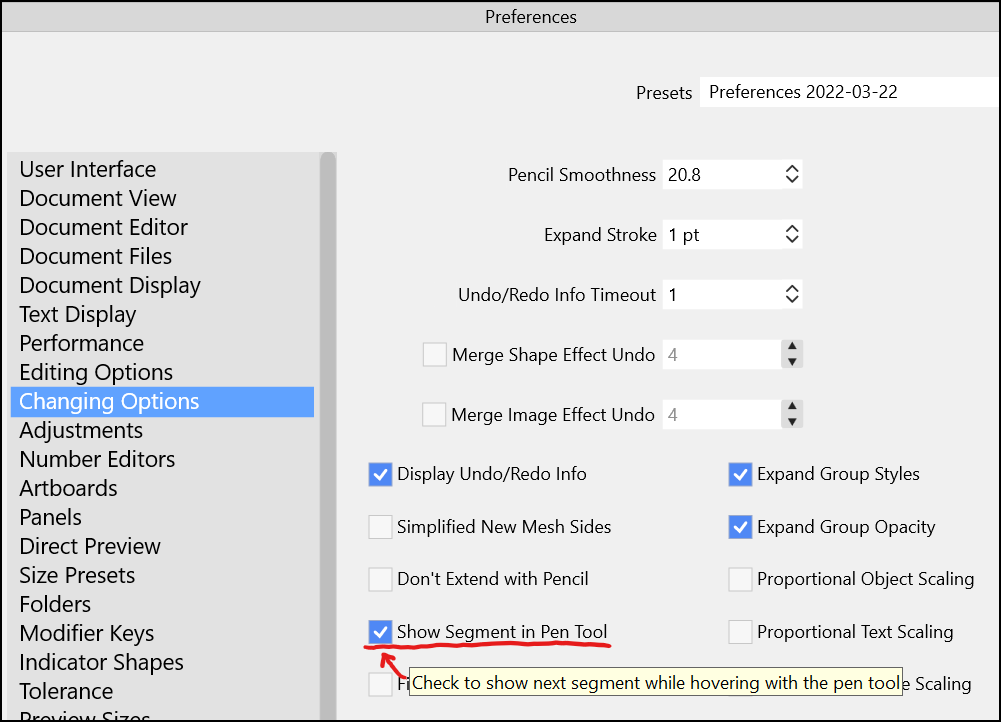

-
@Victor-Vector I've used it before and it certainly has value - I'm glad it's in there, but for me personally, I would not end up using it and switching back and forth often enough to require it be easily accessible on the UI.
That said, there's another option in preferences very similar to this one - that toggles the very powerful auto-path-adjust. When you go in and delete nodes from a curved stroke, it works to keep the same curve as close as possible with the fewer nodes. This is a genius feature that I use a lot - but there are times when I am trying to delete things and don't want it to bother recalculating the stroke after each node is deleted - I just want it to turn the segment into a straight line or one without a lot of effort made to keep it in the same position as before.
This is an option I've brought up before myself, having the option to toggle on the UI or make it more accessible in a customized area of the contextual menu bar, or in a pen panel, or a special section of the preferences - much like what we spoke of with your pen tool feature accessibility🍎 macOS Tahoe 26.2, Mac mini (M1, 2020), Chip Apple M1, Memory 16 GB
Cintiq 27QHD Display and LG Ultra HD Display -
@Victor-Vector Added this to the backlog.
-
@Boldline said in Pen Tool: Show Next Segment check option on Context Panel:
the very powerful auto-path-adjust. When you go in and delete nodes from a curved stroke, it works to keep the same curve as close as possible with the fewer nodes.
Are you referring to the Preferences > Editing Options > "Adjust Node Removal Curvature"? Toggling this preference on or off yields the same result for me when I delete nodes from a shape. It always seems to try and keep the same curve. Perhaps this is not the same as the feature you described but I could not find "auto-path-adjust".
-
@Victor-Vector said in Pen Tool: Show Next Segment check option on Context Panel:
Are you referring to the Preferences > Editing Options > "Adjust Node Removal Curvature"? Toggling this preference on or off yields the same result for me when I delete nodes from a shape. It always seems to try and keep the same curve.
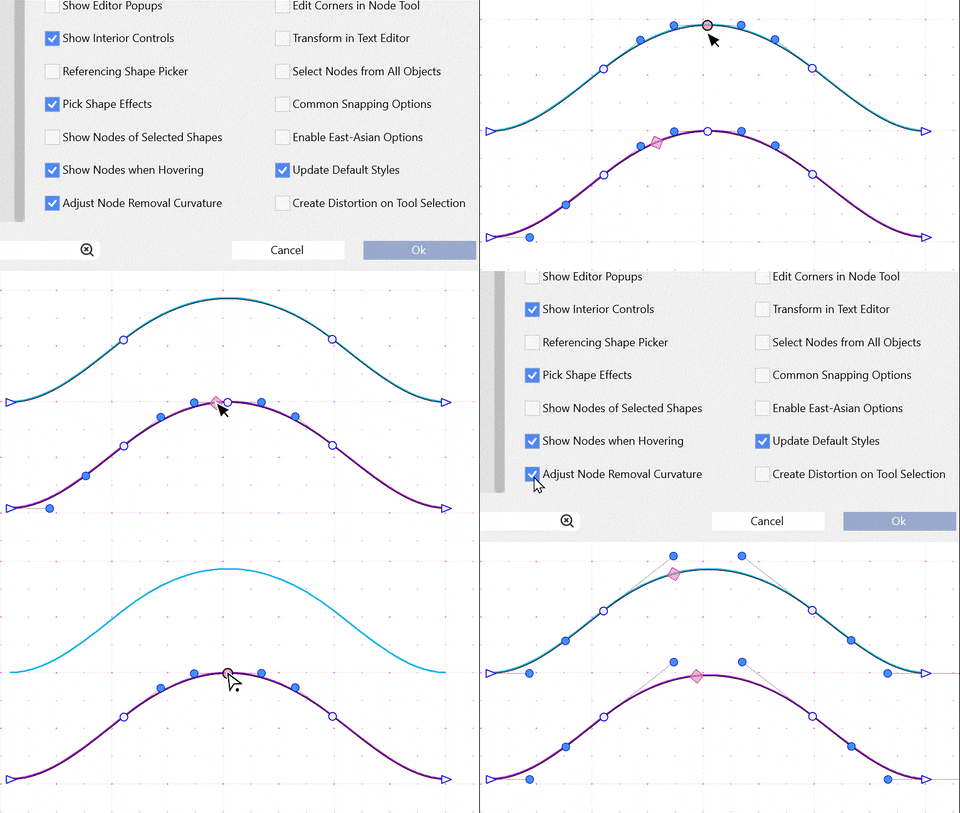
I just tested this and it seems to be working here. One way to see the difference: when enabled, the control points at the nodes next to the deleted node are adjusted, when disabled the control points stay the same.
-
@vectoradmin
I am starting to think maybe my preferences are corrupted somehow?
Here is the behaviour with the option enabled and disabled:
-
@Victor-Vector Works here, at least on the Mac version: https://recordit.co/Bkal8Q6seM
MacBook Pro (Intel) running Monterey 12.6.4
-
@Victor-Vector said in Pen Tool: Show Next Segment check option on Context Panel:
Are you referring to the Preferences > Editing Options > "Adjust Node Removal Curvature"?
yes this appears to be the preference I was referring to. This is an option I would be toggling far more than the "show next segment" but that's just my personal workflow vs your personal workflow. Both are great options and I use them both, but we each use one more than the other does.
I'm testing out the Preferences > Editing Options > "Adjust Node Removal Curvature" more and I'm going to compare how it functions with what I am used to in Illustrator and see how they compare specifically.
-
@b77 Thanks for posting your results to see what happens when it is turned off. I hope someone with more experience can determine why the option won't turn off for me, but if I had a choice, I am grateful it's on, as it is more of what I expect to happen when deleting nodes.

-
@Victor-Vector said in Pen Tool: Show Next Segment check option on Context Panel:
I hope someone with more experience can determine why the option won't turn off for me
What happens if you turn it off and then restart VS. Is still off?
-
@vectoradmin Oh brilliant! You called it.
Turning "Adjust Node Removal Curvature" on or off, saving preferences, closing VS, reopening VS, trying to delete nodes will respect the previous saved on or off preference.Thanks for troubleshooting the problem, I hope it is a quick fix.



